SecVideoEngineService Android Application
It’s hard to not recognize the brand name “Samsung” in today’s age. The South Korean Tech giant covers it all from hardware to software. Samsung Electronics develops the SecVideoEngineService Android application as a system app for their android operating system-enabled One UI (User Interface). What this app does for the user, is that it enhances the online video streaming/watching experience. The app is essentially a video processing platform. Smartphones, tablets, smart TVs, set-top boxes, etc. running on Samsung’s in-house Exynos SoC (System-on-Chip) use it. Originally conceptualized as a platform to make the process of online video-watching easier for the end user.
That being said the app’s offered experience is anything but smooth sailing. The app has a bad reputation for getting quite buggy and often crashing or stopping working. Malfunctioning and crashing seem to be consistent issues with the app. In this article, we are gonna cover all about the app. Discuss all of its quirks. I will also help in guiding you through the ways to fix it. In case none of the ways help: disable it on your Android device.
So without any further delay let us dive right into the nitty gritty of it.
What is the SecVideoEngineService Android application?
Samsung developed this app as a manager and controller application for video content playback on Android devices. Originally designed to work alongside another Samsung stub app called, “carmodestub”. Samsungs electronics division, later on, released it as a separate application exclusively for Android devices. The main purpose of the app, as already mentioned is to smoothen the online video-streaming experience of users.
Samsung develops and distributes the stub app carmodestub for their own “MirrorLink” technology. Samsung has also patented a technology known as the MirrorLink technology. It is primarily meant for its Galaxy series devices. The app acts as an alternative to “Android Auto”. What the technology does is connect the phone to the car’s infotainment system. Now for those of you wondering what a stub application is, we have got that covered as well. A stub application is a smaller app that facilitates the working of larger more complex apps.
Sources to get the Android application:-
This application sideloads from the apkmirror website or any other android application download website. The app doesn’t require any in-app payments/purchases to work. It provides the users with the features of pausing, rewinding, and fast-forwarding, adjusting the playback speed to slower or faster. It also provides other quality features like adjusting the volume and brightness of videos during their playback. For users who are concerned about sideloading apps from third-party hosting, no need to worry about security as the app Samsung Electronics Co., Ltd distributes it.
Various uses of the Android application:-
The SecVideoEngineService application allows android devices to connect to other Samsung devices and provides the user with the option to stream content from them. Users can use this feature to directly stream and consume content from the Samsung devices, they had earlier stored them in. Using this app the user gets the ability to control compatible devices connected within the same network, such as Smart Television, Gaming Consoles, etc. Android devices use this app during carrier-based video calls, as it helps in enabling captured video streaming for cellular networks.
For people wanting to wrap their heads around the working of this app just simply imagine an OTT platform that is hosted and distributed on an individual local network.
Still not clear?
Netflix/Amazon Prime on a Local Access Network. There, you have it.
Except for infotainment uses the app user can also use the app to monitor security camera footage on their Android devices and even control their movements, orientations, etc.
What issues persist with the Android app and how to solve them?
To call the experiences that various users have had during their time using this app, challenging would be an understatement. Users give this Android application, the tag of being unreliable and very frustrating to use with unstable elements throughout its UI, and it has received bouts of malfunctioning reports.
The most recurring issue reported with this app on Android devices is that it is not able to work. Now there could be a variety of causes for this, but the most common reasons can be that the app is not installed or not installed properly, or not updated.
Now that we have talked about the shortcomings of the app, let’s guide you through some of the ways you can try to address said issues, should you experience any while using it.
As with any issue on any android device, the first method of trying to solve the issue should always be the simplest of them all, i.e., restarting/rebooting the device. The user can try to see if trying this has fixed the issue. In case it hasn’t been, the user can proceed to try the other methods.
Methods to fix the errors with the app:-
To address the issues the user first needs to check whether the app is even installed on their Android device. In case the user finds the app not already installed on the system: the user can download the app from the third-party downloadable android APK hosting websites like apkmirror, apkcombo, etc. After downloading the app the user can then install it on their device. First, the user might need to enable the ‘install from unknown sources’ option from the settings.
In case the app is present on the device but still not working, the user can tackle the issue in either one of two ways, and they are:
The user can try clearing the cache and data of the app on the Android device. To do that the user can find the app from the settings menu. Then in the storage option select the ‘clear cache’ and ‘clear data’ options. What this would do is refresh the app and then the user can try to access it again.
Chances are the app hasn’t been installed properly, and the user now needs to remove/uninstall/deactivate the app and follow the earlier-mentioned steps to re-download and re-install the application on their android device.
If the issue persists then the user can try to update the app to its newest version. The user should also make sure to keep their Android devices updated and on the latest security patches rolled out by their respective OEMs.
In case the issue is with the ability to access the security camera footage via the app, the issue could exist with the device or the network. Rebooting the device and the cameras might be a handy way to solve the issue.
Conclusion
The SecVideoEngineService Android application seems very much to be a work in progress. Hopefully, this article has been able to help you understand the working of the app. Refer to the article to try out all the troubleshooting methods to fix the errors that persist with the app. I wish you all the best of luck with it.
FAQ
It is a stub application created and distributed by Samsung on its devices to enable the MirrorLink technology.
Stub apps are smaller apps created to facilitate the working of bigger complex apps. These are basically intermediary applications that help in the information exchange between the device and the main application.
MirrorLink is a technology similar to Android Auto, developed and distributed by Samsung for its Android devices to help set up a car infotainment system control on them.
In order to do that there are a few things you can try to check and then proceed accordingly to fix the problem. All this includes having the Android device up-to-date with all of the latest security patches installed. Uninstalling and reinstalling the app could help. And trying to clear the App data and cache is also a reliable technique to help solve the issue.
What Is Secvideoengineservice App? A Comprehensive Guide
Are you encountering issues with secvideoengineservice? This application is a pre-installed system app that helps in decoding and encoding videos. However, users have reported experiencing errors such as “secvideoengineservice has stopped” or “com.sec.android.app.videoplayer keeps stopping.”
In this blog post, we’ll explore what secvideoengineservice android app is, whether it’s safe to use, and six ways to fix the error. So let’s dive in!
What Is Secvideoengineservice?
Secvideoengineservice is a pre-installed system app on Samsung devices that helps in decoding and encoding videos. It’s an important component of the operating system, primarily responsible for providing smooth video playback. The app works with the built-in media player to decode various video file formats like H.264, MPEG-4, and HEVC.
Moreover, this service also aids other apps installed on your phone in decoding or encoding audiovisual files efficiently. Without a sec video engine service, you might experience lagging or freezing when watching videos or using certain apps that require video playback.
It’s worth noting that secvideoengineservice isn’t a standalone app but rather a background process working alongside other components of the operating system to provide seamless multimedia experiences to users.
In essence, sec video engine service app is an integral part of Samsung phone hardware infrastructure designed to ensure optimal multimedia performance while conserving battery life and resources.
It’s Safe to Use Sec Video Engine Service App?
Many users have raised concerns about the security of this app. But in reality, secvideoengineservice is a legitimate system app developed by Samsung and used by various other manufacturers. It doesn’t pose any significant risk to your phone security or privacy.
However, keep in mind that some third-party apps may exploit sec video engine service vulnerabilities to gain access to your personal data or install malware on your Samsung. To avoid such risks, make sure you only download apps from trusted sources like Google Play Store.
If you notice any unusual behavior with the app or receive notifications asking for suspicious permissions. It’s best to disable the app immediately until further investigation can be done.
While there are no major risks associated with using secvideoengineservice as a system application on your Android device.
Should I Disable Secvideoengineservice?
Now, let’s discuss whether or not you should disable secvideoengineservice. It is necessary to note that the app is pre-installed such as com.sec.android.app.myfiles. So, removing system apps may cause issues with other applications or the operating system itself.
However, if you are experiencing constant crashes or errors related to the sec video engine service, disabling the app might be a good solution. This option will prevent the app from running in the background.
Before making any changes to your device. It is always recommended to back up your data and proceed with caution. Disabling an essential service can have unintended consequences that may harm your phone performance.
Ultimately, whether or not you choose to disable secvideoengineservice depends on how much trouble it’s giving you. If the app isn’t causing any problems for you then there is no need to remove it. But if its incessant crashing has become unbearable then temporary disabling could be a viable option until a permanent fix becomes available.
How to Fix Secvideoengineservice Keep Stopping Error?
- Restart your phone: Sometimes a simple restart can fix any issue, including secvideoenginerivce crashing and native dropbox agent error. Turn off your device and turn it back on after a few seconds.
- Clear cache and data: Go to Settings >Apps > locate secvideoengineservice >Storage, then click on “Clear Cache” and “Clear Data.”
- Disable secvideoengineservice: If you don’t use this app frequently. Then, you can disable it by going to Settings > Apps > secvideoengineservice > Disable.
- Update the app: Check for updates in the Google Play Store and download any available updates for all applications.
- Factory reset: If none of the above methods worked, perform a factory reset on your phone.
These tips should help solve the issue with minimal effort from your side!
Conclusion
Secvideoengineservice is a system app that helps optimize video playback on Android devices. It is generally safe to use and disabling it may not be necessary. Ultimately, understanding what the Video Sec Engine service does and how it affects your phone can help you make informed decisions when dealing with potential issues with this app.
what is secvideoengineservice android?
This is a service that enables video playback on Android devices. It allows for the playback of video content from a variety of sources, including the Internet, local storage, and content providers.
What is Samsung multi connectivity?
What is Droid Guard service?
Droid Guard is a security service that helps protect your Android device from malware and other threats. It provides real-time protection against viruses, spyware, and other malicious software. Droid Guard also helps keep your personal information safe by blocking unwanted access to your device.
What are the benefits of multi-connectivity?
Multi-connectivity allows devices to connect to multiple networks simultaneously. This can provide a number of benefits, including increased speed, reliability, and redundancy. By connecting to multiple networks, devices can automatically switch to the strongest signal or the one with the best connection, providing a more seamless and reliable experience. Additionally, multi-connectivity can help to reduce congestion on a single network by distributing traffic across multiple networks.
What is Samsung multi disabler?
Samsung multi disabler is a software tool that allows you to disable certain features on your Samsung smartphone or tablet. This can be useful if you want to prevent someone from using certain features, or if you want to disable certain features to save battery life.
Is SKMS agent spyware?
No, SKMS agent is not spyware.
How do I find hidden apps on my Droid?
There are a few different ways to find hidden apps on your Android device. One way is to look through the device’s settings. To do this, go to the settings menu and look for a section labeled «Apps» or «Applications.» Once you find this section, you should be able to see a list of all the apps installed on your device, including any hidden apps.
Another way to find hidden apps is to use a file manager app. There are a number of these apps available for free on the Google Play Store. Once you have installed a file manager app, you can use it to browse through the files and folders on your device. This can be a bit more tedious than using the settings menu, but it can be a good way to find hidden apps that are not listed in the settings.
If you are still having trouble finding hidden apps on your Android device, you may want to try a third-party app like Lookout or Android Spy. These apps can help you to find hidden apps by scanning your device for hidden files and folders.
What is multi-connectivity?
Multi-connectivity is the ability to connect to multiple networks simultaneously. This can be useful in a number of situations, such as when you need to connect to both a corporate network and a public Wi-Fi network. There are a few different ways to achieve multi-connectivity, and the best option for you will depend on your specific needs.
One option is to use a VPN, or virtual private network. A VPN can create a secure connection between your device and a private network, such as a corporate network. This will allow you to access the private network as if you were physically connected to it, while still being able to connect to other networks.
Another option is to use multiple Wi-Fi adapters. This will allow you to connect to multiple Wi-Fi networks at the same time. This can be useful if you need to connect to a Wi-Fi network that has a limited number of connections, such as a hotel Wi-Fi network.
Finally, you can use a mobile hotspot. This is a small, portable device that creates a Wi-Fi network that you can connect to. This can be useful if you need to connect to a Wi-Fi network but don’t have access to a physical Wi-Fi
What best defines multi-connectivity?
Multi-connectivity is the ability to connect to multiple networks or devices simultaneously. This can be useful for a variety of reasons, including increased speed, reliability, and redundancy. There are a few different ways to achieve multi-connectivity, and the best method will vary depending on your specific needs.
One way to achieve multi-connectivity is to use multiple physical devices, such as multiple routers or modems. This can be useful if you need to connect to multiple networks, or if you want to have a backup in case one of your devices fails. Another way to achieve multi-connectivity is to use a single physical device with multiple virtual devices, such as multiple virtual private networks (VPNs) or virtual machines (VMs). This can be useful if you need to connect to multiple networks or devices simultaneously, or if you want to isolate different parts of your network for security or performance reasons.
The best way to achieve multi-connectivity will vary depending on your specific needs. If you need to connect to multiple networks, you may want to use multiple physical devices. If you need to connect to multiple devices simultaneously, you may want to use a single physical device with multiple virtual devices. If you need to isolate different parts of your
What is multi network connection?
A multi network connection is a type of computer networking configuration that allows for multiple networks to be connected together. This can be done using a variety of methods, such as a router, a switch, or a bridge.
What are hidden apps on Samsung?
There are a few different types of hidden apps on Samsung devices. Some are stock apps that come pre-installed on the device, while others are downloaded from the Google Play Store.
To access hidden stock apps on your Samsung device, go to the App Drawer and tap the “Menu” button. From there, select “Show hidden applications”. This will reveal any stock apps that are hidden on your device.
To access hidden apps that have been downloaded from the Play Store, go to the “My apps & games” section of the Play Store. From there, tap on the “Installed” tab and then select the “All” option. This will show you a list of all apps that are installed on your device, including any that are hidden.
Can Samsung remotely disable my device?
Yes, Samsung can remotely disable your device if it is running an unauthorized version of the Android operating system. To prevent this from happening, you should only install apps from trusted sources, such as the Google Play Store. You should also avoid rooting your device, as this can give Samsung or other malicious actors access to your device.
How do I use the Samsung hidden menu tool?
To use the Samsung hidden menu tool, you will need to open the Samsung hidden menu by dialing *#0*#. Once the hidden menu is open, you will be able to access various tools such as a magnifying glass, a ruler, a mirror, and a compass.
What Is Secvideoengineservice App On Android and How To Fix It?
The Secvideoengineservice App on Android is a great way to watch online videos. But sometimes the system app can get buggy, and it will crash or stop working. But what is it and how you can fix it on your Android device?
What Is Secvideoengineservice app?
Secvideoengineservice is an app developed by Samsung that can be used to manage and control the playback of video content on an Android phone.
Originally, this app was designed to be used with Samsung devices like carmodestub, but it has since been released as a standalone application for Android devices.
The app can be downloaded from the apkmirror or any other apk website and is free to use.
The main purpose of Secvideoengineservice is to allow users to control the playback of video content on their devices.
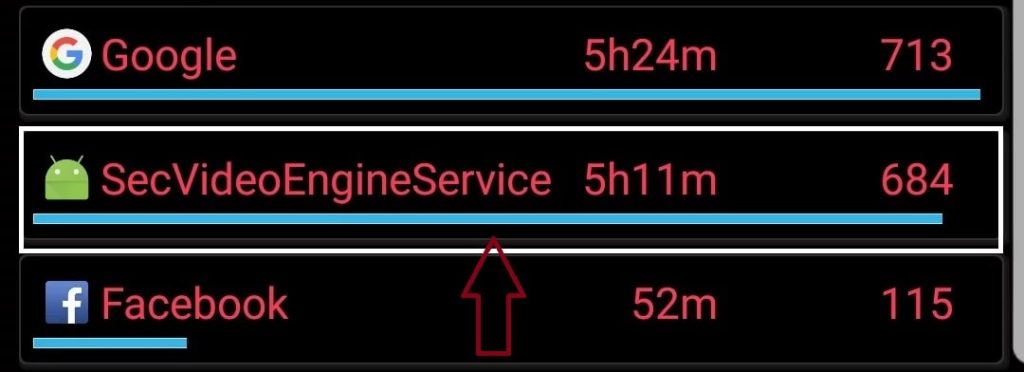
This can be done through the use of features such as pausing, rewinding, and fast-forwarding. Additionally, users can adjust the volume and brightness of videos.
Another feature of Secvideoengineservice is its ability to connect to Samsung devices and stream content from them.
This feature is useful for users who want to watch videos that they have stored on their Samsung device. In addition, the sec video engine service app can also be used to control other compatible devices that are connected to the same network.
For example, it can be used to control the playback of videos on a TV or gaming console that is connected to the same network.
Why is the Secvideoengineservice App Not Working on Android?
One common issue reported with the Secvideoengineservice App on Android devices is that it is not working. This problem can be caused by a variety of factors, but the most common reason is that the app is not installed or updated.
If you are having trouble using the Secvideoengineservice App, there are a few steps you can take to try to fix the issue.
How to Fix the SecVideoEngineService App on Android?
The SecVideoEngineService app on Android can be frustrating to use. This app allows users to access and manage security cameras on Android systems.
Unfortunately, the app has been known to be difficult to use and unstable. If you are experiencing difficulties with the SecVideoEngineService app, there are a few things that you can do to fix it.
The first step is to try and ensure that the SecVideoEngineService app is installed on your device. If you do not have the app installed, you can download it from the APK websites or the google play store.
If you are not able to access your security footage using the Sec Video Engine Service app, then there may be something wrong with your device or network connection.
First, you can disable the secvideoengineservice app if that does not seem to be working. If disabling the app does not solve the problem, you can uninstall and reinstall the app. If that still does not work, you can try a force stop or factory reset your Android phone.
You can try restarting your device and turning off cellular data if possible. Additionally, you can check for updates for the SecVideoEngineService app and install any available updates.
Hopefully, this article was able to help you out and get your Sec video engine service app working again!
Conclusion
If you’re having trouble using the Secvideoengineservice app on your Android phone. There are a few things you can do to try and fix the problem. First, make sure that your phone is up-to-date and has all of the latest security patches installed. Next, try uninstalling and reinstalling the Secvideoengineservice app from Google Play. If that doesn’t work, you can also try clearing your cache or data on your Android device.