Sorry, you have been blocked
This website is using a security service to protect itself from online attacks. The action you just performed triggered the security solution. There are several actions that could trigger this block including submitting a certain word or phrase, a SQL command or malformed data.
What can I do to resolve this?
You can email the site owner to let them know you were blocked. Please include what you were doing when this page came up and the Cloudflare Ray ID found at the bottom of this page.
Cloudflare Ray ID: 80418b9bae672859 • Your IP: Click to reveal 178.175.133.131 • Performance & security by Cloudflare
Все об ID в Роблокс
Если вам нужно узнать свой ID в Роблоксе, то вы обратились по адресу. Мы расскажем, как узнать свой ID в Роблокс с телефона и ПК. А также покажем, как узнать ID другого игрока.
Что такое ID в Роблоксе
Это ваш цифровой идентификатор. Он автоматически присваивается вам, как только вы регистрируете аккаунт. Собирается он из случайных цифр. В игре и во всем мире нет ни одного аккаунта в Roblox, который имел бы такой же ID, как у вас.
С помощью ID можно добавлять в друзья, можно дарить подарочные карты и делать индивидуальные группы. В общем, ID очень полезен и его нужно знать. Если не знать, то хотя бы иметь доступ к копированию (сохраните в каком-нибудь документе).
Как узнать свой ID в Роблоксе
Способов всего 2 — с помощью телефона или с помощью компьютера. Мы расскажем, как узнать свой ID в Роблоксе с помощью и того и другого устройства. Главное не используйте официальное приложение от Роблокс.
С компьютера
Для того, чтобы узнать свой айди в роблокс с компьютера, нам нужно:
- Зайти в свой аккаунт в Roblox.
- Взять ссылку из поисковой строки и найти там беспорядочно идущие цифры. Выглядит оно так:
- roblox.com/users/2348123412341 взяты случайные цифры.
Вот эти цифры и являются вашим айди.
С телефона
Здесь всё полностью аналогично. Нам нужно зайти в любой браузер, потом авторизоваться в своем аккаунте Roblox, а после этого посмотреть и скопировать из адресной строки ссылку на свой профиль. Эти цифры и будут вашим айди.
Важно! Если вы зайдете в свой профиль через приложение Roblox, то сможете скопировать ссылку на профиль, но она не всегда будет показывать ID
Как узнать ID другого игрока
Это ещё проще. Нам нужно зайти в Roblox, найти аккаунт другого человека (друга или случайного), а потом скопировать то, что есть в адресной строке после перехода в его профиль. Те же самые цифры и будут его ID в Roblox.
Как узнать свой идентификатор пользователя Roblox
 Гайды
ГайдыЧтобы узнать идентификатор вашей учетной записи в Roblox, вам нужно выполнить несколько простых шагов. После этого вы сможете скопировать его и использовать в своих целях. В этом руководстве мы расскажем, как это легко сделать.
Как узнать идентификатор в Roblox по телефону
- Для этого вам нужно перейти на сайт Roblox из любого браузера (не через приложение);
- Авторизуйтесь там и перейдите в профиль;
- Нажмите на замок в адресной строке и скопируйте десять- цифровой код (это ваш идентификатор).
Как получить Roblox ID на ПК
- Прежде всего, мы заходим на официальный сайт Roblox и войдите в систему. Затем откройте меню и нажмите кнопку «Профиль».
- Как только вы будете перенаправлены на страницу профиля, в адресной строке появится десятизначное число, это ваш идентификатор.
Как узнать идентификатор другого игрока в Roblox
Чтобы узнать идентификатор другого игрока в Roblox, вам необходимо открыть его профиль и скопировать десять цифровой код из адресной строки, это идентификатор учетной записи игрока.
How To Find Your Roblox User Id In Minutes: 2022 Quick Guide
Who doesn’t know Roblox nowadays? This specific online gaming site is quite well-liked by both kids and adults, and since there was so much free time during the pandemic, its appeal has grown tremendously.
As one of the sandbox game platforms, Roblox enables its users to play, interact with each other, and even create games.
Players can also monetize their game and collect Robux or Roblox’s virtual currency.
To be able to play Roblox, of course, each user has to sign up and create their unique username.
Unlike some other game platforms, in Roblox, we can change our username as long as it’s not already being used by other people.
Players keep their current usernames, which cannot be changed even if they change their username.
Sometimes people get confused and are unable to distinguish between these two, making it difficult to find their user ID.
No need to worry, folks, because we will cover the same in this blog. We’ll show you how to find it because it’s not displayed on your profile page.
Table of contents
What is Roblox User ID?
Different from username which consists of letters that can be modified and changed as our wish, Roblox User ID is a unique read-only integer number that identifies every user account.
Here’s one example of Roblox User ID: 3339040049.
You see, no matter how many times we change our usernames in Roblox, the user ID will always stay the same ever since the first time we created our account. It won’t be changed unless we create a new one.
How to Find Your Roblox User ID
There are a few simple steps to be followed to get your Roblox User ID which is located in your profile URL:
- Visit the Roblox website using a browser
To get your Roblox User ID, the first thing you need to do is visit the website using a browser from your laptop. You can use either Google Chrome or Mozilla Firefox.
You can directly go to https://www.roblox.com/ or Google it and then click on the link from the search engine.
- Log into your account
The second step would be to log into your account using your username or your registered email.
- Click your profile icon
Since Roblox User ID is related to your profile, the next step would be clicking on your profile icon at the top right corner.
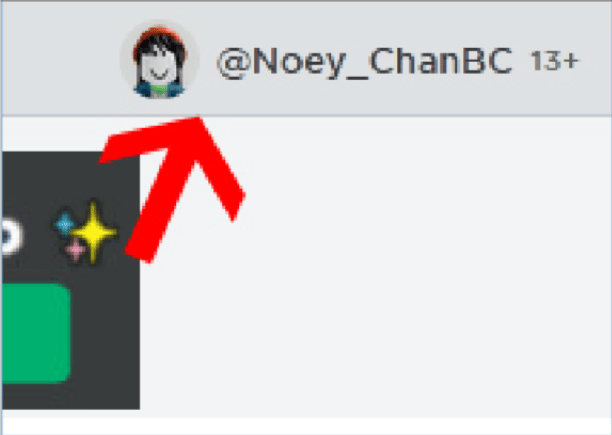
You can also click on the 3 lines at the top left corner and click on Profile from there.
- Click The URL and Copy your Roblox ID
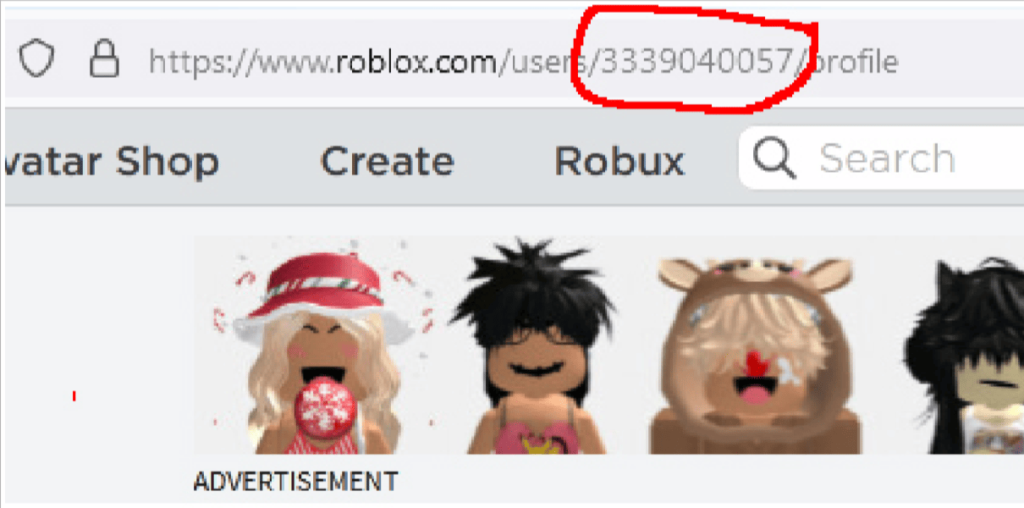
The next step is to view your URL, and you’ll notice some numbers between /users/ and /profile; this is your Roblox User ID, which you can copy for future use.
Conclusion
The game platform has various uses for User ID, and as the methods above show, you can only get your Roblox User ID by using a browser.
Therefore, using your laptop is preferred. What happens, though, if you want to try it out on your smartphone?
You will be able to finish it, of course. Just be sure you use a browser to log in to your Roblox account rather than the Roblox mobile app.
Learn to create fun games in Roblox at BrightChamps with its specially designed curriculum, which makes learning game development and coding simple for students in Grades 1-12.
BrightChamps also teaches a variety of other programs that assist children in developing a foundation in computer programming through activities, interactive lessons, and other means. Also, don’t forget to check out these innovative robotics kit for kids, inspiring young minds to explore the exciting world of technology and programming while having a blast building their own robots!