Lambda Symbol
Information, easy-to-copy variants, customizer, and more.
Text symbol of Greek letter «Lambda».
The lambda symbol (λ) finds its use in various scientific and mathematical contexts.
| Symbol | Unicode |
|---|---|
| λ | U+3BB |
�� Lambda Text Symbols to Copy and Paste
There are 2 symbols. To copy the specific symbol to your clipboard, just click on it!
⚙️ Customize Lambda Text Symbols
Do you want to change the symbol size, or try different colors? Customize it for yourself and copy ready-to-use HTML code.
How to Type the Lambda Symbol

If you’re a physician, there are times when you’ll need to type the Lambda symbol (λ)– this is the symbol that looks like an upside-down Y. It’s used in physics to show wavelength – the distance between corresponding points and two consecutive waves. Lambda is the 11 th symbol is in the Greek alphabet and it has a value of 30.
Unfortunately, most keyboards don’t allow you to type various symbols such as lambda so to type it, you need to use different codes or the character map on your Windows or Mac PC.
Microsoft Programs
Table of Contents
If you’re on Microsoft programs such as Word or PowerPoint, you can type the lambda symbol using an Alt + X code. This can be used if you have a keyboard that doesn’t have a number keyboard and you’re on a Microsoft program like Word. To type the lambda symbol, press 03BB + Alt + X. This will bring up the lambda symbol.
Windows
If your keyboard has a number keyboard, then you can type the lambda symbol using an Alt code – this consists of you pressing a few numbers whilst holding the Alt key. The numerical keyboard is on the right-hand side of your keyboard – most desktop keyboards have a numerical keyboard.
If you’re using a laptop, you’ll only see the numbers in the top row of your keyboard and not on the right. To type the lambda symbol on your keyboard, type 955 whilst holding Alt. For the upper-case lambda, type 923.
If you have a laptop or keyboard without a numeric keypad, then you’ll need to use keyboard 7, 8, 0, U, I, O, J, K, L, and M. These keys are alternatives to 0-9 when Num Lock is activated. M=0, J=1, K=2, L=3, U=4, I=5, O=6, 7=7, 8=8, 9=9. If you haven’t got a numeric keypad:
1. Hold Fn + NumLk to enable Num Lock.
2. Hold the Alt key and type 955. Remember which number corresponds to regular keypads without a numeric keypad. So 9=9, 5=i.
3. Let go of all the keys and you should see the lambda symbol in your text.
Windows Character Map
If you’re confused by the Alt code, then you can just use the Map installed on your computer.

1. Open the Start menu and open the Character Map.
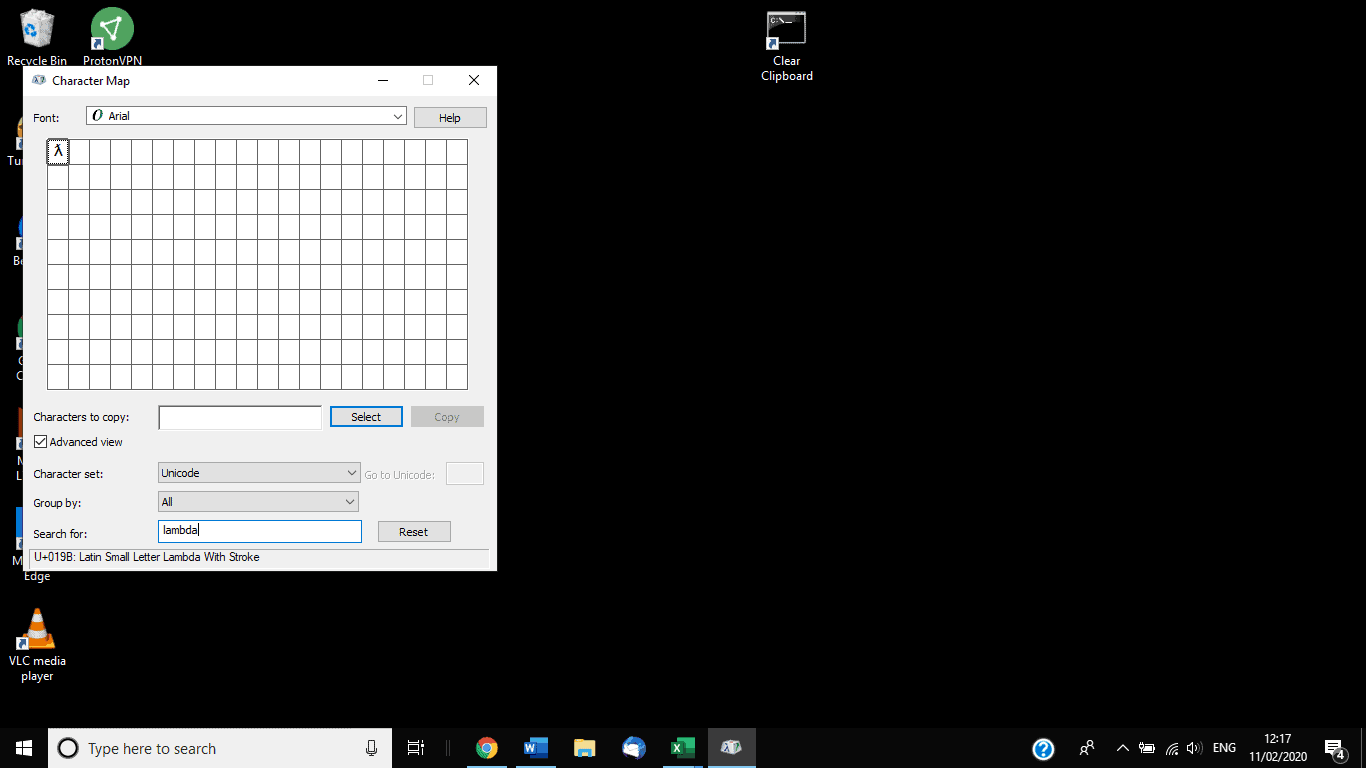
2. In Search for, search lambda and double-click on it to make it appear in Characters to copy.
3. Select Copy to copy the symbol and then you can paste it within your text.
1. Go to the Finder > Emoji & Symbols.

2. In the Search bar, search for lambda.
3. Right-click the lambda symbol and select Copy Character Info. This will add it to the keyboard.
Греческая строчная буква лямбда λ
Лямбда — 11-я буква греческого алфавита (использовалась также в коптском). В ионийской системе счисления соответствовала значению 30. Произошла от финикийской буквы Ламд. От самой лямбды произошли многие буквы, такие как L или Л.
Строчная лямбда широко используется в научной нотации. Лямбдой обозначается длина волны, постоянная распада, удельная теплота плавления, плотность заряда, а также многие другие переменные. λ-зонд — датчик остаточного кислорода в выхлопных газах. λ-фаг — название одного из бактериофагов.
Символ «Греческая строчная буква лямбда» входит в Подраздел «Буквы» Раздела «Греческое и коптское письмо» и был утвержден как часть Юникода версии 1.1 в 1993 г.
Как написать лямбду в ворде? Какой код Лямбда в ворде?
В программе ворд можно поставить разнообразные символы, в т.ч. лямбду. Так как с её написанием нередко возникают вопросы, то рассмотрим подробную инструкцию, как написать лямбду в программе ворд.
Первый шаг. Выберем на листе место, куда поставим символ лямбды, после перейдем на верхней панели настроек в закладку «Вставка» и нажмем в блоке «Символы» на иконку с аналогичным названием.

Второй шаг. В появившемся меню, нажмите на самую последнюю строчку «Другие символы».

Третий шаг. Появится подробное меню выбора различных символов, в строке набор из выпадающего списка, необходимо выбрать «греческие и коптские символы». Там можно найти маленькую и большую лямбду.

В итоге мы поставили в программе символы лямбда.

Некоторые пользователи вставляют символы через коды. Чтобы поставить символ большая лямбда, нужно вести код «039B», а для маленькой «03BB». Для преобразования кода в символ, поле его введения, нужно нажать сочетания клавиш «ALT+X».