SageThumbs #
SageThumbs is a powerful shell extension allowing to preview enormous amount of image formats directly in Windows Explorer by using Pierre-e Gougelet’s GFL 3.40 library an author of XnView Classic, XnView MP.
Features #
- Extended thumbnail image view of Explorer folder
- Thumbnail image in explorer context menu (right-click menu)
- Extended info tips
- Support 162 image formats (224 extensions) via GFL Library
- Support additional 26 image formats via XnView plugins (if installed)
- Send by mail support
- One-click conversion to popular image formats support
- Wallpaper selection support
- Copy to clipboard support
Please read carefully the following information:
As SageThumbs is a Windows Explorer context menu extension, there is no an executable file that you should launch to bring it up. To use it, just open any folder with image files in Windows Explorer, and then right-click a file you want to preview. You’ll see the thumbnail immediately in the context menu.
System Requirements #
- Windows XP/2003/Vista/2008/7/2012/8/8.1/10 32/64-bit
- About 5 Mb of disk space + additional space for cache
AI, PS, EPS, PDF Support #
To enable thumbnails for Adobe Illustrator (ai), Postscript (ps, eps) and Adobe Acrobat (pdf) files you need installed old GhostScript library:
-
AFPL GhostScript 8.54 32-бита
Troubleshooting #
To fix unwanted SageThumbs extension:
- Uncheck problem extension in SageThumbs options and press OK;
- Restore extension association in original application or using Windows Control Panel;
- Clear Windows thumbnail cache using Windows Clean Manager ( cleanmgr.exe );
- Reboot.
Note: It may be sufficient to make not all those steps.
External plugins #
SageThumbs can use external XnView plugins, it tries to automatically detect XnView installation folder or if failed it will use predefined folder. Typically this folder is C:\Program files\XnView\PlugIns for 32-bit SageThumbs on 32-bit Windows or 64-bit SageThumbs on 64-bit Windows and C:\Program Files (x86)\XnView\PlugIns for 32-bit SageThumbs on 64-bit Windows. So if you have no XnView installed you can create this folder manually and unpack plugins to it. Just don’t forget that you need same “bit capacity” for plugins and SageThumbs.
Translation #
SageThumbs can be easily translated to other languages.
New translation #
- Download and install poEdit utility;
- Copy “SageThumbs.dll.pot” file (can be found in SageThumbs installation folder) under new name “SageThumbs.dll.XX.po” near “SageThumbs.dll” file. Where “XX” is a 2-digit (or 4-digit) hexadecimal code of language, see “primary language identifier”. For example Russian has code 0x19 so its a “SageThumbs.dll.19.po”.
- Open new file in PoEdit, translate and save as UTF-8 (it’s by default)
- Open SageThumbs options and check a new language in it
- E-mail PO-file to me: <raspopov@cherubicsoft.com> . File will be definitely included in the next version
Update existing translation #
- Download fresh “SageThumbs.dll.pot” file.
- Open your .PO-translation file by PoEdit.
- Select menu item Catalogue -> Update from POT file. and open SageThumbs.dll.pot , you’ll see what was added to and what was removed from new translation.
Complete translations #
- English (built-in) by jerry by Semidio by You-Cheng Hsieh by Gaston Loos by Ropsi by DenB, Joël Boyer, Damien Bigot by Murasame, Kai Evers by Chris Tsekouras by Nitsan Rozenberg by Morva Kristóf by Marcello Gianola, Marco Reni by Shoichi Ito by JunHyung Lee by Ireneusz Chorosz, Krzysztof Cisło by Fabiano Reis, Paulo Teixeira, Ricardo de Souza Pereira by IRIman by Nikolay Raspopov by Åke Engelbrektson by Adisorn Aeksatean by Emrah Güzeltaş
Incomplete translations #
-
by William Chai by Baco Baco
Translation for SageThumbs provided by my “PO-Localization” library.
SageThumbs — удобный инструмент для просмотра изображений в Проводнике Windows
SageThumbs — это весьма удобный инструмент, упрощающий поиск, просмотр и конвертацию изображений в Проводнике Windows. Утилита интегрируется в Проводник и показывает миниатюры во всех режимах просмотра файлов, включая режимы «Плитка», «Список» или «Таблица», а также в контекстном меню нужного изображения.
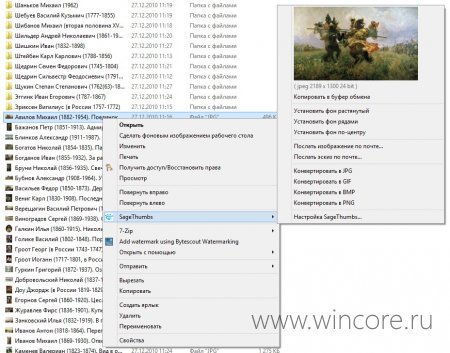
Из контекстного меню SageThumbs доступны функции конвертирования изображений в популярные форматы файлов, установки в качестве обоев рабочего стола, отправки самого изображения или миниатюры (эскиза) по электронной почте. В настройках программы разрешается задать размеры эскиза, указать форматы файлов, для которых они будут отображаться.
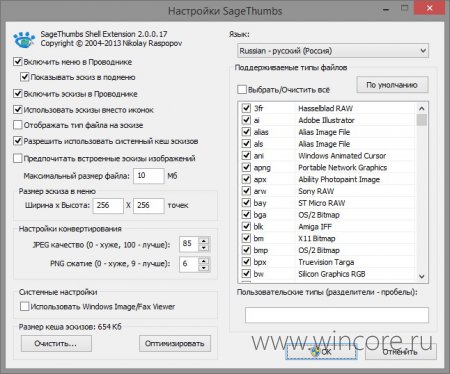
Распространяется программа на бесплатной основе, интерфейс полностью русифицирован. Тестирование проводилось в среде Windows 8.1 (x64), никаких сбоев или недочётов замечено не было, всё работает как заявлено разработчиками.
SageThumbs
SageThumbs – это мощное Shell-расширение, позволяющее вам просматривать огромное количество форматов изображений прямо в Windows Explorer-е, используя библиотеку Pierre-e Gougelet’s GFL. SageThimbs является расширением контекстного меню Windows Explorer. Вам не нужно запускать SageThumbs как отдельную программу, просто кликните на иконку изображения правой кнопкой мышки и выберите соответствующий пункт меню. Всего поддерживаются 162 формата рисунков. Все они будут отображаться, в том числе, и в виде уменьшенных изображений в папке (иконок). Расширение также предоставляет функции быстрого конвертирования изображений в самые популярные форматы, а также отправку рисунков по email и установку фона рабочего стола.
SageThumbs
Powerful Windows shell extension allowing to preview images.
- Summary
- Files
- Reviews
- Support
- Tickets
- Code
SageThumbs is a powerful shell extension allowing to preview enormous amount of image formats directly in Windows Explorer by using Pierre-e Gougelet's GFL library (XnView's author).
Please read carefully the following information:
As SageThumbs is a Windows Explorer context menu extension, there is no an executable file that you should launch to bring it up. To use it, just open any folder with image files in Windows Explorer, and then right-click a file you want to preview. You'll see the thumbnail immediately in the context menu.
* Windows XP/2003/Vista/2008/7/2012/8/8.1 32/64-bit
* About 5 Mb of disk space + additional space for cache