How To Make Tables in Discord
 By Richard Hebert February 5, 2023 June 22, 2023

Discord is gradually becoming a go-to communication platform for many people and businesses. Discord makes it possible to create and make different types of messages because of its communication tools.
Tables on Discord are one of the tools that make it possible to create and send a readable text to other users. It lets you group messages into different readable categories. So, how does one create a table on Discord?
Using tables on Discord is a form of formatting text and content. It lets you display Discord content in columns and rows using markdown characters or bots like “Tabler.” The bot will help you create and display simple and complex tables as you talk to your team or friends via Discord. You’ll have to add “Tabler” to your Discord and use different commands like “t!table” to create and utilize tables on Discord.
Tables make Discord messages more readable. Today’s article will present various ways to create and use tables on Discord.
Tables on Discord
Discord lets you interact with others via voice and text channels. The platform allows users to edit and add special characters to the content shared via Discord. Discord also allows users to create and use tables while chatting with friends, colleagues, or team members. Tables make it simpler to communicate information in a structured manner.
But one will have to create tables on Discord to structure their texts. Here are the various ways Discord users can create tables on Discord.
Method #1: Using Markdown
It’s possible to create markdown tables in Discord. Markdown is a straightforward language that allows one to create and format content on platforms like Discord and Reddit. Markdown employs a collection of symbols, including bold, italic, headers, lists, and links.
You can also create a Discord table using the Markdown feature. Sadly, you can’t structure a Markdown table on Discord. You’ll have to do it on a platform that supports Markdown tables. A great place to start would be on Reddit.
Creating a Table Using Markdown
You’ll have to use a combination of characters to structure your table.
The “|” symbol will help you create columns, while the “—” will let you create rows. Markdown also allows one to add a header and content to a table. Here’s an example of how to create a simple table in Markdown.
Header
| Column 1 content | Column 2 content | – first row
| Column 1 content | Column 2 content | – second row
| Column 1 content | Column 2 content | – third row
You can present your data or messages in the column. Use color or code blocks to separate the column and the rows. The column’s data will align to the left. But you can use colons to align the table:
- :- allows you to align content to the left.
- -: allows you to align content to the right.
- :-: allows you to align content to the center.
Once done, copy the table and post it to your Discord threat.
Method 2: Using Bots
You can use a bot to create and display content in tables on Discord. The bots eliminate the manual factor when building your table. You’ll use commands to set your table and feed information into the table. The bot can also format the content displayed on the table.
Discord users have a variety of bots that can help them create and add content on Discord tables. Tabler bot is an example of such a bot. It will help you build any kind of table you wish within seconds. Tabler bot tables are more readable than markdown tables. However, you’ll have to add “Tabler” to create and use readable tables on Discord.
Invite the bot as follows.
- Ensure you have server managing permission before inviting the bot to your server.
- Go to the top.gg website.

- Tap the “Invite” button.
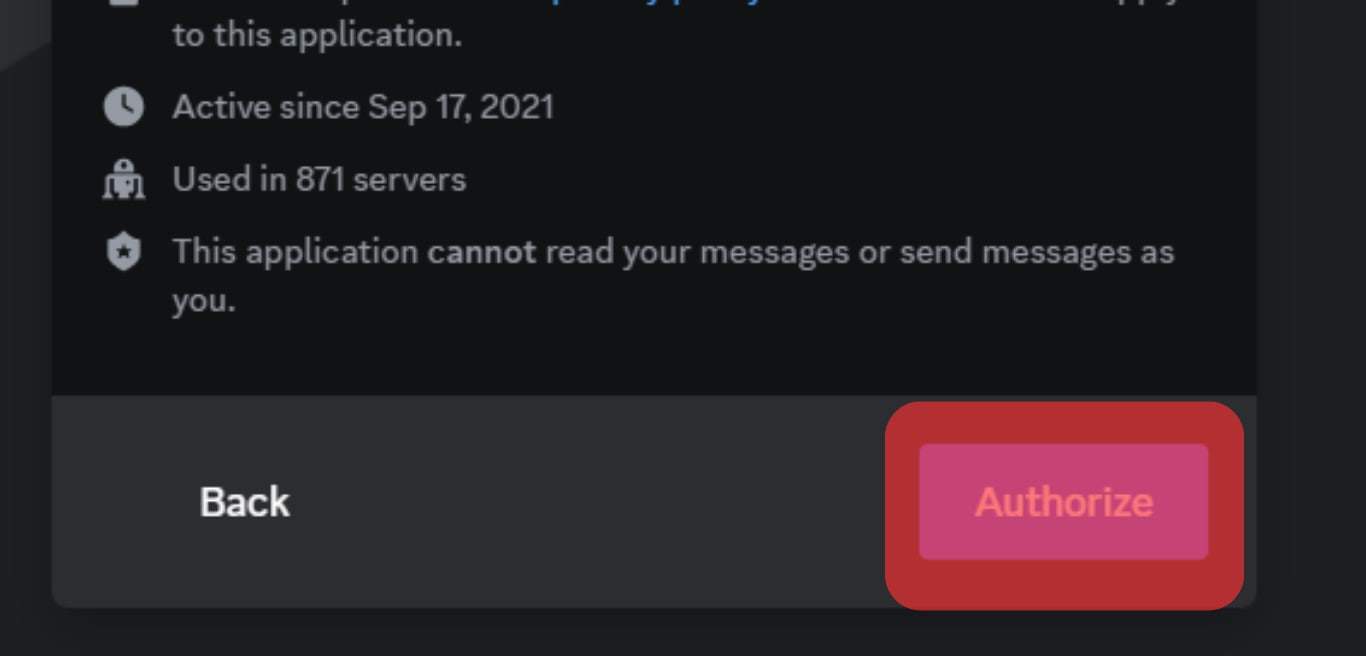
- Select your server and click the “Authorize” button.
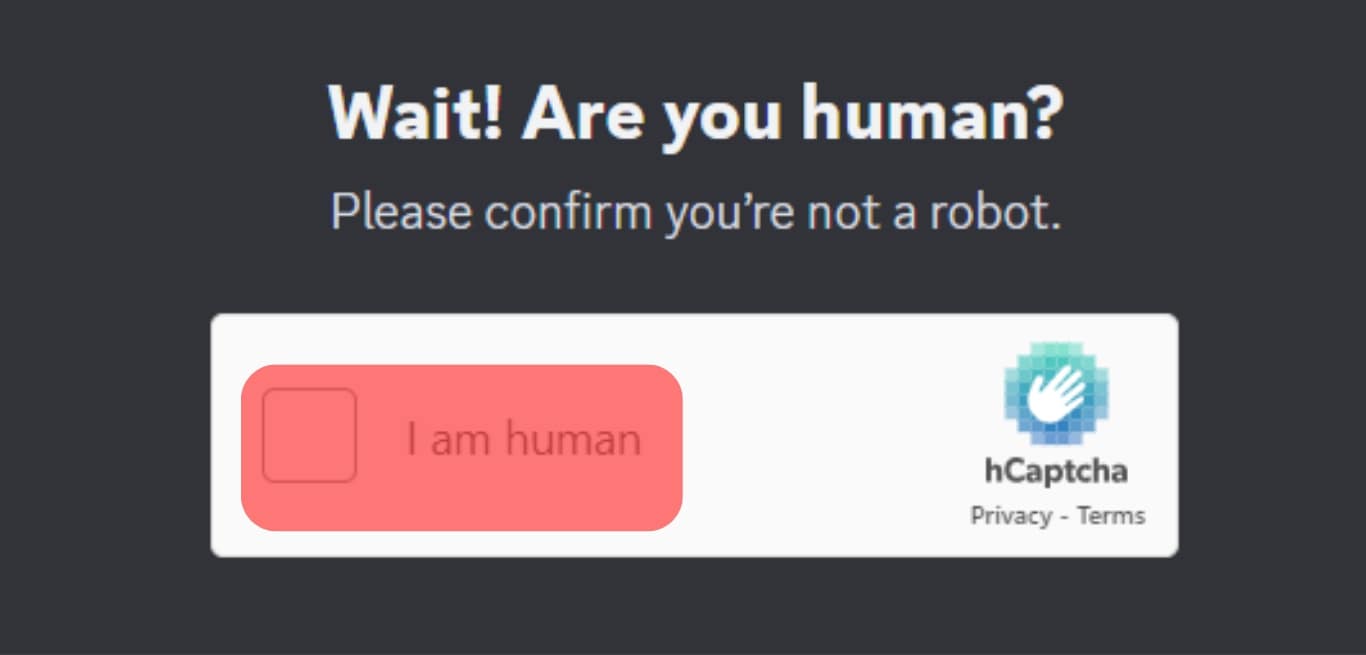
- Check the “I am human” capture request.
- Go to your server and check if you can see the Tabler bot on the members’ list.
After setting it up, type the t!table command to create your table. You’ll also have to inform Tabler of the number of your column and rows. The table set-up command should look like this: t!table –col(1).width= [number of spaces]
The command informs Tabler to set the first column with a width of 10 spaces. Use the “|” to create a new column. Check the other Tabler commands and tools on here.
There is a chance that you can’t invite the bot to your server because this bot has reached its limit on joining servers. In this case, you’ll need to find another bot.
Method #3: Use Integrations
Integration tools like Zapier can help your link Discord to table-generating tools like Google Tables. You’ll need a Zapier account to connect Discord to your Google tables.
It’s easy to enter data into your tables once you connect Discord to Google Tables.
Wrapping Up
Markdown table generators or bots like “Tabler” can help you create and use tables on Discord. You can also integrate Discord into table-generating tools like Google Tables. The tools make table building a quick and easy task. You won’t need codes and a coding environment to create Discord tables.
The tools will also help you create orderly Discord tables that you can use to manage data, project timeline preparation, or just display content. Try to generate your tables and share the experience with us.
FAQs
Most Discord bots are generally safe. But ensure to check if the bot is verified before inviting it to your Discord. Some bots can attempt to request access to data, email, or contacts. Don’t let any bot access your data. It increases the risk of data leakage or hacking.
Форматирование текста
Форма1.1 Игрок, посетивший проект автоматически соглашается с данным сводом правил. [ ]
1.2 Администрация имеет полное право вносить изменения и дополнять правила в любое время без какого-либо оповещения или предупреждения игроков. 1.3 Незнание правил не освобождает от ответственности. 1.4 Запрещено упрекать администрацию в её действиях, касаемо модерирования или же проекта. 1.5 Администрация проекта вправе наказать игрока по причине, не указанной правилах на своё усмотрение, каждый случай рассматривается отдельно. 1.6 Набор на какие-либо должности производится строго в официальной ВК группе. 1.7 Администрация в праве забрать донат-привилегию в случае нарушения данных правил. 1.8 Покупка донат-привилегий возможна только с нашего сайта (https://mc-starcraft.ru/). 1.9 Игроки обязаны выполнять требования администрации. Администрация в праве наказывать игроков на свое усмотрение, каждый случай рассматривается отдельно. 1.10 Запрещено провоцировать администрацию на нарушение правил проекта, а так же клеветать на них(Например для того чтобы занять их место).
1.11 Данные правила распространяются на весь сервер. Обновленные правила вступают в силу с момента их публикации.тирование [ ]
«`md
Многострочный блок.
— Пример.
* Еще.
1. Еще один.
# Еще не конец.
[Может когда-нибудь](он наступит).
«`

1.11 Данные правила распространяются на весь сервер. Обновленные правила вступают в силу с момента их публикации.
Большой заголовок
Средний заголовок
Малый заголовок
— Тоже список
(пробел)* Подсписок
(пробел)- Тоже подсписок
- Список
- Тоже список
- Подсписок
- Тоже подсписок
- Нумерированный
- Список
Список часто используемых имен синтаксиса для многострочного блока кода:
Имя Настоящее имя md Markdown diff Difference html HyperText Markup Language xml Extensible Markup Language css Cascading Style Sheets php Personal Home Page / PHP: Hypertext Preprocessor ts TypeScript js JavaScript json JavaScript Object Notation py Python go / golang Golang ps PostScript c C c++ / cpp C plus plus c# / cs C sharp yaml / yml Yet Another Markup Language / YAML Ain’t Markup Language bash Bourne Again SHell ini Initialization file elixir Elixir Экранирование [ ]
Допустим, вы хотите написать сообщение __это просто текст__. Но Discord заменяет его на это просто текст. Для этого поставьте перед первыми двумя подчеркиваниями обратный слеш: \_\_это просто текст__. Слеши показываться не будут, а текст не будет подчеркнутым. Используйте двойные слеши чтобы показать и их \\_\\_это просто текст__
Комбинирование [ ]
Любое форматирование можно комбинировать, однако помните о том, что форматирование не применяется к блокам кода.
Ввод (текст) Результат ***Жирный курсив*** или **_Жирный курсив_** или _**Жирный курсив**_ Жирный курсив **(Жирная ссылка)[https://google.com]** Жирная ссылка Другое [ ]
Ввод (текст) Результат <https://www.example> Выводится ссылка без прикреплённого вложения. <@80351110224678912> Упоминание пользователя. Цифры — ID пользователя. <#103735883630395392> Упоминание канала/ветки. Цифры — ID канала/ветки. <@&165511591545143296> Упоминание роли. Цифры — ID роли. <:mmLol:216154654256398347> Вставка статичного эмодзи (имя и ID эмодзи). <a:mmLol:216154654256398347> Вставка подвижного эмодзи (имя и ID эмодзи). <t:1618953630> Временная отметка. Цифры — количество секунд с 1 янв. (четверг) 1970 года, 3:00. <t:1618953630:STYLE> Временная отметка со стилем. STYLE — стиль отображения, является символом (список примеров в таблице ниже), по умолчанию f. </leaderboard:937908452720795659> Вставка слэш-команды (имя и ID команды). <id:customize> Упоминание «Каналы и роли», вкладки выбора ролей. <id:browse> Упоминание «Каналы и роли», вкладки выбора каналов. <id:guide> Упоминание «Путеводитель по серверу». STYLE Результат Пример синтаксиса t 0:20 <t:1618953630:t> T 0:20:30 <t:1618953630:T> d 21.04.2021 <t:1618953630:d> D 21 апреля 2021 г. <t:1618953630:D> f * 21 апреля 2021 г., 0:20 <t:1618953630:f> F среда, 21 апреля 2021 г., 0:20 <t:1618953630:F> R 7 месяцев назад <t:1618953630:R> Спойлеры файлов на мобильных устройствах [ ]
Для того чтобы пометить файл как файл-спойлер вы должны переименовать файл, добавив в начало имени файла «SPOILER_».
Шрифты и выравнивание [ ]
Дискорд не имеет инструментов управления шрифтами. Однако, со своей стороны мы можем использовать любой генератор или изображения. Выравнивание по правому краю применяется для определенных языков, например для арабского языка и иврита.
Discord таблицы
В Discord таблицы могут быть созданы только с помощью специальных онлайн-сервисов – встроенной возможности попросту нет. Также нужно помнить о том, что для добавления результата в чат требуется использовать специальные стили, поддерживаемые программой. При правильном подходе получится сделать несколько колонок и столбцов, добавив в них текст. Подобные блоки применяются для указания доступных команд, правил сервера и прочей структурированной информации. В общем, предлагаем разобраться, как в Дискорд канале сделать таблицу самостоятельно.

Как сделать таблицу в Discord?
Для создания таблицы в Дискорде рекомендуем использовать онлайн-сервис, доступный по ссылке – www.tablesgenerator.com/text_tables#. С помощью платформы возможно создавать разные элементы, состоящие из определенного количества столбцов и строк. И чтобы сделать все правильно и не допустить ошибок, предлагаем воспользоваться следующим пошаговым руководством:
- Переходим на официальную страницу сервиса.

- Обращаем внимание на верхнее меню, с помощью которого выбираем размер и стиль. Вы можете вручную указать нужное количество строк и столбцов, а также ввести любой текст.
- В небольшом окошке видим результат, который получится скопировать посредством кнопки Copy to Clipboard.

- Открываем нужный канал и вставляем результат, обернув его в двойные кавычки («содержимое «).
Таким образом, мы кратко рассмотрели, как делать таблицу в Дискорде на сервере. Легких вариантов достаточно мало, и это – один из них. Созданный блок корректно отображается в чате и позволяет выводить различную информацию. Если у вас остались вопросы или другие способы, то напишите об этом в комментариях!
How to make a table on discord
If you looking to get solution of How to make a table on discord then must check given helpful tips & tricks and guides. We have listed all the related questions to provide you as much best possible solution.
Can I put a table in discord?
Zapier lets you send info between Discord and Google Tables automatically—no code required. Triggers when a new message is posted to a specific text channel. automatically do this! Creates a new row in a table.
How do I add a chart in discord?
- Include a chart URL in a regular message.
- Add the chart URL in an embed.
- Upload the chart as a file attachment.
How do you do special text in discord?
How do you flip a table in discord?
Is Mattermost like discord?
Does discord support markdown tables?
What are all the Discord commands?
Command Function /me [word or phrase] Emphasizes the text that you type after the command so that it stands out in the channel. /tableflip Inputs this emote into the channel: (╯°□°)╯︵ ┻━┻ /unflip Inputs this emote into the channel: ┬─┬ ノ( ゜-゜ノ) /shrug Inputs this emote into the channel: ¯_(ツ)_/¯ How do you make a Discord stock bot?
How do you use Stockbot on Discord?
Or pop. So i pop type that in and it gives us a list right here most popular symbols out of 8963 servers the period last day and it gives you the top 10 tickers.
What does RED text mean in Discord?
How do I send C++ codes in Discord?
- Step 1: Open the Discord App. …
- Step 2: Select a Discord Channel. …
- Step 3: Select the Chat Box. …
- Step 4: Type a Back-tick. …
- Step 5: Type the Text That You Want Formatted. …
- Step 6: Type Another Back-tick at the End of Your Text.
How old is Discord app?
What are the best Discord bots?
- MEE6. MEE6 is a bot that enables you to automate tasks like sending welcome messages. …
- Dank Memer. If you want a fun Discord atmosphere, then you might want to consider adding the Dank Memer bot to your list. …
- Helper.gg. …
- ProBot. …
- IdleRPG. …
- Community Hubs. …
- Tip.cc. …
- Double Counter.
What are MEE6 commands?
# MEE6 Command Description 1 !play To start playing a song from the queue 2 !stop To stop / pause the current song 3 !search To search for a song 4 !record To record the current conversation in the voice channel What does table flip mean in Discord?
No related posts.
Similar Posts
How to unblock someone in discord
If you looking to get solution of How to unblock someone in discord then must check given helpful tips & tricks and guides. We have listed all the related questions to provide you as much best possible solution. How do you unblock someone on Discord app? Unblock someone on Discord Select the Friends tab from…
How to get a discord auth code
If you looking to get solution of How to get a discord auth code then must check given helpful tips & tricks and guides. We have listed all the related questions to provide you as much best possible solution. How do I find my 6 digit auth code on Discord? Launch Discord, go to User…
How to make a discord account
If you looking to get solution of How to make a discord account then must check given helpful tips & tricks and guides. We have listed all the related questions to provide you as much best possible solution. Can a 12 year old have a Discord account? The COPPA rule says a child can be…
How long does it take for discord support to respond
If you looking to get solution of How long does it take for discord support to respond then must check given helpful tips & tricks and guides. We have listed all the related questions to provide you as much best possible solution. How long does it take for the Discord team to respond? We do…
How to make discord bot easy
If you looking to get solution of How to make discord bot easy then must check given helpful tips & tricks and guides. We have listed all the related questions to provide you as much best possible solution. Can I make a Discord bot without coding? With Connect, you can emulate and simulate similar algorithms…
How to get on discord
If you looking to get solution of How to get on discord then must check given helpful tips & tricks and guides. We have listed all the related questions to provide you as much best possible solution. How do you start on Discord? Starting on the left you’ll see a large plus button this is…