Cache module / status information – HP Insight Management Agents User Manual

RAID Stack Version—lists the RAID stack version operating the B-series array controller.
This value may change when upgrading or downgrading the operating system device
driver.
Option ROM Version—lists the option ROM revision of the chipset or HBA being used by
the B-Series controller.
HBA Firmware Version—lists the firmware revision of the chipset or HBA being used by
the B-Series controller.
HBA Mode Option ROM Version—lists the revision of option ROM that would run on this
chipset or HBA (being used by the B-Series controller), if it were to run in HBA mode.
Cache Module / Status Information
Select the cache module item from the Mass Storage submenu to display the following information:
For some controller models, a cache module board that physically attaches to the controller
or chipset may not be an available option. For these configurations, the Storage Agent will continue
to populate fields that are related to read caching operations.
Status—Displays the status of the cache module and/or cache operations. The following values
are valid:
Enabled—Cache operations are currently configured and enabled for at least one logical
drive.
Temporarily Disabled—Cache operations have been temporarily disabled. Check the
Cache Module Error Code for the monitored item to determine why the cache operations
have been temporarily disabled.
Permanently Disabled—Cache operations have been permanently disabled. Check the
Cache Module Error Code for the monitored item to determine why the cache operations
have been disabled.
Cache Module Flash Memory Not Attached—The flash memory component of the flash
backed cache module is not attached. This status will be set when the flash memory is
not attached and the Supercap is attached. This value is only used on flash backed cache
modules that support removable flash memory.
Cache Module Degraded—Failsafe Speed—The cache module board is currently degraded
and operating at a failsafe speed. View the cache memory fields Data Width and
Transfer Rate
to obtain the cache module board’s current memory data width and
memory transfer rate.
Cache Module Critical Failure—The cache module board has encountered a critical failure.
The controller is currently operating in Zero Memory Raid mode.
Read Cache Could Not Be Mapped—The read cache memory in a split cache configuration
could not be mapped by the operating system and as a result is not available. This status
may be caused by virtual space limitations in certain operating systems and is only
applicable to B-Series controllers.
Amber blinking light indicvating (HP ProLiant DL380p G8) that Cache Module Status is disabled because a capacitor has failed to charge to an acceptable level
HP Proliant DL380p G8 server has started (last 24 hours) showing a blinking amber light indicating degraded health. Upon further examination the iLO and array reported that the "Cache Module Status" (on a Model HP Smart Array P420i Controller) has failed and that it is "disabled because a capacitor has failed to charge to an acceptable level" Please see screenshots from iLO and Array diagnostics below for details. The server is out of warranty (we will just pay the cost), but what I am really trying to figure out is how serious this issue is. Everything seems to be working okay and we have no plans on rebooting this server (read that it might not come back up). Is this something that we can live with for the next 10 days or so or is it an A.S.A.P major situation? Appreciate any/all insights to help me determine the severity of the context as an external HP tech might not be available for a few days. Cheers as always 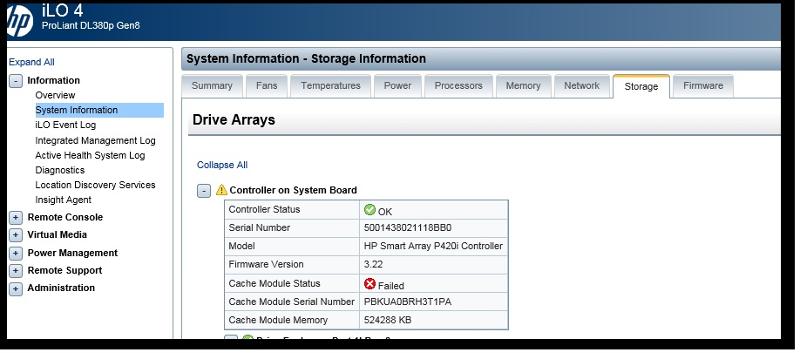
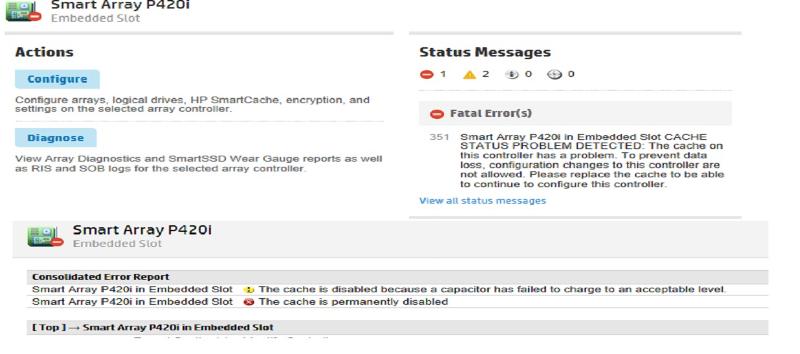
HP proliant cache module failure
In our windows server environment, we often get the alert for HP servers that storage cache module has failed. What exactly is the function of cache module?
1 Answer 1
Unfortunately, you are neither mentioning a specific server model nor a specific controller, thus I’m assuming Smart Arrays here. HP/HPE Smart Array RAID controllers provide a battery-backed cache to e.g. temporarily store data before transferring them to disks. The cache is DRAM, thus it’s a lot faster than typical disk drives, and this speeds up e.g. write operations.
Let’s go one step back: Once a data write to the cache is completed, the cache must be able to protect the data in case of a power loss before the data has been transferred to the drives. This happens using a battery, and the battery is normally what fails after some time which leads to alerts or failure reports, because you might be on risk when using a non-battery-backed cache. If this does not apply for you, you should provide a specific failure message here.
The HP document Smart Array technology: advantages of battery-backed cache describes the details of the cache in detail.
You must log in to answer this question.
-
The Overflow Blog
Related
Hot Network Questions
Subscribe to RSS
To subscribe to this RSS feed, copy and paste this URL into your RSS reader.
Site design / logo © 2023 Stack Exchange Inc; user contributions licensed under CC BY-SA . rev 2023.9.7.43618
By clicking “Accept all cookies”, you agree Stack Exchange can store cookies on your device and disclose information in accordance with our Cookie Policy.
HP DL360P Gen8 Smart Array P420 cache disabled replace supercap
I have a few HPE DL360P Gen8 servers in my home lab for testing and learning purposes. They’re older and out of support but they work just fine for my lab testing. Recently one of them had an amber indicator light illuminated. I checked the ILO management interface and noticed that the Smart Array controller was reporting the following error in the IML log:
POST Error: 1705-Slot X Drive Array — Please replace Cache Module Super-Cap. Caching will be enabled once Super-Cap has been replaced and charged.
When I logged into the host and ran the ssacli utility I got some more detail on the problem.
# ssacli «ctrl slot=0 show» |grep Cache
Cache Board Present: True
Cache Status: Permanently Disabled
Cache Status Details: Cache disabled; backup power source failed to charge to an acceptable level
Cache Disable Reason: Permanent disable condition. The posted write cache has been disabled because the backup power source attached to the flash-backed write cache module has failed to charge.
Drive Write Cache: Disabled
Total Cache Size: 1.0
Total Cache Memory Available: 0.8
No-Battery Write Cache: Disabled
Cache Backup Power Source: Capacitors
Cache Module Temperature (C): 35
I can imagine a scenario where a supercap has failed, I recently had to replace a pair of them on my Liftmaster garage door opener. However I thought I would try some troubleshooting before ordering replacements online. When I looked at the firmware I noticed was version 8.00. A quick search online revlealed a much newer firmware was available for the controller on the hpe website.
After downloading and extracting the latest firmware ( 8.32 as of this writing) I flashed it to the controller following the instructions provided by HPE with the firmware.
After a reboot of the lab host the smartarray cache error went away and it appears to have resolved the issue.
If the issue returns running the new firmware I’ll update this blog post.