Spotify Daily Mix Not Updating? Here’s How to Fix It?
Is Spotify Daily Mix not updating? Often weeks go by with the Daily Mix playlists not updating. Then they do change at some random point only for the cycle to repeat. This has been happening for the last few months. Has anyone else faced this? Is there a solution?
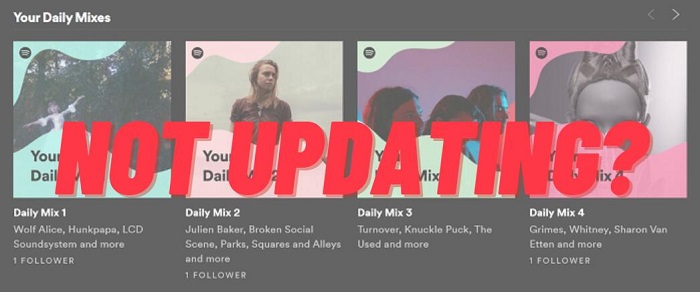
Spotify Daily Mix is a discovery feature for both Spotify Premium subscribers and Free users. You can find the customized Daily Mixes in the Made for You section, and enjoy them on mobile and desktop. The Daily Mix compiles six different playlists that continuously add new music over time to keep the mix fresh and relevant to your listening preferences. Depending on the music you like and your listening history, the mix is continuously experiencing slight changes by Spotify’s algorithm based on your current listening habits.
The Daily Mix aims to reflect your recent listening activities. And the customized playlists update regularly with new tracks. However, some users complain that their Daily Mixes are not updating for a long time. This article will discuss some ways to fix the issue that Spotify Daily Mix is not updating. On the way to our goal, we’ll put in a few words about other useful tips on how to download Spotify Daily Mix for offline listening with or without a premium subscription that we’re sure you’ll appreciate.
Part 1. How to Fix Spotify Daily Mix Not Updating Issue
1.1 Update Spotify App
If Spotify Daily Mix is not updating automatically, you can try to update the Spotify app. Some users said that after updating the Spotify app, the Spotify Daily Mix not updating problem has been fixed.
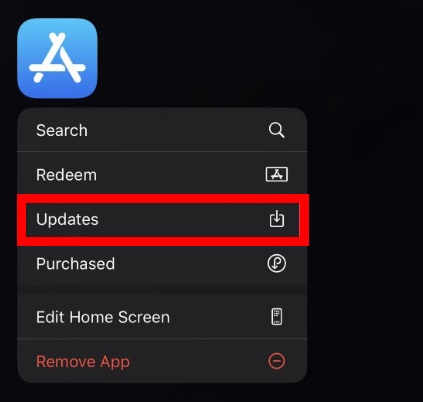
To update the Spotify app on your iOS devices, press and hold the App Store icon to reveal the options. Select Updates and it’ll open the list of apps pending an update. Find Spotify from the list and tap on the Update button to apply the update.
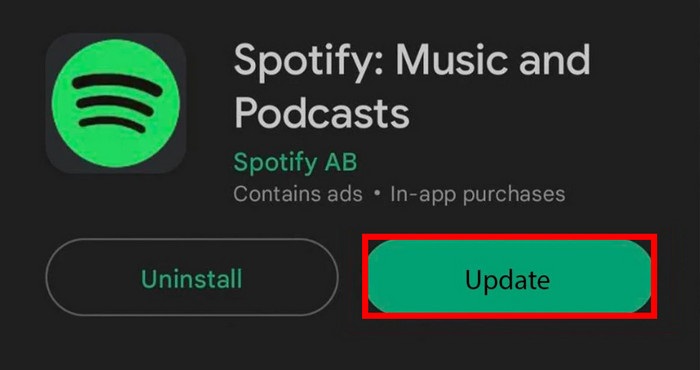
To update Spotify on Android smartphones, go to the Google Play Store and search Spotify. App updates might be pending which you’d need to install.
1.2 Clear Spotify Cache
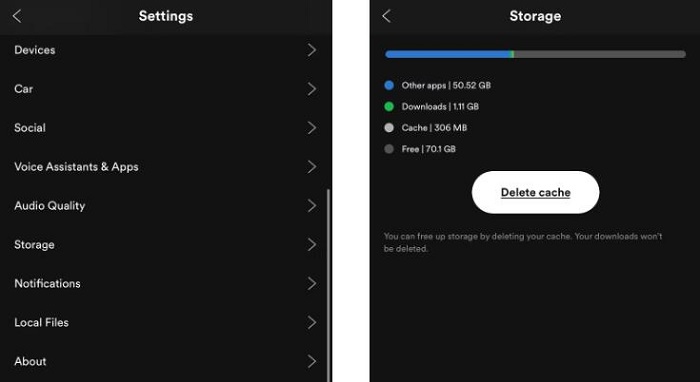
The Spotify cache and data files can cause this problem. You can also try to clear the cache on Spotify, here’s how to do it.
To clear your Spotify Cache on Android or iOS devices, open your Spotify app. Then, select the Settings icon. Go to Storage. Select the Delete cache option to clear Spotify cache.
1.3 Uninstall and Reinstall Spotify
If the issue doesn’t solve by following the above instructions, you can uninstall and reinstall the app.
Step 1. First, log out of Spotify, then uninstall it from your iPhone or Android device. Wait till the uninstallation is complete.
Step 2. Search for the Spotify app in the Google Play Store or the App Store.
Step 3. Once it shows up in the results section, tap the Install button to reinstall Spotify on your device.
1.4 Using Spotify Web Player
If it was not possible to solve the problem with the previous method, you can listen to music through the web version of the Spotify service. It will help the system work more correctly. With a high degree of probability, it will fix the error by updating the playlist of the day.
1.5 Restart Your Phone
If you are also facing the problem of Spotify Daily Mix not updating on your Android or iPhone, you should restart your phone once. Because it has often been seen that all the minor bugs are fixed after restarting the phone.
Part 2. How to Download Spotify Daily Mix with A Spotify Premium Subscription
Once you’re on the Spotify Daily Mix page, you can play, shuffle, or reorder the mixes. If you have a Spotify Premium subscription, you can also download the Spotify Daily Mix for offline listening.
2.1 How to Download Spotify Daily Mix on Desktop
Step 1. Open the Spotify app on your Mac or PC, and log in to your Spotify Premium account.
Step 2. Head to the Home page, scroll down and you’ll find Made For You.
Step 3. You can choose one Daily Mix playlist you prefer to play and toggle the Download button to download the playlist.
2.2 How to Download Spotify Daily Mix on Mobile
Step 1. Launch Spotify on your iPhone or Android phone, then sign in with your Spotify Premium account.
Step 2. Click on the Search from the bottom of the screen and scroll down to find the Made for You hub.
Step 3. Choose a Daily Mix playlist you like, click the Download button and save offline songs to your music library.
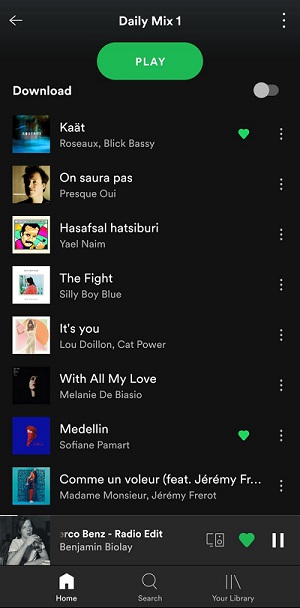
Now you are able to listen to your customized playlists offline on Spotify. But the Daily Mix playlists are constantly updating. You won’t be able to play songs from the previous day, even if you downloaded the playlist. It will just result in downloading the songs that are currently in it.
To solve this, you can go to your Daily Mix, and select all songs by using the keyboard CMD+A (Mac) or CTRL+A (Windows). Then drag them to a new playlist. Then you can easily download your Daily Mix playlists for offline listening.
Part 3. How to Download Spotify Daily Mix Without A Spotify Premium
Downloading the Daily Mix playlist is very simple, only needs a Spotify Premium subscription. Alternatively, you could use a third-party tool to download Spotify Daily Mix without having to pay for the paid service. Here Macsome Spotify Downloader is strongly recommended for you. With it, you can not only download Spotify Daily Mix playlists on your computer with a Spotify Free account but also can convert Spotify songs, playlists, and podcasts to MP3, AAC, WAV, FLAC, AIFF, and ALAC without quality loss. Thus, you can play your favorite mix playlists anytime without worrying about them changing.

Main Features of Macsome Spotify Downloader
- Download Spotify music, playlists, and podcasts with high quality.
- Convert Spotify songs to MP3, AAC, WAV, FLAC, AIFF, or ALAC.
- Support batch downloading at up to 10x faster speed.
- Available for both Spotify Free and Premium users.
- Almost all the ID3 tags will be preserved.
- Directly import Spotify music to iTunes on your PC.
- One click to burn Spotify music to a CD on your PC.
Step-by-step Instructions: Download Spotify Daily Mix Without Premium
Here we provide step-by-step instructions on how to download Spotify Daily Mix for offline listening without a Spotify Premium subscription.
Step 1. Add Spotify Music or Playlists.
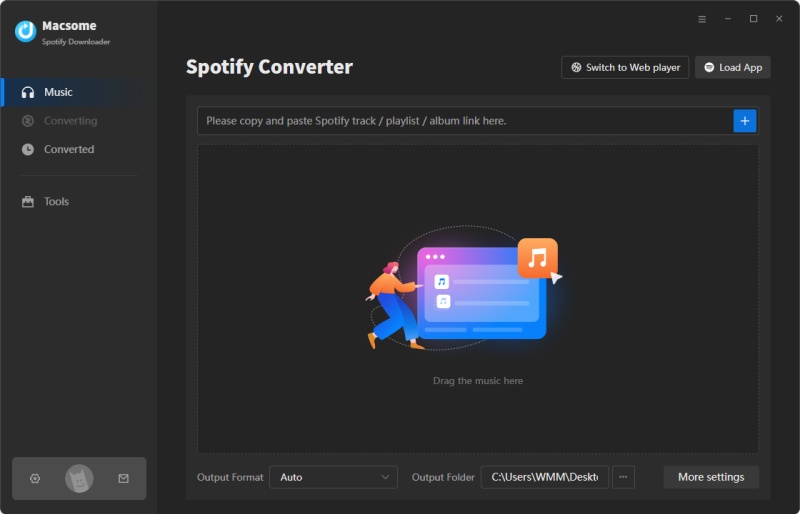
First, download, install, and open Macsome Spotify Music Downloader on your computer, and it will immediately launch the Spotify app. On Spotify, find the curated lists from the title Made For You. You can drag and drop the tracks from the Spotify Daily Mix playlist to the clipboard. You can also copy the link to the playlists from Spotify and paste it into the search box.
Step 2. Set Output Parameters.
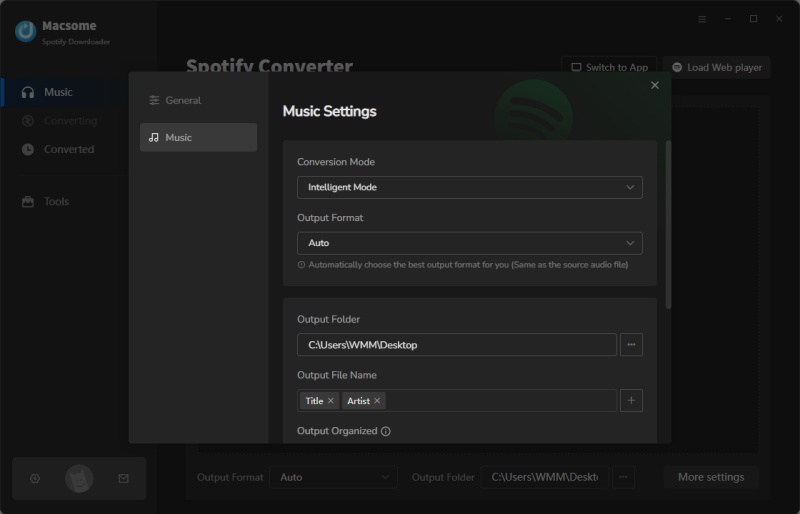
Tap the «Settings» in the top right, you could set up the output parameters as your own needs. You can choose MP3, AAC, WAV, FLAC, AIFF, and ALAC as the output format. The AUTO is the default option, which lets you get the best output quality as the original files. You’re also allowed to adjust some other parameters like bit rate and sample rate.
Step 3. Download Spotify Daily Mix Playlists.
Click on the «Convert» button to start downloading Spotify Daily Mix playlists.
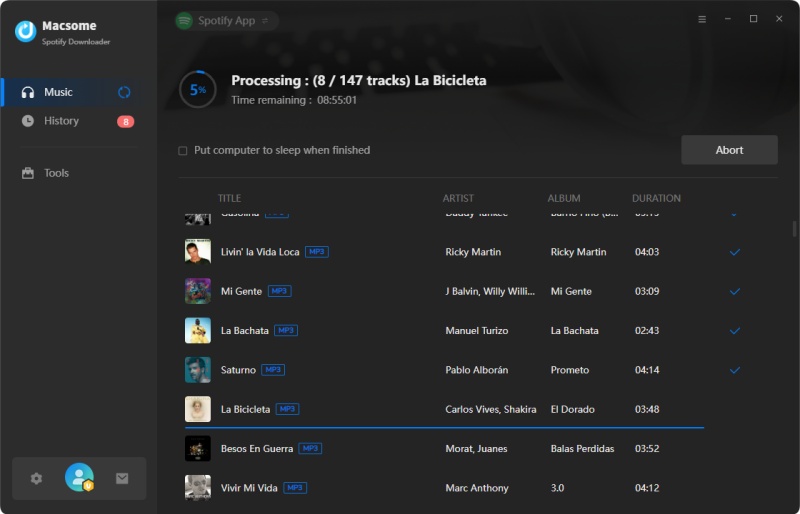
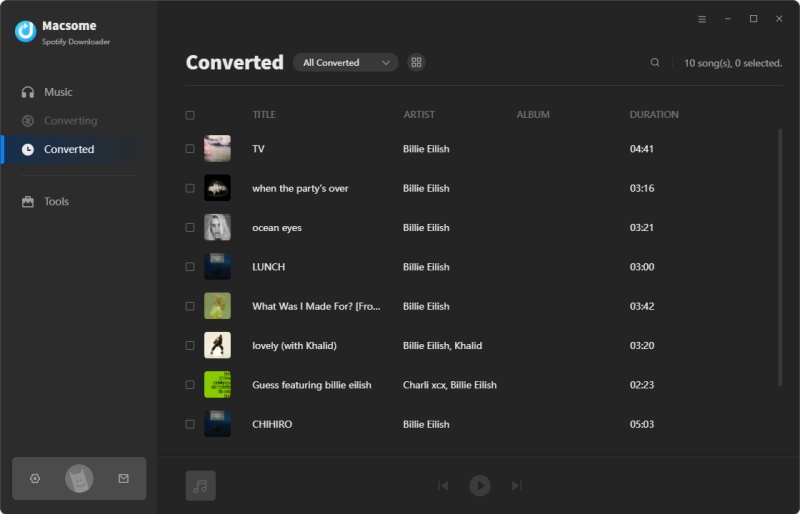
Once finished downloading, you’ll see a blue check mark next to each song. To local the downloaded Spotify songs, you can click the blue check mark directly, or go to the «Converted» panel, and hit the «folder» icon after the track duration. Now you will be able to move Spotify Daily Mix playlists to any player you own and listen to it without an internet connection.
Final Thoughts
Spotify Daily Mixes are playlists made for you, and they are changing based on your top listening preferences. Some users may experience some errors like «Spotify Daily Mix not updating», «Can not keep Spotify Daily Mix playlist», etc. In this tutorial, we’ve listed some of the effective methods to fix the issue that Spotify Daily Mix is not updating, and we also introduced two simple ways to download Spotify Daily Mix playlists so that you can listen to Spotify Daily Mix offline.
Macsome Spotify Downloader allows you to download Spotify songs, albums, playlists, podcasts, and audiobooks without a Spotify subscription. What’s more, you can convert Spotify songs to a common format like MP3 with high quality. In this way, you can enjoy Spotify Daily Mix offline without limits. Macsome Spotify Downloader has a free trial version that enables you to download the first minute of each song. Please have a free trial.
Spotify Daily Mix Not Updating 2022, How To Fix Spotify Daily Mix Not Working?
Daniel Ek and Martin Lorentzon established Spotify on April 23, 2006, as a Swedish audio streaming and media services provider. It has over 406 million monthly active users and 180 million paid members as of December 2021, making it one of the top music streaming service providers. Spotify provides digital copyright-restricted recorded music and podcasts from record labels and media firms, totaling more than 82 million songs.
Daniel Ek, a former Stardoll CTO, and Martin Lorentzon, a co-founder of Tradedoubler, launched Spotify in Stockholm, Sweden, in 2006.
According to Ek, Lorentzon’s name was screamed at and the company’s title was misheard at first. Later, they devised an etymology for «spot» and «identify» as a combination.
Spotify Daily Mix
The Daily Mix is a collection of up to six pre-mixed playlists based on what our customers want to listen to. On desktop or premium mobile, it can be found in «Your Library,» on the radio tab on premium mobile, or on the home screen for users of the new free app experience.
This is a feature that both premium and free users can make use of on mobile and desktop. After you’ve been listening to your favorite songs on Spotify for a while (in the new free app, it can be as soon as the day you download it), the platform will present up to six personalized playlists based on your favorite songs and similar music you might like. These playlists are updated on a daily basis, ensuring that the head-bopping never stops.
Как обновить микс дня в спотифай
Вопрос по Spotify, почему дальше не обновляются миксы дня ? Я что должен слушать одно и тоже ?
Вернулся на YM через две недели, а хайпа то сколько вокруг Spotify было.
Вернулся уже через 2 дня
Для справки, YM — это youtube music или yandex music?
Без персонализированной радиостанции яндекса тяжело. Досижу где-то еще до недели пятой, если плэйлисты не начнет кидать, то я продлевать не буду.
Дизер тот же больше предлагает, хоть и дороже. А яндекс лучше подбирает.
Самое важное, чего нет в спотифае. Либо слушай однотипные плейлисты одного жанра, либо ебись со своими плейлистами, но все равно будет один жанр, потому что иди нахуй.
Когда в ЯМ ты жмакнул на радио — и понеслось, любые треки, любые жанра, никакой ебли.
Удали эту помойку, которая даже не может предоставить топ песен исполнителя, а дает только 5 его композиций. А которая тебе нужна, предлагает искать ее среди его дискографии, ты ведь должен знать в каком альбоме трек который ты ищешь.
Вообще-то она даёт топ 10 песен исполнителя, врунишка
ладно это было грубо
в стране где времени на раскачку нет
Согласен. Но трактат по второй ссылке открыл для меня этот сервис на сто процентов.
Кстати, кто-нибудь знает, чё это за блок? Он там с первого дня такой и не обновляется
Я так понимаю, что спотик составляет этот блок из того, что ты\похожие слушатели чаще всего слушают в утреннее\дневное\вечернее время
Спотифай все еще не обновляет миксы дня. Держу в курсе.
Если разрабы не уберут тупую функцию автовыгрузки альбомов с плейлистами, а также не пофиксят миксы дня, то однозначно надо уходить на ЯМ.
Вообще конечно маркетологам респект. Настолько круто продвинуть сырой проект на ру рынок, при этом настолько промыть мозги аудитории. Хочу разбор кейсов на vc.ru от маркетологов споти.
У меня 6 плейлистов, постоянно попадаю на их обновления.
Врубаю плейлист с каким нибуль Deathcore/metalcore спустя 10 песен обновление, хуяк и этот плейлист под номером 2 теперь чисто из саундтреков состоит.
Выходит что сразу после какого нибудь Lorna shore включается Westworld main theme.
На spotify с 2016
Без обид , но я вернулся на ям.
Пользую и яму и споти. не вижу проблемы раз в месяц выложить четверть от суммы пропиваемой по пятницам.
У меня тоже миксы дня не обновляются. Только иногда новые появляются.
Также не обновляется плейлист "на повторе"
Я не знаю, я уже лет 10 не слушаю музыку альбомами, притом слушать неизвестных артистов альбомом как-то не очень.
А однотипные плейлисты вгоняют в уныние. Причём песни там подобраны под мой стиль музыки, но под мой вкус не попадают. Я задолбался уже выискивать нужные песни из поиска и лайкать. А споти все пофиг
Только что проверил. И на самсунге допотопном и в декстоп версии и в броузере. Всё обновляется. и даже треки из вк перенесённые в ежедневных особо светится перестали.
Может у вас ребят дело в предпочтениях. Точнее в их разнообразии. Я прост эклектичный распиздяй и мне каждый день споти наваливает вкуснятины как говна за баней.
А ну да. Пришлось повозиться полвечера. с инструкцией выше. Извиняюсь.
В очередной раз пользователи сервисов доказали, что их сервисы говно)0ф))0)0)0)
Как обновить Микс дня Spotify — разберемся
Как известно, есть в Spotify микс дня, где собрана наиболее актуальная для владельца аккаунта музыка. Найти соответствующую вкладку без особых сложностей получится как в мобильном приложении сервиса, так и в веб-версии на компьютере – раздел располагается на главной странице. Но периодически пользователи платформы сталкиваются с проблемой, когда на протяжении нескольких дней или даже недель персонализированный плейлист вообще не обновляется. Что же делать в такой ситуации? Мы проанализировали все доступные варианты, поэтому готовы рассказать вам, как работает микс для Spotify.
Микс дня – что это такое?
И начнем с того, что микс дня в Spotify – это персонализированный плейлист, в который попадает ваша любимая музыка, а также некоторые рекомендации от самого приложения. К примеру, встроенная система аналитики учитывает наиболее востребованные вами жанры, а затем включает в подборку несколько похожих по звучанию композиций. Вообще, таких плейлистов может быть до шести штук – все зависит от того, насколько активно вы слушаете разные треки.
Как можно догадаться по названию, обновить миксы в Спотифай получится на следующий день, после прослушивания предыдущего плейлиста. В результате в новую подборку уже будут включены другие треки, которые вы активно слушали на протяжении последней недели или месяца. Но иногда алгоритмы плохо работают, из-за чего наблюдаются сбои с обновлением музыки. Поэтому у людей возникает такой вопрос: почему мой микс дня в Спотифай не обновляется?
Как обновить?
Если вы интересуетесь, как обновить микс дня Spotify, то мы хотим отметить, что новые треки в подборку включаются автоматически. К примеру, вы прослушали все композиции за предыдущие сутки. Следовательно, встроенная система это обнаружила, поэтому аналогичные треки больше не будут включены в ежедневный плейлист. Но так происходит далеко не всегда, ведь периодически случаются сбои – как вариант, микс может вообще не изменяться на протяжении недели. Здесь рассказываем всё про историю прослушивания в сервисе.
Почему не обновляется – что делать?
А теперь пора выяснить, что делать, если в Spotify не обновляется микс дня. Если честно, то разработчики сервиса не предлагают каких-то способов, а всего-то рекомендуют немного подождать. Но остальные пользователи все-таки обнаружили варианты, дающие положительный результат. С ними мы предлагаем вам ознакомиться немного ниже:
- Очистка кэша. Эта процедура приведет к тому, что приложение немного обновится, а алгоритмы будут условно сброшены. Для этого открываем программу и переходим в настройки, заходим во вкладку «Хранилище», а затем выбираем «Очистить кэш». Подтверждаем действие и удаляем все временные файлы Spotify.


- Включение музыки через браузер. Если до этого вы слушали треки исключительно с помощью приложения на смартфоне или компьютере, то временно запустите несколько композиций посредством веб-версии. Рекомендуем включать только любимые мелодии, ведь впоследствии они будут добавлены в тематическую подборку.
На этом варианты решения проблемы закончились. Как рекомендуют другие пользователи, желательно слушать музыку через Spotify ежедневно, дабы избежать подобных ошибок. Если у вас остались дополнительные вопросы, то можете задать их в комментариях! Посмотрите информацию про функции сервиса в браузере — как пользоваться, что в нем есть.