Как узнать какой сервер на хостинге Apache или Nginx
Существует несколько простых способов выяснить, какой веб-сервер установлен на вашем хостинге. В их основе лежит просмотр заголовков HTTP-запроса посредством различных сервисов или вручную. Чаще всего поиски данной информации заканчиваются тем, что пользователь сталкивается с такими вариантами ответа: Nginx или Apache – одни из самых популярных и хорошо зарекомендовавших себя проектов, предоставляющих в совокупности до 50% веб-трафика, который гонится на сайт.
Следовательно, в этом материале мы разберем упомянутые веб-сервера. Данное руководство будет полезно всем пользователям, которые сталкиваются с этим вопросом впервые.
Важно! Радикальных различий между Nginx и Apache не существует, но все-таки приходится говорить об отличительной обработке соединений.
Вернемся к тому, как узнать тип веб-сервера на хостинге, и какие сервисы станут наилучшими помощниками для этих целей.
Определяем руками, просмотр HTTP заголовков
В этом варианте будем использовать сам браузер и инструменты разработчика CTRL+ SHIFT +I.
В качестве браузере, рассмотрим на примере Google Chrome.
Шаг 1. В браузере Google Chrome открываем сайт, у которого требуется узнать веб-сервер.

Шаг 2. Открываем инструменты разработчика. Меню (три тоски) —> Дополнительные инструменты —> Инструменты разработчика.
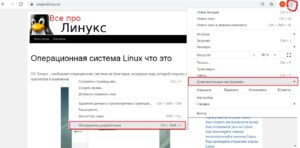
Шаг 3. Заходим на вкладку network (сеть), затем перезагружаем сайт.
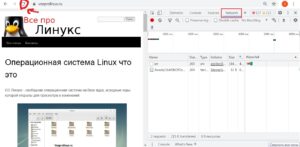
В столбце «Name» находим название сайта, в моем случае это vseprolinux.ru.
Кликаем левой кнопкой мыши.
В появившемся окне справа в headers ищем слово «server».
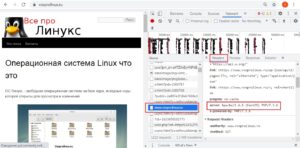
Это и есть веб-сервер, который используется на сайте.
Bertal
Предлагаем вашему вниманию еще один надежный сервис, посредством которого можно посмотреть HTTP-заголовки веб-файлов различных форматов. Чтобы воспользоваться инструментов, пользователю необходимо перейти по ссылке. Если размер интернет-страницы < 4 Мб, сервисом Bertal можно воспользоваться еще и для просмотра html-кодов.
Типы поддерживаемых протоколов:
- http
- https
- ftp
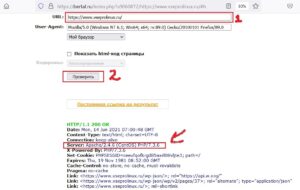
Чтобы произвести успешную проверку http-заголовка, пользователю потребуется заполнить поля формы на странице сайта. Если пользователь предпочтет заполнить одно поле (URL сайта), то он получит лишь основную информацию о своём хостинге. Для получения развернутой информации все же рекомендуется заполнять все имеющиеся поля на странице сайта.
Примечательно, что запрос информации происходит несколькими способами:
- GET
- HEAD
- POST
Выдача результата будет напрямую зависеть от того, какие данные укажет пользователь в полях формы на сайте.
Несколько интересных фактов о популярных веб-серверах
- Разработка проекта стартовала в 1995 году. Сервер улучшали вплоть до 1999-го года. И уже через год после этого продукт начал широко применяться в сети Интернет.
- Имеет множество модулей, гибкий.
- Разработка сервера стартовала в 2002 году. Готовый продукт был представлен широкой публике в 2004 году.
- Обладает высокой чувствительностью при мощных нагрузках.
Заключение
У пользователя может возникнуть срочная необходимость выявить тип веб-сервера на своём хостинге. В этой статье мы рассказали, как получить нужную информацию самостоятельно, без обращения в саппорт. Просто используйте для этих целей один из упомянутых способов.
How To Find Web Server Type Running On A Linux Or Windows Machine?
How to find web server type running on a Linux or windows machine? Is there any Linux command to get the details?
Ans : Yes it’s possible in Linux by using curl(client for URL) command. To find which web server is running on a machine use blow command.
#curl -I www.linuxnix.com
# curl -I itig
HTTP/1.1 200 OK
Via: 1.1 us-PROXY1, 1.1 us-PROXY2
Connection: close
Proxy-Connection: close
Expires: Mon, 1 Jan 2001 00:00:00 GMT
Date: Mon, 14 Jun 2010 03:26:55 GMT
Content-Type: text/html; charset=utf-8
Server: Apache/2.2.3 (Red Hat)
X-Powered-By: PHP/5.1.6
Set-Cookie: b2933756b1f0288a74dd630e51954bff=5sl7jaqpgliambi2fq7q3ailv6; path=/
P3P: CP=”NOI ADM DEV PSAi COM NAV OUR OTRo STP IND DEM”
Last-Modified: Mon, 14 Jun 2010 03:26:55 GMT
Cache-Control: no-store, no-cache, must-revalidate, post-check=0, pre-check=0
Pragma: no-cache
In the above out put we can see server as Apache 2.2.3.
cURL is an excellent tool to do many thing such as
1. File transfers(FTP, FTPS, HTTP, HTTPS, SCP, SFTP, TFTP, TELNET, DICT, LDAP, LDAPS, FILE, IMAP, SMTP, POP3 and RTSP)
2. Can understand SSL certificates
3. Can understand Proxies
4. Can understand Cookies
5. User+password authentication (Basic, Digest, NTLM, Negotiate, kerberos…)
6. File transfer resume
7. Proxy tunneling etc..
How can I check if current web server is NGINX or Apache using bash script?
I have a Laravel project deployed on Ubuntu VM. I have a script that I am working on right now that to know if the current VM deployed using nginx or Apache programmatically.
I know I can just check using these ps and grep command I will find that out
With those result about, I know that this VM is using Apache.
But, I have no idea how to check it via a Bash script. How would one go about and do that? I’m open to any suggestions at this moment.
How to determine which webserver is installed with no information? [closed]
Want to improve this question? Update the question so it focuses on one problem only by editing this post.
Closed 4 years ago .
I’ve recently taken over a project after a developer caused issues with the client. However, due to the lack of documentation (laugh) I have no idea where the website files are stored or what webserver has been installed.
In Linux, how can I see what webserver has been installed?
In Linux, how can I find where the webserver points to in the file directory? (aware that this will depend on the answer from the first question)
** Hosted on Linode
4 Answers 4
A basic approach would be to use netstat -tnlp with an additional grep on the browser ports that it is supposed to be serving. Typically, that would then be:
That should list the process PID and name that owns these ports. That should give you a clue which server it is. Then, locate the configuration files for that server application, e.g. /etc/httpd .

There is no such things as the webserver in linux. Several different servers exist that could do the job. The most common are probably Apache httpd and nginx.
In general you should start by finding out which it is, and then look at it’s configuration.
One option to find out which webserver is installed is using netstat to see what is listening to the ports commonly used for HTTP traffic, 80 (for unencryted) and 443 (for encrypted/HTTPS) are the most common. But if there is some proxy in front, any port might be used, in that case 8080 and 8443 are common choices.
Another option would be to utilise your distribution’s package system. The tools to use depend a lot on which distribution you have, on Debian it would be something like dpkg -l | grep -i web , it probably outputs several packages, but the relevant should be aming, and easy to pick from the descriptions.
In this specific case it might make sense to just see if the two common choices have configuration on the system. In most cases apache httpd will have it’s configuration in /etc/apache (possibly /etc/apache2 ), nginx often in /etc/nginx .
For apache httpd, the relevant setting will often be DocumentRoot , for nginx it’s most commonly root , but both can be configured to do almost anything (Apache httpd supports ModRewrite that is said to be Turing complete, making it theoretically capable of doing absolutely anything), so it can be a bit difficult to find what you need.