Методы загрузки автотюна для FL Studio 21: сравнение платных и бесплатных вариантов
Автотюн — это программа, которая используется для коррекции и изменения высоты голоса в записи. Это инструмент, который часто используется в современной музыке, особенно в жанрах, таких как R&B и хип-хоп.
Платные методы
Существует множество платных методов загрузки автотюна для FL Studio 21. Некоторые из них намного популярнее других:
Antares Auto-Tune Pro — это один из наиболее распространенных автотюнов. Он имеет широкий диапазон функций и поставляется с набором инструментов, необходимых для создания профессионально звучащих записей.
Celemony Melodyne — это программа, которая позволяет изменять мелодию записи, не влияя на ее естественность и звучание. Хотя Melodyne не является чистым автотюном, он может выполнять многие из тех же функций.
Waves Tune Real-Time — это программа, которая позволяет в реальном времени корректировать высоту голоса в записи. Это удобно, если вы хотите услышать, как изменения влияют на запись еще во время ее создания.
Бесплатные методы
Есть также множество бесплатных методов загрузки автотюна. Некоторые из наиболее известных включают:
GSnap — это бесплатный автотюн, который доступен для загрузки на сайте GVST. Он обладает стандартными функциями автотюна и может быть использован в FL Studio 21.
MAutoPitch — это бесплатный автотюн, который также доступен для загрузки на сайте Melda Production. Он имеет некоторые продвинутые функции, такие как автоматическое выравнивание голоса, чтобы добиться более естественного звучания.
KeroVee — это еще один бесплатный автотюн, который обладает стандартными функциями и может быть легко загружен из интернета.
Сравнение бесплатных и платных методов
Хотя большинство платных методов обладают более продвинутыми функциями, бесплатные методы также могут быть полезны в FL Studio 21. Если вы только начинаете работать со звуком и не хотите тратить много денег на программах, то бесплатные варианты могут быть для вас правильным выбором. Тем не менее, платные методы как Antares Auto-Tune Pro и Celemony Melodyne все еще являются мощными инструментами и могут оказаться более подходящими для профессиональных студийных работ.
Заключение
Выбор метода загрузки автотюна для FL Studio 21 зависит от ваших потребностей и бюджета. При выборе метода нужно учитывать не только стоимость, но и функциональность и производительность программы. Независимо от того, выбираете ли вы платный или бесплатный вариант, автотюн является важным инструментом для создания профессионально звучащих записей.
Лучшие AUTOTUNE плагины для вокала в 2022 году

Autotune — это инструмент для автоматической настройки высоты тона. В настоящее время коррекция интонации голоса является одной из основных и стандартных процедур в микшировании, применение которой уже стало обычным явлением. Безусловно, Autotune чаще всего используется в поп- и хип-хоп песнях, и не ограничивается только вокалом. Большинство плагинов этого типа предлагают отдельные режимы для таких инструментов, как гитара или даже труба. Проще говоря, Autotune берет любой аудиофайл и измеряет его высоту и тональность с помощью программного аудиопроцессора. Следуя «музыкальным тенденциям», мы подготовили список из пяти премиальных и пяти лучших бесплатных плагинов для вокала в 2022 году, которые пригодятся вам, будь вы вокалист или музыкальный продюсер.
Премиальные AUTOTUNE плагины
1. Celemony Melodyne 5
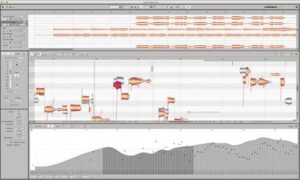
Melodyne предоставляет вам непревзойденный доступ ко всем мелодическим тонкостям — нота за нотой. Это становится возможным благодаря расширенному программному исследованию материала: детальное изучение нот, их качества, гаммы, тональности и гармонии, ритма, оттенка тона…
Celemony Melodyne — один из самых ценных и важных vst плагинов, в который продюсер должен инвестировать, — говорит Эндрю Болоки, обладатель Грэмми.
2. Antares Audio Auto-Tune Pro

Auto-Tune Pro — наиболее полная и усовершенствованная версия базового плагина Auto-Tune. Он включает в себя автоматический режим для постоянного исправления, режим графика для точного изменения высоты тона и времени, модуль Auto-Key для идентификации тональности и гаммы, а также множество других функций, таких как классический режим, Humanize или моделирование горла. Независимо от того, нужно ли вам быстро исправить пару ошибочных нот, настроить идеальный плавающий эффект Auto-Tune или скрупулезно очистить все исполнение, Auto-Tune Pro предлагает экспертное решение этого вопроса.
3. iZotope Nectar 3

Модули Nectar 3 реагируют на звуковую информацию и создают ровное, отрегулированное исполнение с простыми в использовании элементами управления. Ключевые особенности: Vocal Assistant — исследует содержание вашей вокальной дорожки и предлагает порядок обработок, соответствующие тонкостям исполнителя и вашей музыки, Vocal Unmasking — помощь в размещении вашего вокала на переднем плане микса, перемещая другие конкурирующие звуки на второй и третий план. Dimension — включает в себя эффекты хоруса, фленджера и фейзера, для добавления глубины вокалу.
4. Waves OVox Vocal ReSynthesis

OVox управляется инновационной технологией Waves Organic ReSynthesis® (ORS), чтобы передать непревзойденное качество вокала. ORS берет голосовой сигнал и разделяет его на «ДНК» компоненты — высоту тона и форманты. Затем он повторно интегрирует эти компоненты, чтобы создать новый вокальный звук, который освобождается от нежелательных артефактов с добавлением выразительности голоса. Создавайте безграничную вокальную палитру, редактируйте настройки, воздействуйте на вокодер и глубину тембра.
5. SoundSpot VoxBox

SoundSpot побуждает вас увеличивать и утолщать ведущий вокал простым и инстинктивным способом, не нагружая процессор и сохраняя базовую цепочку смешивания. Он имеет быстрый и инстинктивный рабочий процесс, прогрессивный расчет разделения вокала и сохраняет переходные процессы.
5 лучших бесплатных AUTOTUNE плагинов
1. Antares Audio Auto-Tune Evo
Auto-Tune пересматривает интонацию и синхронизацию в вокале или сольных инструментах без искажений, сохраняя при этом всю выразительную тонкость.
2. Auburn Sounds Graillon 2
 Graillon — это живой вокальный редактор, который приносит в вашу DAW программу целую вселенную результатов с тщательно структурированными функциями, такими как модуляция с отслеживанием высоты тона, шифтер и коррекция.
3. Acon Digital Multiply
Acon Digital Multiply — это бесплатный и гибкий эффект хоруса с интересным поворотом. Каждый имитируемый голос подготовлен с помощью канала рандомизации сцены.
4. Melda Production MAutoPitch

MAutoPitch — это простой, но невероятно звучащий программируемый модуль коррекции высоты тона, предназначенный для вокала и других монофонических инструментов. Помимо того, что звук становится более упорядоченным, MAutoPitch также дает творческие эффекты, такие как формантное движение и расширение звуковой сцены. Это быстрый, простой в использовании и бесплатный инструмент!
5. GSnap

Одним из замечательных элементов, отличающих GSnap от других бесплатных autotune плагинов, является возможность настраивать обрабатываемый звуковой сигнал в соответствии с MIDI-нотами на входе — вам не нужно зависеть от запрограммированного в модуле вычисления распознавания высоты тона.
Об авторе: mix-master
Частичное или полное копирование любых материалов сайта возможно только с указанием ссылки на первоисточник.
18 Best FREE Autotune VST Plugins ( 2023 )
Here are the best free autotune VST plugins that can be used with FL Studio, Ableton Live, Logic Pro, and VST-supported programs. Easily autotune audio vocals.
What Is Autotune?
Autotune is software that allows singers to correct their sound when they sing out of tune, whether in the studio or live. Autotune is available as a plugin for DAWs used as a stand-alone unit for live performance processing and in a studio setting.
The software processor helps to shift pitches to the closest, correct semitone slightly. It can also be used as an effect to alter the human voice when the pitch is lowered or raised significantly.
Autotune has become a standard tool in professional recording studios and works great for tweaking minor inaccuracies while retaining the power of the original performance. How Auto-Tune Works
Explore our ultimate guide to Free VST Plugins and take your music production to the next level!
Best Autotune VST Plugins
We have included autotune plugins that work for Windows and Mac.
Instructions: Click the links below to visit each Autotune VST plugin. Look around each website for the download link or button. Do not install any suspicious software.
1. Graillon 2 Autotune VST

Graillon 2 Free Edition by Auburn Sounds
Graillon by Auburn Sounds is a Vocal Live Changer that brings Carefully designed features and a world of possibilities right into your DAW.
With the Pitch-Tracking Modulation, which is unique to Graillon 2, this plugin can change the type of speakers, generate throat sounds, create choruses, make octave sounds, and enrich a voice to make it more masculine.
- Pitch Tracking Mod
- Pitch Shifter
- Bit Crusher
- Correction Controls
- Classic Auto-Tune Sound
- Pitch Correction Software
- Process Audio Files
- Vocal Live Changer
- Stereo Width Adjustment
Graillon 2 | Windows / Mac / AU Plugin
Graillon 2 Preview
2. MAutoPitch Autotune

MAutoPitch – Best Autotune VST Plugins
MAutoPitch is a simple but great-sounding automatic pitch correction plugin designed for vocals and other monophonic instruments.
Besides making the audio more in tune, MAutoPitch also provides innovative format shift and stereo-expansion features.
- Automatic Tuning: Depth, Detune, Speed, Base Frequency
- Effects
- Vocal Tuning Plugin
- Subtle Vocal Pitch Correction
- Save & Load Presets
- Enhance Your Vocal Performance
- Adjust a processed audio signal according to MIDI notes
- Unlimited Beats & Pages
- Sell Digital & Physical Products
- Full WordPress Music Website
- 90 Free Graphics — Get $15 Off
3. GSnap

GSnap GVST Free Autotune Plugins
GVST GSnap is a free pitch-correction effect plugin that can be used to subtly correct the pitch of a vocal or create a robot-voice effect.
GSnap requires a monophonic input audio signal to operate and can be controlled using MIDI.
- Detection Controls: Gate, Min Freq, Speed, Max Freq
- Correction Controls: Fixed Mode, MIDI Mode, Threshold, Attack, and Release
- MIDI Controls: Pitch Bend, Vibrato, Speed, Calibrate
- Use subtle pitch correction settings to nudge off-key vocals back in line.
- Extreme settings can create sounds like the famous T-Pain or Cher effect.
- MIDI input control mode allows you to fit a recording to a new melody.
- Simple user interface
- Adjust the tone of recorded MIDI notes
- Use with a MIDI controller
- Snap Pitch to MIDI Signal
4. Autotalent
Autotalent by Oli Larkin is an excellent real-time pitch correction auto-tune Vst plugin. The Autotalent plugin ensures that only the specified notes are hit.
Also, use this auto-tune Vst plugin to make Cher-like vocal effects or use it as a simple pitch-shifting and pitch-correction for a noticeable effect.
You might have to disable multiprocessor support in your VST host for it to work.
- Formant Shifting
- Includes Tune & Glide Controls
- Free Pitch Correction Plugin
- Pitch Shifter
5. 4 Band Shifter

4 Band Shifter – Free Autotune VST Plugin
4 Band Shifter by Bitterspring is a free 4-band pitch correction VST Plugin that can independently shift the pitch of 4 adjacent, user-definable frequency bands.
Also, the Pitch correction range goes from -12 semitones to +12 semitones).
6. Son of a Pitch

Son Of A Pitch Free Autotune VST Plugin
Son of a pitch is an audio pitch-bend effect. The pitch of the incoming signal can be controlled by the pitch knob or by a sync to host LFO.
Its pitch knob ranges from +3 octaves to -3 octaves of the original pitch.
The effect also features an LFO-controlled filter section.
There are three filters to choose from, 2 SV filters and a Butterworth filter. Filters can be bypassed by sending the dry signal straight to the pitch bender.
7. Autotune Evo – Free Autotune Plugins

Autotune Evo | Free Autotune Plugin
Autotune Evo provides two different approaches to pitch correction.
For most common pitch problems (and correcting live performances in real-time), Autotune Evo’s Automatic Mode instantaneously detects the pitch of the input and identifies the closest pitch in a user-specified scale.
8. Multiply

Multiply | Free Autotune VST Plugins
Multiply is a free and versatile chorus effect with a unique twist. Each simulated voice is processed with a phase filter to avoid unpleasant comb filter effects.
- Frequency Modulation
- Amplitude Modulation
- Voice Count
- Equalizer
- Stereo Spread
- Pre-Delay ( ms )
- Big Chorus
9. DSP 2 Vocal

DSP 2 Vocal | Auto-Tune Plugins
DSP 2 Vocal is a high-precision insert effect for vocal processing and also includes an Intelligent Dynamic Processor, a saturator, a four-band equalizer fixed on vocal key frequencies, and a room emulator based on the Schroeder reverberator.
- Intelligent Dynamic Processor (IDP)
- 4 different automatic operative modes
- Selectable compression ratio.
- Saturator with three different operation modes
- EQ fixed on vocal key frequencies.
- Room emulator based on Schroeder reverb model
- Transparent increment of the perceived volume level
- High precision input/output VU-meter.
- Low CPU usage.
10. Old Skool Verb

Old Skool Verb Autotune Plugin
Old Skool Verb is an algorithmic reverberation for professional music production applications.
- Plate, Room, and Hall Reverb
- Undo & Redo History
- All Sample Rates Supported
- Stereo Processing
- A/B Comparisons
- Zero processing latency
- Preset Manager
- Contextual Hint Messages
11. Vocal Finalizer

Vocal Finalizer | Free Autotune Plugin
Vocal Finalizer is designed for holding vintage and modern characters.
- NoiseAsh’s Magical, Fast, Analog Quality All-in-One DSP Engine
- Simplified controls, lots of creative possibilities.
- 3 Vocal Compressor/Limiter units.
- 3 Vocal Tempo sync stereo delay units.
- Vocal Specific High Definition Reverb units.
- 3 Types of Vocal Stereo Doubler – Chorus modulation unit
- Vocal Correction Software
12. VocEQPro

VocEQPro
VocEQPro is a special vocal equalizer. It is specially tailored for musical needs – simply type in your lyrics and then play on your MIDI keyboard.
13. Vocal King

Vocal King | Best Free Autotune Plugins
The pres compressor knob is the main workhorse of the Vocal King.
- Vocal Processing
14. EasyVox Autotune VST

EasyVox | Free Autotune Plugins
The EasyVox vocal strip plugin was developed by Terry West for Windows computers.
EasyVox offers simple audio effects for vocals, such as a three-band equalizer, autogain and pre-limiter, auto noise gate, and vocal doubler effect.
- Dynamic Mono Vocal Compressor, Limiter, Enhancer
- 3-Band Equalizer
- Autogain and Pre-Limiter
- Auto Noise Gate
- Auto Band-off
15. KeroVee Pitch Correction Plugin

KeroVee Pitch Correction Plugin | Pitch Correction Plugins
KeroVee is a free pitch correction software. As a VST effect, it can be used with applications such as FL Studio, Cubase, and Sonar that support plugins.
The plugin offers auto-tune effects, but the latest version includes enhanced support for natural pitch correction.
The two outputs of pitch correction can be mixed and bypassed, allowing a chorus-like effect to be applied to the vocals.
To install this free pitch correction tool, copy and paste the KeroVee.dll file into your computer’s VST plugin folder. Depending on which host app you are using, the procedure differs.
Please follow the instructions for the host app of your choice.
KeroVee is a VST effect, so insert it into your audio track. The audio track must be stereo to specify the pan.
Please note, the website is in Japanese, so you will have to use Google Translate or Google Chrome to help translate the text.
16. Voloco

Voloco | Best Free Autotune Plugins
The Voloco plugin is a free VST3, and AU plugin that allows you to apply six audio presets to adjust the key, scale, and audio pitch correction to vocals.
This free autotune plugin supports sample rates between 24k to 96k.
It is a fun creative tool to modify audio samples to create a sample pack. It is a simple pitch-shifting plugin that would be a good addition to your music production setup.
17. Beat Lab Autotuna

Beat Lab Autotuna | Free Autotune Plugin
Beat Lab Autotuna is a free plugin that allows you to select the scale you want to pitch correct audio.
18. VstSpeek

VstSpeek Free Autotune Software
VSTSpeek is a free vocal synthesis plugin for recreating the old-school robotic text-to-speech we all love. Choose a preset, type any text, and let’s speak!
- Trigger the speech with MIDI Controller (velocity-sensitive)
- Use MIDI pitch bend ( MIDI Input Support )
- Change the original pitch or mouth/throat parameters while it’s speaking.
- Easy to use and self-explanatory
- Simple User Interface
- Robotic Sounds
What Are Examples of Autotune?
Here is a video of 10 music artists who heavily use auto-tune. The list includes Cher, Will.I.Am, Bon Iver, Kanye West, Travis Scott, Kesha, Future, Daft Punk, Lil Wayne, and T-Pain.
How to Use Autotune
Why Is Autotune Popular?
Autotune has had a negative reputation past, but it is very popular today with singers and rappers. Autotune has openped up new possibilities in hip-hop, pop, R&B music.
The first time this technique was popularized was in 1998, when singer Cher used auto-tune to distort vocals creating what became known as the ‘Cher effect.’ The effect gradually spread like a slow burn in the music industry, especially within R&B and dance music communities.
With famous artists like Kanye West, Lady Gaga, Madonna, and Maroon 5 using auto-tune for their performances, it has become very popular with time. Auto-tune plugins have made it more accessible and readily available to all musicians making it an indispensable tool for singers.
Related: What Is Autotune?
What Is The Best Free VST Autotune?
There are many free plugins that you can use to make your music sound professional and high-quality. Some of the best free Auto-tune VST Plugins include Graillon 2, Vstspeek, MautoPitch Autotune, Gsnap, and Autotalent.
How Do I Autotune My Voice For Free?
Auto-tune lets singers achieve perfection by enhancing the feel of a track and removing any minor pitch imperfections. Many singers use auto-tune as a normal part of the production process. Some also use it as an added effect to make their voice sound robotic, creating an edge in their music.
All you need is to download one of the plugins above and install it in your favorite DAW software. The process is pretty simple: record vocals and use the plugin to add the auto-tune effect to your track.
Is There A Free Version Of Autotune?
Antares Audio Technologies introduced its Auto-tune software in 1997. From the beginning, producers and engineers have experimented with the technology. Auto-tune is now a colloquial term, understood and used by artists for heavily processed modern vocals.
There are several options for beginners to use the auto-tune effect for free. You can try the free plugins above to create it.
How Do I Use A Autotune VST Plugin?
Auto-tune is a real-time module that allows pitch correction software and manipulation to correct pitch errors in pre-recorded audio and create special effects.
It consists of two parameters: basic and advanced, consisting of bypass snapping, notes, speed, pitch, fine-tuning, scale, key, F-Mode, F-Shift, Byp, Pitch preference, base frequency, stability, and mix.
The best paid autotune plugins are Antares Auto-Tune Pro, Celemony Melodyne, and Waves Tune Real-Time Plugin. These plugins offer more features, formant shift options, and controls to fine-tune your audio for a professional sound.
But the plugins mentioned above are great free autotune plugin options that offer pitch correction features, vocal effects, and good sound quality if you don’t have money to spend.
My final thoughts are these free autotune plugins are great free alternatives to paid plugins such as Super Vocoder, Antares Auto-tune (Auto-Tune Unlimited or Auto-Tune Access), Waves Tune Real-Time plugin, Synchro Arts RePitch, and paid Izotope plugins.
There are several plugins that offer a variety of creative tools and unique features for vocal recording projects, such as real-time pitch correction, and formant shifting features to help music producers and musicians reach their desired effect.
We hope you enjoy this list of free autotune VST plugins. Do you have a favorite free autotune plugin? Let us know in the comments.
Written By Mark V.
Mark Valenzuela is a professional blogger, entrepreneur, and educator with more than 15 years of experience in music production. In 2008, Mark founded Hip Hop Makers, a top resource for aspiring music producers and beatmakers. He specializes in content on music production, software, gear, and free music resources. Committed to empowering creators of all levels, Mark continues to inspire and help music creators pursue their dreams. Learn About Hip Hop Makers
5+ Best Free Auto-Tune VST/AU Plugins: (Updated 2023)!

From slight pitch correction to some cool robotic sounds, pitch correction software can be extremely useful.
T-Pain made this effect very popular, but it’s also been used by a lot of other artists such as Daft Punk, the Black Eyed Peas, and more.
Auto-Tune can be used to achieve a lot of different effects and you don’t need to spend hundreds of dollars on the Pro version of the Software since there are a lot of free ones available.
In this post, I’ll go over the best free pitch correction plugins available for Windows, Mac, and even Linux.
Let’s get started!
Related: I also wrote an article about the best Pitch-correction/auto-tune plugins in general, not just free ones.
Best Auto-Tune/Pitch-Correction Plugins
I will be listing the plugins in order, starting with the one I consider to be the best:
MAutoPitch – (Win/Mac)
Best Free Pitch-Correction Plugin!

MAutoPitch absolutely takes the Nr.1 Spot on this list because it comes with a lot more built-in features than any of the other ones, it performs better, and it’s 100% free.
It comes with the typical pitch correction features such as depth, detune and speed. However, it also includes some additional controls such as a dry/wet knob, a width knob that will allow you to control the stereo spread, and the keep- and shift-formants knobs.
How does Formant Shifting affect the sound?
Formant Shifting allows you to make the sound deeper or higher, or in other words, “more masculine or feminine”.
However, keep in mind that this can alter the pitch if you go too far.
Additionally, MAutoPitch allows you to choose between different scales such as; Chromatic, major, minor, and pentatonic, and this lets you set up the pitch correction in no time, or at least use it as a jumping-off point.
This plugin features A/B comparison, A to H switching which, essentially, lets you set up eight different versions of the plugin and quickly swap through them to test different effects, Automatic Gain Compensation, and a built-in Safety Limiter, which is more than any other Free Alternative has to offer.

In addition to this, it lets you choose what content to process (Left, right, mid, surround, etc.) and you can even enable 64-channel ambisonic compatibility.
User Interface: MAutoPitch, like all Melda Production Plugins, has a fairly cluttered interface which might not be suitable for beginners, but this is because it comes with a couple more built-in features than most other free Pitch-Correction software.
Distinctive Features:
- A/B comparison.
- A to H switching.
- Chromatic, Major, Minor, and Pentatonic Scales.
- Loads of Built-in Presets.
- Select what channel to process.
Pros:
- Most Powerful Free pitch-correction plugin out there.
- High number of built-in features that no other plugin has.
- Completely Free.
Cons:
- Harder to learn than other pitch-correction plugins.
- Fairly cluttered interface.
- Kind of intrussive banner at the bottom reminds you to upgrade the software.
The MAutoPitch is part of a 37-plugin bundle (100% FREE) that you can find here (I absolutely recommend getting this bundle, it’s awesome).
You can download it here.
Looking for Vocoder VSTs? Here’s a post I wrote about the best ones.
Graillon2 – (Win/Mac)
Good Alternative with a Premium Upgrade!
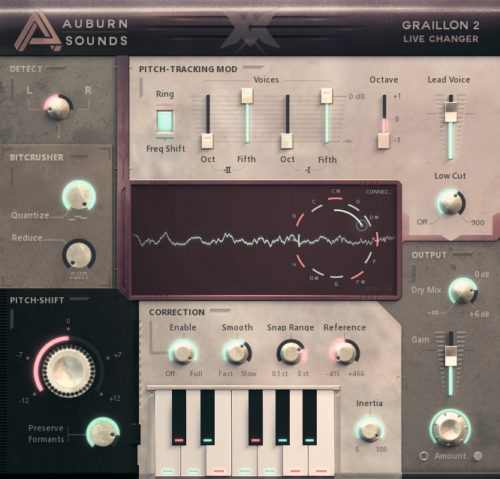
Graillon2 takes the second spot on this list because of how well it performs and how easy it is to use since it is a very visual plugin that has a display where you can see the notes that are being played as well as where Grallion2 is snapping/correcting them to.
This plugin is specifically designed for vocals and the pitch-shifting can be smoothly adjusted from minus 12 to plus 12 semitones.
One interesting feature is the “preserve formants” knob which, in theory, helps you preserve the tone and characteristics of the vocal track while shifting the pitch. In some cases, this ends up creating some issues, so make sure to play around with these settings to see what happens.
The “speed” knob is also quite useful since it helps the notes “stick” a little longer, reducing the pitch correction jumps, and helping them sound more natural.
Grallion2 also allows you to choose how fast or slow the snapping occurs, which is done by adjusting the “smooth” knob.
By adjusting the controls on the “bit crusher” section, you should be able to achieve some interesting growl sounds and add some sparkle as well.
The typical controls such as dry/wet, low-cut, and output level adjustment are also include, and lastly, the Pitch Correction module can be driven by MIDI.
User Interface: The Interface is what makes Graillon2 stand out the most in my opinion since it’s divided into distinct sections (Detection, Bit-Crusher, Correction, etc.), making it really easy to navigate, plus it’s got this vintage look to it which is absolutely stunning.
Distinctive Features:
- Preserves Formants.
- Slight pitch correction all the way to robotic sounds.
- Built-in Bit-crusher.
There is one important note though: It’s not completely free but rather “freemium”. Basically, you won’t get its full functionality unless you buy it, and with the free edition you only get the “pitch shifting” and “pitch correction” features.
If you want the full version then it will set you back about $25, or you may also consider Melodyne 5 Essential.
Pros:
- Super easy to use.
- Smooth snapping.
Cons:
- Freemium (won’t get all features unless you buy it).
You can download it here.
If you’re looking for the best free VST plugins in the world, I have a list of 225 of them here.
GSnap – (Windows)
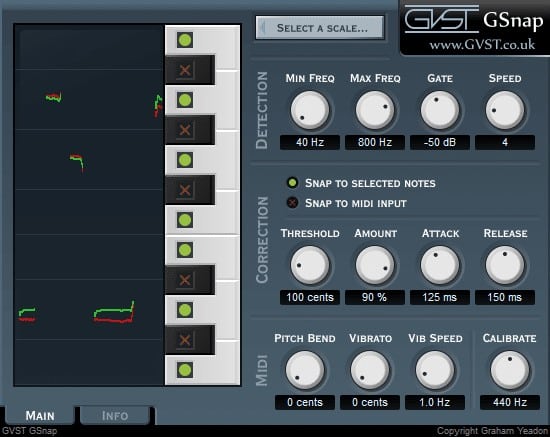
GSnap gives you the ability to control the notes that it snaps to through MIDI. This means that if you need to correct a singer’s performance through pitch correction you can play the notes on a MIDI keyboard, feed these notes into the plugin and GSnap will now use them as a guide to correct the pitch to whatever notes are in the MIDI file.
This will also prevent unwanted snapping to other notes.
If you don’t want to control the plugin through MIDI, then you can set any scale you’d like or control it by turning specific notes on or off.
On the left side of the plugin, you can see the original notes and the ones it’s snapping to, which will not only give you a visual representation of what’s going on but also allow you to fine-tune everything more easily.
It has a 12-knob control system which is divided in the following way;
- Detection: Min Freq, Max Freq, Gate, and Speed knobs.
- Correction: Threshold, Amount, Attack, and Release knobs.
- MIDI: Pitch bend, Vibrato, Vib Speed, and Calibrate knobs.
All of these knobs let you edit the sound with precision and accuracy.
It also features a gate that gives you the ability to select on what parts the plugin actually affects the sound, for example; If you only want to affect the louder parts, or more importantly, if you don’t want the plugin to trigger on any unwanted noises that might be part of the track and just the vocals.
User Interface: The interface may look slightly dated but it’s set up in such a way that makes the workflow quite easy to understand and follow, with distinct sections for Correction, Detection, and MIDI.
Distinctive Features:
- Control the notes via MIDI.
- Built-in Gate.
Pros:
- The Built-in gate lets you control when the effect is supposed to trigger or not.
- Multiple Scales to choose from or you can select individual notes.
Cons:
- Outdated Look and feel.
- Not a lot of additional built-in features.
You can download it here.
Are you looking for a new DAW? Here’s a list of the best DAWs currently available!
Voloco – (Windows, Mac)

If you’re looking for an Auto-Tuner that is capable of slight- and in-depth correction, then Voloco might not be the right one for you since it’s designed to be used as a creative tool that corrects the pitch in a more dramatic way than other plugins, which is also why you only get access to 6 presets that you can’t even edit, and that’s it.
Each of these presets affects the audio in a slightly different way. However, they are all optimized to achieve the “T-Pain” auto-tuned vocal effect.
Naturally, since it doesn’t feature any more controls than changing the presets, setting the Key, and adjusting how much correction you want, Voloco is extremely easy to use.
As far as the Scales go, you can choose Major, Minor, Minor Harmonic, Whole tone, and about four more, then you simply select the jey, adjust the level of pitch correction, and off you go!
User Interface: If there’s one plugin on this list that I would consider to be extremely simple to use, Voloco has got to be it since it only features like 3 adjustable parameters, making it easy to use and also offering a clean-looking interface.
Distinctive Features:
- Multiple Scales and keys to choose from.
- Handful of presets included.
Pros:
- Very easy to use.
- Not CPU intensive at all.
Cons:
- Can’t do “slight” pitch correction but rather creates a T-Pain style of effect.
- Almost no Customization.
Voloco is a fun plugin to have, especially for coming up with new ideas, but it’s not the most in-depth auto-tuner. Still, I find it easy to recommend to beginners!
Lastly, you can also download a mobile version for your phone that you can use to sing over other songs you have on your device and Voloco will adjust your performance to the song’s key.
You can download it here.
X42 Auto-Tune – (Win/Mac/Linux)
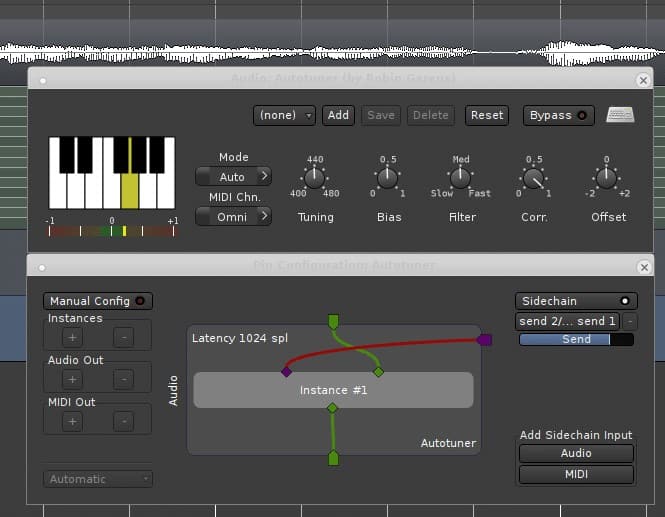
X42 Auto-Tune is intended to correct the pitch of a voice singing slightly out of tune.
It works by resampling and looping the signal and does not include formant correction, which means that it should be used to correct small errors only and not really to transpose a song or to correct big mistakes.
Even though it is a very simple pitch-correction plugin, it actually does a decent job at what it’s supposed to do.
It comes with a “Bias” knob that controls how long the original note lasts before it corrects it to either the ones you selected from the scale or the ones input through MIDI.
This allows it to go off-tune a little making the performance feel more realistic and natural.
Similar to the “Bias” control you also have the option to use the “Offset” feature that gives you the option to adjust how far from the note the singer is allowed to go before it gets corrected.
Both of these parameters are designed to keep the vocal recording sounding more human and natural.
User Interface:The interface is very easy to navigate, it can be controlled via MIDI, or you can input a fixed number of notes in any key and the plugin will correct to the notes on that key.
Distinctive Features:
- Bias Knob lets you tell the plugin how long it needs to wait before correcting a note.
- The Offset feature lets you adjust how far, or out of tune, the note can be before it gets corrected.
Pros:
- Features different modes as well as the Bias and Offset knobs which some of the other plugins don’t have.
Cons:
- Slightly cluttered and outdated interface.
If you’re looking for a very simple and easy-to-use pitch-correction tool that focuses mainly on subtle changes, then X42 Auto-Tune might be a great alternative for you.
You can download it here.
Honorable Mentions
Here I will include all the other pitch-correction plugins I could find which may only work on a specific DAW, Operating System, or have a very niche use-case.
Logic Pitch Correction – (Mac Only)

If you’re a Mac user, then you’re probably producing your music on Logic Pro, and guess what? It comes stock with a pitch correction plugin that actually works quite well, although it hasn’t been updated in quite some time now.
Just like most other pitch correction plugins, this one has a really simple workflow where you put the plugin first in the chain, and then you select a scale and the notes you want it to snap to. In addition to this, this plugin can show you the notes that are being hit by the performer and how out of tune they are, making it simple for you to detect what needs to be corrected.
Even though it’s outdated and lacks some of the features we take for granted on other pitch correction plugins, this one doesn’t use a lot of CPU resources, making it ideal for anyone who runs a low-end machine or who needs to load multiple instances of the plugin.
Note: As I mentioned, you need to get Logic Pro to use this plugin.
KeroVee – (Windows)

KeroVee was created back in 2010 by the Japanese company “g200kg”.
The whole point behind this software was to create a precise vocal pitch adjustment plugin without focusing too much on the other effects that can be achieved; like a robotic sound.
This is why KeroVee is an excellent alternative for anyone who just wants to apply some subtle and precise adjustments to their vocal tracks.
Similar to Gsnap and Graillon2, you have the option to route the MIDI notes to KeroVee.
This will allow the plugin to use these notes as a guide to properly snap the notes from the singer’s performance to where they should be.
Using MIDI to guide the plugin is great, however, this might take some time to set up, and this is why KeroVee also allows you to select the notes you want it to correct to-, or not, through a simple clickable interface;
Enable the ones you want it to snap to or disable the ones you don’t want it to snap to, and that’s it!
KeroVee shares a lot of parameters with most other autotune plugins, however, there is one that’s unique to it which is the “nuance” control;
The “nuance” knob lets you select whether or not to keep the vibrato of the original sound, making the vocals sound more natural while still being autotuned.
Note: If set to max, even the smallest vibrato will trigger the correction, resulting in a mechanical sound.
There are loads of other typical controls and features available with this plugin like Tunespeed, formant shifting, panning, volume, etc.
As I mentioned earlier, KeroVee is excellent for fine-tuning the vocal track and doesn’t really emphasize too much on achieving robotic sounds.
You can download it here.
Related: Here’s a post with the best GuitarVST Plugins currently available.
Auto-Tune Evo – (Windows)
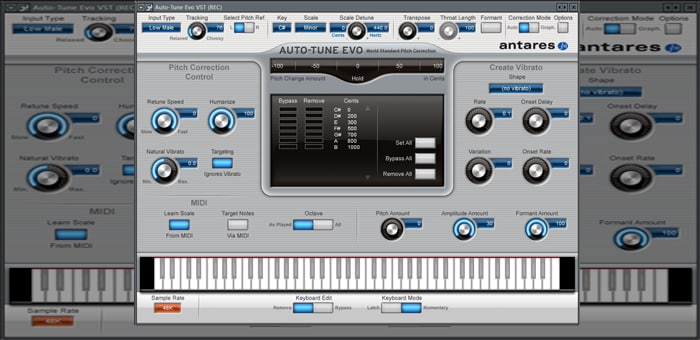
Auto-Tune Evo by Antares Audio Technology has been released in February of 2018 and has been rising in popularity ever since then.
It’s got a great set of features such as pitch correction in real time, for live performances, vibrato controls and Humanize.
Auto-Tune Evo was created, like most auto tune plugins, with vocals in mind; However, it can also be used with most monophonic instruments as well; e.g. bass.
It has two basic modes; Automatic and Graphical.
With the Automatic Mode, you give Auto-Tune some basic information about the track and that’s it, it will do the rest or its own.
With the Graphical Mode, you can go through the entire track manually and tell Auto-Tune exactly where it needs to apply some correction and how much.
While using the Graphical Mode might be a lot more work and definitely not for everyone, in my experience I’ve found that you get a much more transparent and realistic sound, and the common artifacts associated with tuning tend to be less noticeable.
Automatic Mode is excellent if you’re going for that T-Pain style of sound, or if you just want to quickly adjust a track.
It really comes down to what sound you’re going for and how much time and energy you’re willing to invest into it.
Regardless of what mode you’re going to be using, the first thing you’ll need to do is set up the “Input Type”, like Soprano, Alto/Tenor, Low Male, Instrument, and Bass Instrument.
Another feature is the Key and scale selection where you can tell Auto-Tune the precise key of the song.
Lastly, the Formants control will keep as much of the original characteristics of the vocals if switched on.
If you want a versatile and good-sounding plugin that is good for both beginners and advanced producers, then definitely give it a try.
You can download it here.
Looking for free Drum VST plugins? Here are the best ones.
AutoTalent – (Linux)

If you’re a Linux user, then this one’s definitely for you!
Autotalent is an open-source and real-time pitch correction plugin that allows users to specify the notes that the singer should be hitting, and then AutoTalent will do the rest.
Not only can it correct the pitch but it can also be used to create effects like those T-Pain effects.
Now, don’t be fooled by the simple- and stripped-down look of the interface, since it’s actually a very capable plugin, and you can use it for some light pitch correction or to achieve a full robotic auto-tune.
It includes all of the typical parameters that other auto-tune plugins have, such as; Formant shifting, selecting a scale or notes for the plugin to use or to exclude, and more.
However, it provides one feature that most auto-tune plugins don’t; The Vibrato section.
This section can help you add some vibrato to the vocals to give it a more natural sound, and of course you can go overboard and use it as an effect.
All in all, Autotalent is an extremely useful and fully-featured auto-tune plugin, plus it’s for Linux users who don’t have that many alternatives when it comes to plugins and music production software.
You can download it here.
BeatLab Autotuna (Ableton Only)
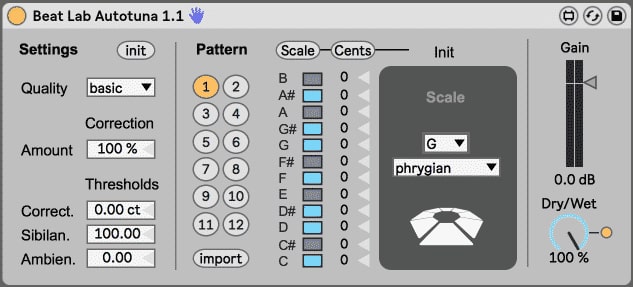
BeatLab Autotuna is only compatible with Ableton, which is a shame since it’s a great vocal processing tool, and it’s also the reason why I put it last on this list.
The original Autotuna was a lot harder to use since it made you select the notes that you wanted it to snap to as well as de-select the ones that you didn’t want it to snap to, or you were able to import a scale.
With the BeatLab version of Autotuna you can select different already built-in scales and patterns, how much or how hard it should be correcting the sound, and more.
Other features include a dry/wet control, amount control & correction settings.
The only drawback to Autotuna, aside from only working on Ableton, is that it’s a fairly basic pitch correction tool that won’t let you do too much in-depth tweaking. If you require something more powerful, then Graillon2 would be a much better alternative.
BeatLab’s autotune comes as part of a free Max4Live pack, which features pitch & time machines that comes with a range of other plugins that you can use creatively for sound design.
You can download Autotuna here.
Soundtrap (Online DAW; Browser only)

Sountrap is a free to use platform that works just like any regular DAW with a couple minor limitations, but this is to be expected since it’s browser-based.
Soundtrap offers plenty recording and mixing features and of course, Auto-Tune is one of them (a very limited version).
You can choose how Heavy or Light the effect should be (Heavy sounds more robotic), and then you can select the notes Auto-Tune should snap to by clicking on them. Otherwise, all the major and minor scales can also be selected.
I have to say that the lighter settings do work quite well, but when I tried the “Heavy” one on my vocals, even though it sounded robotic and pretty usable, there were some annoying artifacts present.
How to use Sountrap’s Auto-Tune:
- Hover your mouse over the track you want to tune.
- Click on Edit and select Auto-Tune.
- Choose all the parameters and click on save.
After this, it will process the track which will take a couple seconds and you will be able to hear how the effect sounds. If you don’t like it then click on cancel to further adjust it, and if you like it simply click on “Use it”.
Top Choice
Out of all the plugins on this list, I think that the MAutoPitch takes the win by a mile since its feature-set extends far beyond what any other free pitch-correction plugin has to offer, plus you also get access to 36 additional free plugins which are all fantastic!
Budget yet premium Alternatives
While the plugins I will list now aren’t free, they also won’t cost you an arm and a leg.
If you have some money to spend and want a higher quality pitch-correction tool, then these are my recommendations:
-
: The more affordable and stripped-down version of the famous Antares Auto-Tune. : This is the most basic version of Melodyne, but it should be enough for most people. : While more advanced, it’s definitely one of the best alternatives.
Learn how to use AutoTune properly
Even though there’s nothing wrong with learning how to use this kind of software all on your own, learning from someone can be quite useful as well.
Here’s a course about vocal music production where they also teach you how to use Autotune, Vocoders, etc.
Conclusion
Quality software doesn’t necessarily need to come at a premium price…
All of the plugins on this list are more than capable of delivering excellent pitch-correction while still offering other features, and all of this is completely for free…
Since they are free, I’d recommend you try them all out and choose the one that suits your needs the most.
I hope this information was useful!
Have a great day!
Frequently Asked Questions
Is autotune Evo free?
The Auto-Tune Evo VST demo is available to all software users as a free download with potential restrictions compared with the full version.
Can autotune be used live?
Yes, with the progression of vocal technology, companies like TC Helicon, ART and Boss have developed several Live Autotune & Pitch Correction Vocal Processors that work essentially like foot-pedals used on stage to turn on/off autotune.
Does Auto Tune change your voice?
Autotune corrects the pitch of your voice, essentially making you sound better and on key.