IddSampleDriver Save
AS IS — NO IMPLICIT OR EXPLICIT warranty This may break your computer, it didn’t break mine. It runs in User Mode which means it’s less likely to cause system instability like the Blue Screen of Death. Check out the latest release to download, or find other versions below:
If you want me to build on this donate eth or similar here: 0xB01b6328F8Be53c852a54432bbEe630cE0Bd559a I now have a NEAR address: moopaloo.near
Indirect Display Driver Sample
This is a sample driver that shows how to create a Windows Indirect Display Driver using the IddCx class extension driver.
Background reading
Customizing the sample
The sample driver code is very simplistic and does nothing more than enumerate a single monitor when its device enters the D0/started power state. Throughout the code, there are TODO blocks with important information on implementing functionality in a production driver.
Code structure
- Direct3DDevice class
- Contains logic for enumerating the correct render GPU from DXGI and creating a D3D device.
- Manages the lifetime of a DXGI factory and a D3D device created for the render GPU the system is using to render frames for your indirect display device’s swap-chain.
- Processes frames for a swap-chain assigned to the monitor object on a dedicated thread.
- The sample code does nothing with the frames, but demonstrates a correct processing loop with error handling and notifying the OS of frame completion.
- Processes device callbacks from IddCx.
- Manages the creation and arrival of the sample monitor.
- Handles swap-chain arrival and departure by creating a Direct3DDevice and handing it off to a SwapChainProcessor .
First steps
Consider the capabilities of your device. If the device supports multiple monitors being hotplugged and removed at runtime, you may want to abstract the monitors further from the IndirectDeviceContext class.
The INF file included in the sample needs updating for production use. One field, DeviceGroupId , controls how the UMDF driver gets pooled with other UMDF drivers in the same process. Since indirect display drivers tend to be more complicated than other driver classes, it’s highly recommended that you pick a unique string for this field which will cause instances of your device driver to pool in a dedicated process. This will improve system reliability in case your driver encounters a problem since other drivers will not be affected.
Ensure the device information reported to IddCxAdapterInitAsync is accurate. This information determines how the device is reported to the OS and what static features (like support for gamma tables) the device will have available. If some information cannot be known immediately in the EvtDeviceD0Entry callback, IddCx allows the driver to call IddCxAdapterInitAsync at any point after D0 entry, before D0 exit.
Careful attention should be paid to the frame processing loop. This will directly impact the performance of the user’s system, so making use of the Multimedia Class Scheduler Service and DXGI’s support for GPU prioritization should be considered. Any significant work should be performed outside the main processing loop, such as by queuing work in a thread pool. See SwapChainProcessor::RunCore for more information.
How to realize multi-screen operation in cloud computer streaming–Virtual display development based on Indirect Display Driver
Virtual display development based on Indirect Display Driver
Earlier we discussed the WDDM HOOK-based virtual display development technology under the Win7 system; after Windows 10 version 1067, Windows supports the graphics card filtering framework, and the development of virtual displays can be easily completed through the Indirect Display Driver (IDD).
You can read the article about the realization of the virtual display under Win7: https://blog.csdn.net/tianxilink/article/details/131924769?spm=1001.2014.3001.5501
A virtual display adapter can be generated through the Indirect Display Driver. For this adapter, we simulate the insertion of a display device to realize the function of a virtual display.
In this article, we analyze the technical principle of Indirect Display Driver and the development process of virtual display.
1. Technical overview
IDD is a WDF-based user-level driver, the basic architecture is as follows:

Several drivers are relied on here, and the basic principles are introduced respectively:
- IndirectKMD.sys is a Display Only driver and is the core driver of the virtual adapter.
- IddCx.dll is a dynamic library provided by the user layer interface, which mainly sends the IddCx related functions of the user layer to the driver for core processing through requests.
- The third-part is the user implemented IDD driver.
Several core IddCx objects need to be mastered before IDD-driven development:
- IDDCX_ADAPTER represents the logical display adapter object.
- IDDCX_MONITOR represents the object of the connected monitor.
- IDDCX_SWAPCHAIN represents the swap chain of the desktop image.
2. IDD driver development
Let’s take a look at the framework of IDD driver development. This is a user-level driver. In the user-level DriverEntry , we only need to register a callback function.
Here we set the callback function IddSampleDeviceAdd when the device is loaded. It will be called when the driver is loaded and the device object is created. In this callback function, we can initialize the IDD driver through IddCx.
From the above code, it can be found that the IDD driver mainly needs to set the relevant callback function through IDD_CX_CLIENT_CONFIG ; the Windows framework has already done everything for us.
In these callback functions, the following functions are generally implemented:
- IddSampleDeviceD0Entry indicates that the device enters the working power state, here we will create the IDDCX_ADAPTER adapter object.
- IddSampleAdapterInitFinished Since the adapter creation function IddCxAdapterInitAsync is an asynchronous process, this function represents the function that the adapter initialization is completed.
- IddSampleParseMonitorDescription , IddSampleMonitorGetDefaultModes and IddSampleMonitorQueryModes are the processing of the following mode sets in different scenarios respectively.
- IddSampleMonitorAssignSwapChain is the callback function for creating the desktop image swap chain.
By implementing the above callback function, we can realize a virtual display adapter; but how to create a virtual display?
We implement the return function of IddSampleIoDeviceControl to receive user input command information, for example, we can realize two functions of plugging and unplugging.
For the insertion of the display, the code flow can be roughly implemented as follows:
Here we can see that the monitor object is created by IddCxMonitorCreate , and then reported to the system by IddCxMonitorArrival that the monitor has been inserted.
At this point we have completed the development of the virtual display.
3. Install
For a hardware or virtual driver, it must work at the kernel layer, so how does an IDD driver that works at the user layer work?
The basic operation of IDD here requires the help of WUDFRd.sys, that is to say, the WUDFRd.sys driver implements all the framework functions of a PNP driver, and sends related IRP requests to the user layer for processing through encapsulation.
We can see that in the INF file, the specified driver file is still WUDFRd.sys, for example:
Of course, for WDF user layer drivers, relevant information still needs to be added:
4. Realize the effect
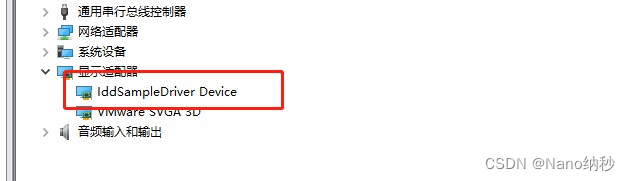
We can insert a virtual display in the virtual machine, so that we can realize the function of extending/copying the screen in the virtual machine, for example, as shown in the following figure:

Indirect display device 01 что это
Обсуждение HUAWEI MateBook D 16 (2021)
 HUAWEI MateBook D 16 R5 8ГБ + 512 ГБ
Описание | Обсуждение » | Покупка » | Аксессуары » | Прошивки » | Источник информацииОперационная система:
Windows 10 ДомашняяРазмер:
Ширина
369 мм
Толщина
234 мм
Высота
18,4 ммВес:
Около 1,74 кгПолезная площади экрана
90%Разрешение
1920×1080, 137 PPIМаксимальная яркость
300 нит (типичное значение)Цветовой охват
100% sRGB (типичное значение)Угол обзора
170 градусовЗащита зрения
Сертификат защиты от синего света TÜV Rheinland
Сертификат защиты от бликов TÜV RheinlandПроцессор:
AMD Ryzen™ 5 4600HВидеокарта:
AMD Radeon™ GraphicsПАМЯТЬ:
8/16 ГБ DDR4 3 200 МГцАККУМУЛЯТОР:
Литиево-полимерная батарея 56 Вт*ч (номинальная емкость)Навигация и беспроводные сети:
Wi-Fi
IEEE 802.11a/b/g/n/ac/ax
2,4 ГГц и 5 ГГц
2 x 2 MIMO
Поддержка WPA / WPA2 / WPA3Bluetooth: ver 5.1
Клавиатура:
Полноразмерная клавиатура с подсветкой
Встроенный датчик Huawei ShareКамера:
Скрываемая HD-камера 720pАудио:
2 динамика, 2 микрофонаРЕКОМЕНДУЕМЫЕ ПРИЛОЖЕНИЯ:
Huawei Share*
HUAWEI PC Manager
Восстановление заводских настроек HUAWEI
Управление экраном (защита зрения)
Производительный режим*Huawei Share поддерживает функцию «Мультискрин» (проекция экрана между смартфоном Huawei и ноутбуком HUAWEI MateBook). Режим требует наличия определенных характеристик операционной системы, условий использования смартфона и других характеристик. Для получения более подробной информации по поводу приобретения связанных продуктов или использования данной функции обратитесь в службу поддержки клиентов Huawei.
Накопитель:
512 ГБ SSD NVMe PCIe
*Фактическая емкость после форматирования может быть меньше.ПОРТЫ:
USB-C x 2, поддержка зарядки 20 В/3,25 A, передачи данных (USB 3.2 Gen 1) и DisplayPort (макс. 4K, 120 Гц)
USB 3.2 Gen1 x 2
HDMI 2.0 (4 К, 60 Гц)
Разъем для наушников 3,5 мм и микрофона x 1Кнопка питания со встроенным сканером отпечатков пальцев
Комплектация:
HUAWEI MateBook D 16
Адаптер питания HUAWEI USB-C 65 Вт
Зарядный кабель USB-C Краткое руководство пользователя
Гарантийный талонSaved searches
Use saved searches to filter your results more quickly
You signed in with another tab or window. Reload to refresh your session. You signed out in another tab or window. Reload to refresh your session. You switched accounts on another tab or window. Reload to refresh your session.
Add virtual monitors to your windows 10 device! Works with Oculus software, obs, and any desktop sharing software
roshkins/IddSampleDriver
Name already in use
- Local
- Codespaces
Use Git or checkout with SVN using the web URL.
Work fast with our official CLI. Learn more about the CLI.
Sign In Required
Please sign in to use Codespaces.
Launching GitHub Desktop
If nothing happens, download GitHub Desktop and try again.
Launching GitHub Desktop
If nothing happens, download GitHub Desktop and try again.
Launching Xcode
If nothing happens, download Xcode and try again.
Launching Visual Studio Code
Your codespace will open once ready.
There was a problem preparing your codespace, please try again.
Latest commit
Git stats
Files
Failed to load latest commit information.
README.md
License MIT and CC0 or Public Domain (for changes I made, check with Microsoft for their license), whichever is least restrictive — Use it
AS IS — NO IMPLICIT OR EXPLICIT warranty This may break your computer, it didn’t break mine. It runs in User Mode which means it’s less likely to cause system instability like the Blue Screen of Death. Check out the latest release to download, or find other versions below:
If you want me to build on this donate eth or similar here: 0xB01b6328F8Be53c852a54432bbEe630cE0Bd559a I now have a NEAR address: moopaloo.near
Indirect Display Driver Sample
This is a sample driver that shows how to create a Windows Indirect Display Driver using the IddCx class extension driver.
Customizing the sample
The sample driver code is very simplistic and does nothing more than enumerate a single monitor when its device enters the D0/started power state. Throughout the code, there are TODO blocks with important information on implementing functionality in a production driver.
- Direct3DDevice class
- Contains logic for enumerating the correct render GPU from DXGI and creating a D3D device.
- Manages the lifetime of a DXGI factory and a D3D device created for the render GPU the system is using to render frames for your indirect display device’s swap-chain.
- Processes frames for a swap-chain assigned to the monitor object on a dedicated thread.
- The sample code does nothing with the frames, but demonstrates a correct processing loop with error handling and notifying the OS of frame completion.
- Processes device callbacks from IddCx.
- Manages the creation and arrival of the sample monitor.
- Handles swap-chain arrival and departure by creating a Direct3DDevice and handing it off to a SwapChainProcessor .
Consider the capabilities of your device. If the device supports multiple monitors being hotplugged and removed at runtime, you may want to abstract the monitors further from the IndirectDeviceContext class.
The INF file included in the sample needs updating for production use. One field, DeviceGroupId , controls how the UMDF driver gets pooled with other UMDF drivers in the same process. Since indirect display drivers tend to be more complicated than other driver classes, it’s highly recommended that you pick a unique string for this field which will cause instances of your device driver to pool in a dedicated process. This will improve system reliability in case your driver encounters a problem since other drivers will not be affected.
Ensure the device information reported to IddCxAdapterInitAsync is accurate. This information determines how the device is reported to the OS and what static features (like support for gamma tables) the device will have available. If some information cannot be known immediately in the EvtDeviceD0Entry callback, IddCx allows the driver to call IddCxAdapterInitAsync at any point after D0 entry, before D0 exit.
Careful attention should be paid to the frame processing loop. This will directly impact the performance of the user’s system, so making use of the Multimedia Class Scheduler Service and DXGI’s support for GPU prioritization should be considered. Any significant work should be performed outside the main processing loop, such as by queuing work in a thread pool. See SwapChainProcessor::RunCore for more information.
About
Add virtual monitors to your windows 10 device! Works with Oculus software, obs, and any desktop sharing software