20 Потрясающих Примеров Команды Nmap
Ниже вы найдете 20 базовых примеров использования команды Nmap.
Вы узнаете, как использовать Nmap из командной строки в Linux для поиска активных хостов в сети и сканирования открытых портов.
Вы увидите, как удаленно определить операционную систему с помощью отпечатков стека TCP/IP и как узнать версию программного обеспечения запущенного на удаленном сервере.
Я так-же покажу как с помощью Nmap осуществить скрытое сканирование, как определить фаервол и как подменить MAC адрес.
1. Сканирование Одного Хоста или IP Адреса
Сканировать Отдельный IP Адрес:
Сканировать сервер по Имени Хоста:
Увеличить Уровень Детализации результатов сканирования:
2. Сканирование Множества IP Адресов
Сканировать Множество IP Адресов:
Сканировать Подсеть:
Сканировать Диапазон IP Адресов (192.168.1.0 — 192.168.1.200):
3. Поиск Активных Компьютеров в Сети
Сканировать сеть в поиске Активных Хостов:
4. Сканирование Списка Хостов из Файла
Сканирование списка хостов/сетей из Файла:
5. Исключение IP/Хостов/Сетей из Сканирования
Исключить Цели из сканирования Nmap-ом:
Исключить Список хостов, взятых из файла:
Формат файла с исключенными хостами аналогичен приведенному выше.
6. Сканирование Определенных Портов
Сканировать Один Порт:
Сканировать Несколько Портов:
Сканировать Диапазон Портов:
Сканировать Все Порты:
Сканировать несколько самых Распространенных Портов:
7. Определение Поддерживаемых IP Протоколов
Определить какие IP Протоколы (TCP, UDP, ICMP, и т.д.) поддерживает сканируемый хост:
8. Сканирование TCP/UDP Портов
Сканировать все TCP Порты:
Сканировать определенные TCP Порты:
Сканировать все UDP Порты:
Сканировать определенные UDP Порты:
Объединение сканирования разных портов:
9. Быстрое Сканирование
Активировать Быстрый Режим сканирования:
* Сканирует меньшее кол-во портов, чем при обыкновенном сканировании.
10. Показывать Причину Состояния Порта
Показать Причину, по которой Nmap считает что порт находится в определенном состоянии:
11. Показывать Только Открытые Порты
Показать Только Открытые Порты (либо возможно открытые):
12. Определение ОС
Одна из наиболее известных функциональных возможностей Nmap — это удаленное определение ОС на основе анализа работы стека TCP/IP. Nmap посылает серию TCP и UDP пакетов на удаленный хост и изучает ответы.
После проведения множества тестов, Nmap сравнивает результаты со своей базой данных и, при нахождении соответствий, выводит информацию об ОС.
Включить Определение ОС:
13. Определение Версии Сервисов
Включить Определение Версии Сервисов:
* Определяет версии программ, запущенных на удаленном сервере.
14. Обнаружение Фаервола
Узнать, защищен ли компьютер какими-либо Пакетными Фильтрами или Фаерволом:
15. Подмена MAC Адреса
Подменить MAC Адреса:
Подменить MAC Адрес Случайным MAC-ом:
16. Сканирование Фаервола на Уязвимости
Эти три типа сканирования используют незаметную лазейку в TCP RFC, чтобы разделять порты на открытые и закрытые.
Когда сканируется система отвечающая требованиям RFC, любой пакет, не содержащий установленного бита SYN, RST или ACK, повлечет за собой отправку RST в ответ в случае, если порт закрыт, или не повлечет никакого ответа, если порт открыт.
Т.к. ни один из этих битов не установлен, то любая комбинация трех оставшихся (FIN, PSH и URG) будет являться правильной.
TCP Null сканирование:
* Не устанавливаются никакие биты (Флагов в TCP заголовоке 0).
TCP Fin сканирование:
* Устанавливается только TCP FIN бит.
TCP Xmas сканирование:
* Устанавливаются FIN, PSH и URG флаги (пакет светится как новогодняя елка).
17. Скрытое Сканирование
TCP SYN сканирование:
* Известное как сканированием с использованием полуоткрытых соединений, так как не отрывает полных TCP соединений.
18. Отключение Обнаружения Хостов (No Ping)
Не пинговать хосты перед сканированием:
19. Отключение Использования DNS
Никогда не производить обратное преобразование DNS имен для каждого обнаруженного активного IP адреса:
Проверка порта
PortScaner.ru Port Checker — это бесплатный онлайн инструмент, чтобы найти открытые порты в вашей системе или на удаленном сервере. Этот инструмент позволяет сканировать открытые порты, которые могут оказаться дырами в безопасности и послужить лазейкой для хакеров. Вы также можете проверить, работает ли перенаправление портов на вашем роутере или нет.
Что такое проверка открытых портов?
Этот инструмент полезен для проверки порта в маршрутизаторе открыт он или закрыть. Это онлайн инструмент безопасности проверки порта открыт или заблокирован в вашей системе брандмауэром.
Какие порты бывают?
Порты являются виртуальными путями, по которым информация передается от компьютера к компьютеру. Всего есть 65536 портов на выбор..
Порты 0 до 1023 — Самые известные номера портов. Наиболее популярные службы работающие на портах: база данных MS SQL (1433), почтовые услуги POP3 (110), IMAP (143), SMTP (25), веб-сервисы HTML (80).
Порты от 1024 до 49151 — зарезервированные порты; это означает, что они могут быть зарезервированные для конкретных протоколов программного обеспечения.
Порты 49152 по 65536 — динамические или частные порты; это означает, что они могут быть использованы кем угодно.
Что такое проброс портов? (Port Forwarding)
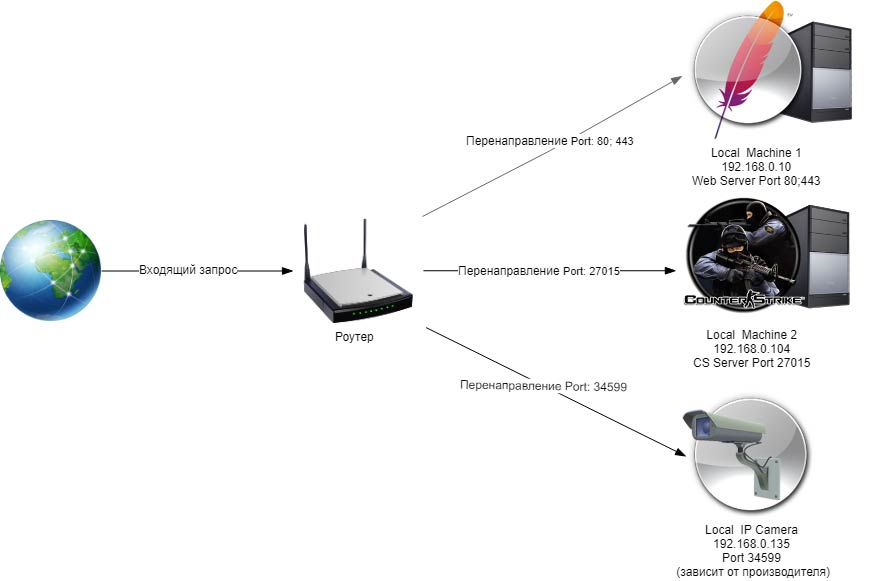
Переадресация портов (Port Forwarding) имеется специальная функция на маршрутизаторе которая позволяет передачу пакетов данных извне (из Интернета) к устройствам или компьютерам в вашей локальной сети (LAN). По умолчанию все порты на маршрутизаторе закрыты, чтобы предотвратить взлом компьютеров вашей локальной сети. Но когда вы используете службу для подключения через порт на маршрутизаторе вам нужно открыть его. Например: Yahoo! Messenger вам необходимо чтобы один из следующих портов был открытым: 5061, 443, 80.

Подробнее
10 инструментов сканера портов для расширенного сканирования сетевыми администраторами
Сканируйте тысячи портов за секунду! Давайте посмотрим, как сетевые администраторы могут это сделать.
Как узнать доступные порты на определенном IP-адресе или диапазоне IP-адресов в вашей сети?
Ну а если вы думаете о проверке вручную, то это займет много времени. Лучше использовать инструменты для более быстрого сканирования портов. Ранее я рассказывал о том, как сканировать порты на IP-адресах, обращенных к Интернету, и получил отзывы о средствах сканирования внутренней сети.
Существует несколько методов сканирования портов — TCP, FIN, ICMP, Idle, SYN, UDP, ACK, Windows и т. д. Не каждый сканер будет иметь их все, поэтому выберите то, что соответствует вашим требованиям.
Итак, вот вы идете.
Сканер TCP-портов
Как следует из названия — он способен сканировать только TCP-порты.
Сканер TCP-портов использует метод SYN и может сканировать до 10 000 портов в секунду. Работает только в Windows.
Nmap (Network Mapper) — один из любимых инструментов администратора. Вы можете установить на Windows, Linux, macOS или собрать из исходного кода. Вы знаете, что Nmap может сканировать порты?
Вот небольшой пример.
Для сканирования портов в быстром режиме вы можете использовать команду nmap -F $IPADDRESS
Для последовательного сканирования портов вы можете использовать синтаксис -r.
Для сканирования портов в диапазоне вы можете использовать синтаксис -p. Ниже приведен пример сканирования портов с 80 по 444.
Nmap — это мощный инструмент с открытым исходным кодом, и если вы заинтересованы в подробностях, вы можете проверить это. пройти курс этического взлома Nmap на Удеми.
Netcat
Netcat это многоцелевой инструмент сетевой отладки со встроенной функцией сканирования портов. Вы можете установить его на NetBSD, FreeBSD, Linux, macOS и т. д.
Администрация порта
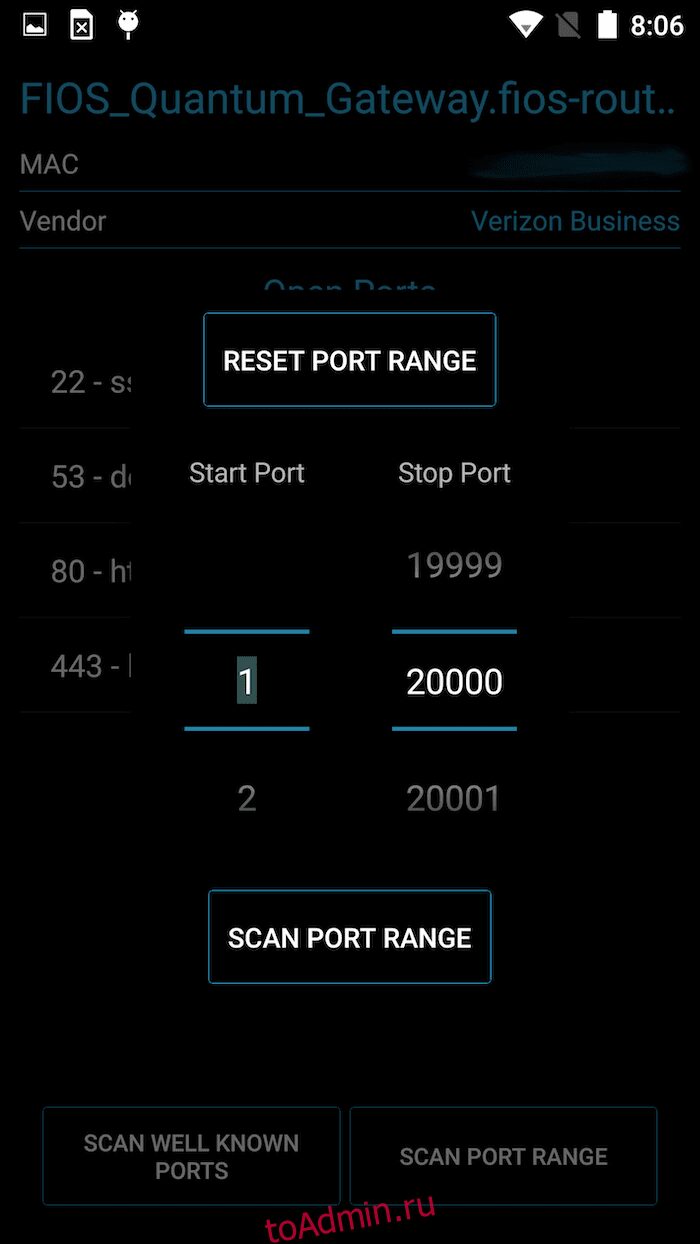
Всегда на мобильном? Пытаться Администрация порта – удобный инструмент для обнаружения сетевых устройств и сканирования IP-адресов.
Как вы можете видеть выше, у вас есть возможность сканировать известные порты и диапазоны портов. Это бесплатно и может быть полезно для следующих целей.
- обнаружение IP
- Снятие отпечатков SSH/HTTPS
- Поиск записей DNS
Расширенный сканер портов
Бесплатный сканер для проверки открытых портов службами, на которых он запущен. расширенный сканер портов является многопоточным сканером; следовательно, это быстро.
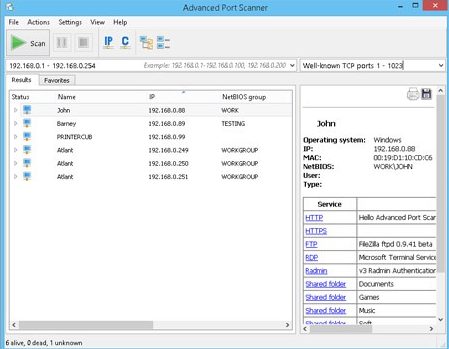
Вы также можете запустить команду удаленно через графический интерфейс.
Сетевой сканер от MiTeC
MiTeC — многоцелевой усовершенствованный инструмент сканера для сканирования IP, порта, AD, NetBIOS, ICMP, SNMP — доступно для загрузки для основных 32-разрядных или 64-разрядных ОС Windows.
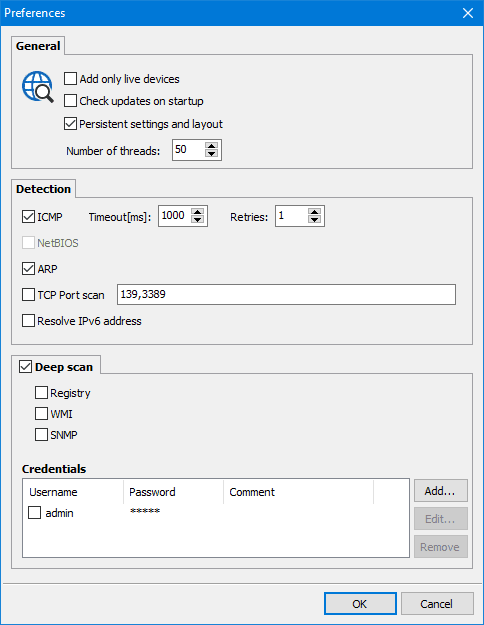
У вас есть возможность импортировать списки устройств и экспортировать данные результатов в формат CSV. Он способен сканировать TCP и UDP и имеет встроенную функцию проверки Whois.
PortQryUI
Популярный инструмент командной строки Microsoft Portqry доступен в удобном графическом интерфейсе. PortQryUI делает все то же, что и командная строка, и работает только в ОС Windows.
NetScanTools
NetScanTools это набор инструментов премиум-класса, который включает более 50 инструментов для DNS, Ping, SNMP, Discovery, Whois, ARP, Traceroute и т. д.
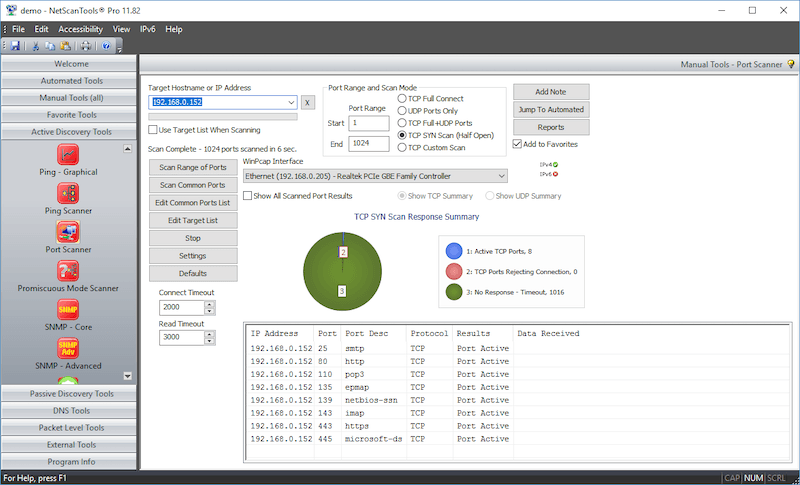
Он поддерживает следующие пять типов сканирования портов.
- Полное TCP-подключение
- TCP SYN полуоткрыт
- UDP ICMP
- TCP/UDP ICMP
- Другое – комбинация SYN, URG, PSH, FIN, ACK, RST.
Результаты сканирования отображаются в красивой отчетной диаграмме.
Злой IP-сканер
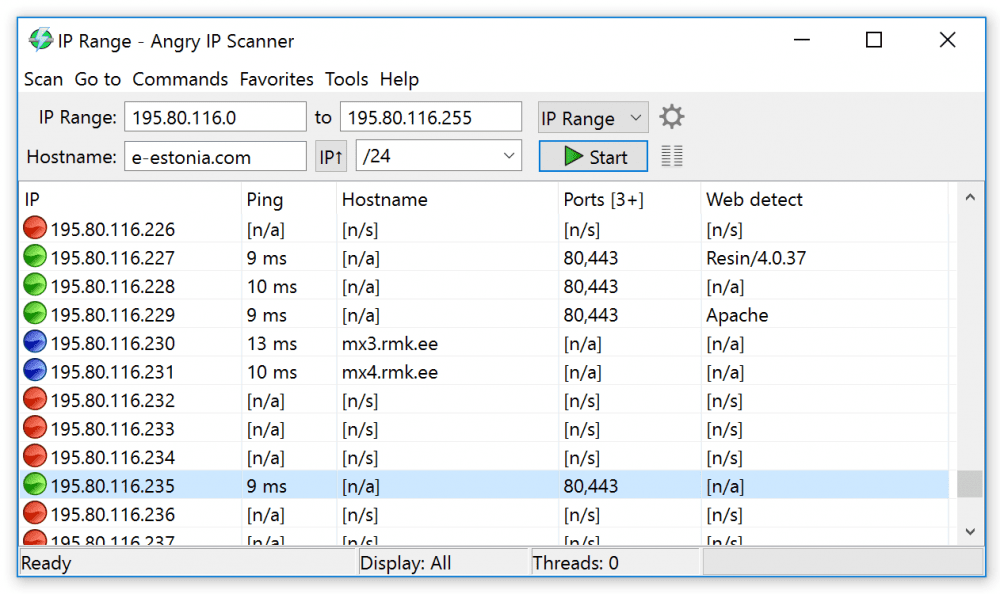
Злой IP-сканер — это инструмент сетевого сканирования с открытым исходным кодом, доступный для Linux, Windows и macOS X. Его можно использовать для сканирования IP-адресов и портов.
Кроме того, он может получать информацию NetBIOS, сканировать избранные IP-адреса, обнаруживать веб-серверы и т. д.
Результаты сканирования можно сохранить в формате CSV, TXT, XML или в виде списков IP-портов.
МАССКАН
Это сканер портов TCP, который работает аналогично Nmap. MASSCAN может похвастаться тем, что сканирует весь интернет за 5 минут.
Хотя он преимущественно создан для Linux, он также может работать на Windows, Mac, FreeBSD и т. д.
Проверьте их репозиторий GitHub Чтобы получить больше информации.
Вывод
Я надеюсь, что перечисленные выше инструменты помогут вам сканировать порты во внутренней сети или общедоступном IP-адресе. Большинство из них БЕСПЛАТНЫ, поэтому попробуйте, чтобы увидеть, что лучше всего подходит для вас.
TCP Port Scan with Nmap
Find open ports and running services (incl. versions), and do OS fingerprinting in a single TCP port check. Inspect Top 100 TCP ports for free or get a paid plan to automate and schedule extensive custom scans for even more ports.
Each Nmap port scan against a target IP address or hostname automatically maps the attack surface and gives accurate data for your reconnaissance work. Sign up for a paid account to perform full port scanning with additional options.
Run a TCP Port Scan online for FREE
Enjoy free light scans every day for most tools on our platform!
Map a company’s network perimeter, check firewall rules, and determine if its services are reachable from the Internet in a single scan. Based on Nmap Online, the tool does accurate port discovery and service detection. A Light Scan checks for the Top 100 TCP ports and also reports the running services’ versions (-sV is enabled in scan configuration).
Try full scans in our Playground
TCP Port Scanner with Nmap
About this TCP Port Scan with Nmap
Our open port checker provides an easy and fast way to run an online Nmap scan with zero setup and maintenance. Compared to using Nmap on your local machine, it’s much more effective to check all open ports from our cloud platform because the TCP Scanner on Pentest-Tools.com gives you the external perspective of your target that any attacker has.
The Full version of this TCP Port Scanner with Nmap lets you scan open ports with custom settings right away. Our pre-configured open port scanner comes with an easy-to-use interface over Nmap’s complex command line parameters. From your online account, you can:
- Indicate custom TCP ports to scan (1-65535)
- Enable and disable service detection, operating system detection, and host discovery
- Do Traceroute
- Do port scans directly against services inside networks with the VPN agent.
For even more effective port scanning, our tool supports scheduled and parallel scans (with notifications), automated Nmap scans with scan templates and pentest robots, and automatic attack surface mapping.
Each port check produces a professional report you can share with clients, managers, and other decision-makers. We also keep our port scan tool up to date through constant improvements in functionality, performance, and integration with the other platform tools and features.
Want to see the full specifications?
The Light Scan only checks for the most common Top 100 TCP ports and service detection (-sV) is enabled in this online port scan configuration. Each free scan retrieves not just available ports, but also their running services – including HTTPS, HTTP, FTP, SSH, SMB, RDP, SMTP, Telnet, IMAP, and POP3 – and their version. Try a free port scan now to see a sample report.
Sample TCP Port Scan with Nmap report
Here is a sample report from our TCP Port Scan with Nmap that gives you a taste of how our tools save you time and reduce repetitive manual work.
Accurate port scanning results
The “check if the host is alive” option ensures the IP addresses and hostnames included in the report are active. This way, you can trust that every IP scan online returns reliable data for your penetration test or vulnerability assessment.
Information at a glance
The portscan report turns the raw output of our TCP scanner into preformatted tables which anyone can quickly go through. We make it easy to find open ports on IP addresses and hostnames in every port finder report, no matter how many it includes.
Indispensable reports – without the noise
Get laser-focused notifications for the scan results which matters the most for your work (e.g. specific open ports and protocols detected). Paid plans give you access to port search reports you can export in PDF, JSON, and HTML.
Automated report delivery for scheduled (re)scans
Keep your attack surface up to date with scheduled scans that run periodically. Get scan reports delivered straight to your inbox to share them with your team, clients, and managers – no manual work involved.

Better vulnerability discovery. Faster pentest reporting.
Get instant access to custom vulnerability scanners and automation features that simplify the pentesting process and produce valuable results. The platform helps you cover all the stages of an engagement, from information gathering to website scanning, network scanning, exploitation and reporting.
How security pros use the TCP Port Scan with Nmap
Set yourself up for success during the reconnaissance stage. Use a reliable port checker to discover network services exposed to the Internet. Do an online Nmap scan to automatically map all the open TCP ports and services in your target’s attack surface.
Network Penetration Testing
Scan IP addresses and hostnames in one click to get an aggregated view of all their open ports. Since our cloud platform has direct Internet connection, you get accurate findings fast from our portscanner that’s optimized for best performance and quality results.
Continuous Attack Surface Monitoring
Schedule periodic port scans to continuously monitor your target’s attack surface and proactively close exploitable security holes. Audit all network entry points available on a target system with auto-delivered reports and drill-down options with dedicated pentest tools.
Firewall Rules Check-up
Check if your firewall is correctly configured and if servers have unnecessary open TCP ports. By also looking at service versions, this open port finder indicates which server software is outdated and needs upgrading.
Asset Inventory
Detect live hosts and TCP services exposed to the Internet to map the network perimeter of your target much faster. Our TCP port checker tells you which machines are outdated and risk being exploited by attackers looking to gain access to the internal network.
Optimized Workflow with Targeted Notifications
Get notifications via webhooks, email, or Slack only when the scanner finds open ports beyond your default list. Reduce noise every time you do a port scan online and quickly respond to vulnerabilities that abuse services that require open ports (e.g. SMBleed and SMBGhost).
Sensitive Data Exposure Mitigation
With our IP port finder you can deliver actionable data to help clients and colleagues reduce the risk of sensitive data exposure through data breaches. Regularly check for open ports and close unused ones to avoid exposing data-rich network services such as FTP, SMB, RDP, and more.
Try a free scan now!
Great compliment to my toolbox! Easy to use.
Excellent with reconnaissance info, external scans.
The scans run quickly and the dashboard is easy to use. I like the attack surface feature. Organizing your scans and data is very simple to follow.

TCP Port Scan with Nmap
Technical details
What is a port scanner?
A port scanner is a software application designed to check open ports on a server’s IP address or hostname by sending probe packets to TCP or UDP ports and checking the responses. Find specific details about each port scanning method below.
Security and IT specialists use an open port scanner tool to check how security policies are implemented and make accurate recommendations to reduce risk.
Malicious hackers also rely on public port scanners to discover exposed and outdated network services they can exploit to gain unauthorized access to a target. This is why offensive security pros need reliable port scanning tools to keep ahead of remote attackers and proactively reduce risk.
Why use an online port scanner at all?
The main benefit of using an online version of the Nmap port scanner (vs using it on your local machine) is that it gives you an external view of your systems as any malicious hacker from the Internet has. If you do the same scan from your internal network you may obtain different results because of various firewalls and network restrictions. Furthermore, our port scanner is:
- Already configured and ready to run
- Periodically upgraded
- Has an easy-to-use interface over the complex command line parameters of Nmap
- Gives you a useful report that you can share with management or stakeholders
The scanner allows you to easily map the network perimeter of a company, check firewall rules and verify if your services are reachable from the Internet. Based on Nmap Online, it performs accurate port discovery and service detection.
What makes our TCP Scanner with Nmap different
Nmap is the de-facto tool for finding open ports and services due to how effective it is. However, it takes a lot of manual work to use the Nmap at peak potential from the command line. That’s because it has lots of parameters and options that need to be well understood from the documentation.
That’s why we built an online port scanner on top of Nmap that comes pre-configured and always up to date. We handle performance and speed improvements so you can focus on using the results you get from our TCP open ports scanner.
Because it’s integrated into the Pentest-Tools.com cloud platform, this online port checker gives you rich options to continue your engagement. Reliable and easy to use network vulnerability scanners, web vulnerability scanners, offensive security tools, and automation features (e.g. attack surface mapping) are one click away and provide support for your entire penetration testing workflow.

The Light Scan version – free port scanner optimized for speed
Need an IP scanner online that doesn’t cost anything to use? You can scan ports for free twice a day for a single IP or hostname.
This open port scan we provide on the house checks for the Top 100 TCP ports and also reports the running services’ versions (-sV is enabled in scan configuration).
Top 100 TCP ports
7, 9, 13, 21-23, 25, 26, 37, 53, 79-81, 88, 106, 110, 111, 113, 119, 135, 139, 143, 144, 179, 199, 389, 427, 443-445, 465, 513-515, 543, 544, 548, 554, 587, 631, 646, 873, 990, 993, 995, 1025-1029, 1110, 1433, 1720, 1723, 1755, 1900, 2000, 2001, 2049, 2121, 2717, 3000, 3128, 3306, 3389, 3986, 4444, 4899, 5000, 5009, 5051, 5060, 5101, 5190, 5357, 5432, 5631, 5666, 5800, 5900, 5985, 5986, 6000, 6001, 6646, 7070, 8000, 8008, 8009, 8080, 8081, 8443, 8888, 9100, 9999, 10000, 32768, 49152-49157
As you can see in the list above, this free Nmap scan online covers the most common TCP ports:
- 21 — FTP (File Transfer Protocol)
- 22 — SSH (Secure Shell)
- 23 — Telnet
- 25 — SMTP (Mail)
- 80 — HTTP (Web)
- 110 — POP3 (Mail)
- 143 — IMAP (Mail)
- 443 — HTTPS (Secure Web)
- 445 — SMB (Microsoft File Sharing)
- 3389 — RDP (Remote Desktop Protocol).
The Full Scan version – ready-to-use Nmap online scanner
The Full version of our TCP Port Scanner online allows you to probe for open ports with custom parameters that you can easily customize from your cloud account.
Ports to scan options:
- common TCP ports (top 10, top 100, top 1000, top 5000)
- port range (1-65535)
- custom port list (22, 80, 443, 5060) for focused online portscans.
Scan for open ports options:
- enable or disable service version detection
- enable or disable operating system detection
- do traceroute
- enable or disable check if host is alive before scanning.
The TCP Port Scanner in our cloud platform gives you two options: either approach your target as an external attacker would or do port scans directly against your services, as if the firewall has already been bypassed. The resulting Nmap scan report gives you the chance to identify and fix the root causes of security risks your target presents.
To get both perspectives and form a comprehensive view of all that target’s open ports, use separate workspaces – one without and one with our ready-to-use VPN agent. Alternatively, whitelist Pentest-Tools.com to gain full visibility into your target.
Let’s unpack how our ready-to-use online Nmap scanner works in three stages to achieve its goal:
1. Nmap host discovery
The scanner attempts to check if the target host is live before probing for open ports. This is essential for optimizing the scan duration when running the online IP scanner against a large range of IP addresses. It would be a waste of time to probe for open ports on a 'dead' host (e.g. there is no server at a given IP).
However, host 'liveness' can’t always be correctly detected. Causes include firewalls which allow access only to a certain port and drop everything else. So you might not find any open ports because of this. In this situation, whitelist our scanners or disable the “Check if host is alive before scanning” option to skip the host discovery phase and jump directly to the check all ports step.
2. Open ports detection
To determine if a TCP port is open, Nmap takes advantage of the Three way handshake mechanism used by TCP to establish a connection between a client and a server.
There are two main methods for detecting open TCP ports:
Connect-Scan (Nmap -sT)
Nmap does a full three-way handshake with the target server, establishing a full TCP connection. The sequence of packets for this type of scan is: SYN, SYN-ACK, ACK, RST.
This method doesn’t require root/administrator access on the client machine, but it’s rather noisy and the server can log the connections attempted from other hosts.
SYN-Scan (Nmap -sS)
This is the default scanning method, also enabled in our online open port scanner. Nmap does a half-open TCP connection, knowing the port is open as soon as the server responds with SYN-ACK. The sequence of packets in this case is: SYN, SYN-ACK, RST.
This method is stealthier than a Connect-Scan but it requires Nmap to run with root/administrator privileges, because it needs to create low-level raw sockets to send the individual packets, instead of leaving the kernel stack to do the connection.
3. Nmap service detection
Once Nmap finds a list of ports, it can do a more in-depth check to determine the exact type of service running on that port, including its version. This is necessary because common services can run on non-standard ports (e.g. a web server running on port 32566). Service detection is enabled with the -sV parameter.
Nmap does service detection by sending a number of predefined probes for various protocols to the target port and see if it responds accordingly. For example, it sends:
- SSL Client Hello to check for SSL services;
- HTTP GET request to check for HTTP service;
- SIP OPTIONS to check for SIP/RTSP protocol, and many others.
Besides accurate and fast port detection, other options in our cloud platform boost this TCP Scanner’s capabilities:
- Automatic Attack Surface mapping that pulls data from multiple pentest tools and bulk scanning for continuous attack surface monitoring
- Real-time notifications through webhooks for uninterrupted workflows for ready-to-use scan engines
- Automation options such as pentest robots and scan templates for effective collaboration.
What to do after running the TCP Port Scanner with Nmap online
After you check website open ports or do an IP port scan, you can act on the findings right from the list of results. A handy drop-down gives you the option to further scan open ports with various tools such as our Website Scanner, Network Vulnerability Scanner, URL Fuzzer, and Website Recon (for either URLs or IPs).

The arsenal of reconnaissance tools on our cloud platform also includes dedicated scanners that help you Find Domains, Find Subdomains, Find Virtual Hosts, find juicy information with Google Hacking, and perform a thorough UDP Port Scan.
To save even more precious time, ready-to-use scan templates which group multiple tools in one bundle sit at your fingertips. Just like scan templates, pentest robots are also customizable or you can build your own and reuse them to fine-tune engagements and do your best work.
For instance, this Recon Robot discovers all subdomains of a target domain and does full port scanning and service discovery. For each web port, it does recon to gather technologies and take screenshots and delivers all the data aggregated in the unified Attack Surface view.
With your TCP port scan report, you can start digging deeper and pursue the most interesting findings in it while also getting inspiration for the next stages in your engagement, particularly around security issues related to business logic.
As a professional Pentester, I definitely recommend this
The way it handles the Fingerprinting, Reconnaissance and reporting, also since it is web based, it saves local resource and helps you to work further on the same target without wasting time.