Распаковка исполняемых файлов
Привет, хабровчане. В рамках курса «Reverse-Engineering. Basic» Александр Колесников (специалист по комплексной защите объектов информатизации) подготовил авторскую статью.
Также приглашаем всех желающих на открытый вебинар по теме «Эксплуатация уязвимостей в драйвере. Часть 1». Участники вебинара вместе с экспертом разберут уязвимости переполнения в драйверах и особенности разработки эксплойтов в режиме ядра.
Статья расскажет о подходах к анализу запакованных исполняемых файлов с помощью простых средств для обратной разработки. Будут рассмотрены некоторые пакеры, которые применяются для упаковки исполняемых файлов. Все примеры будут проведены в ОС Windows, однако изучаемые подходы можно легко портировать на любую ОС.
Инструментарий и настройка ОС
Для тестов будем использовать виртуальную машину под управлением ОС Windows. Инструментарий будет содержать следующие приложения:
установленный по умолчанию плагин x64dbg Scylla;
Самый быстрый и простой способ провести распаковку любого исполняемого файла — применить отладчик. Но так как мы будем также рассматривать язык программирования Python, то может понадобится проект:
uncompile6 проект, который позволяет разобрать байткод виртуальной машины Python;
pyinstallerExtractor инструмент для распаковки архива pyInstaller.
Общие методы снятия паковки
Разберемся, что же такое паковка. В большинстве случаев исполняемые файлы современных языков программирования имеют довольно большой размер при минимальном наборе функций. Чтобы оптимизировать данную величину, можно применить паковку или сжатие. Наиболее распространенный на сегодняшний день пакер — UPX. Ниже приведен пример того, как пакер проводит сжатие исполняемого файла.
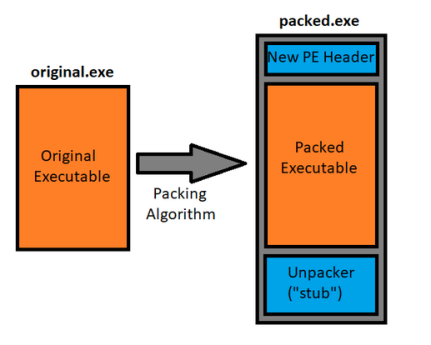
На картинке может показаться, что файл стал по размеру больше, однако это не всегда так. Большинство файлов за счет такой модификации могут уменьшить свой размер до 1.5 раз от исходного объема.
Что же от этого реверс-инженеру? Почему надо знать и уметь определять, что файл упакован? Приведу наглядный пример. Ниже приведен снимок файла, который не запакован:
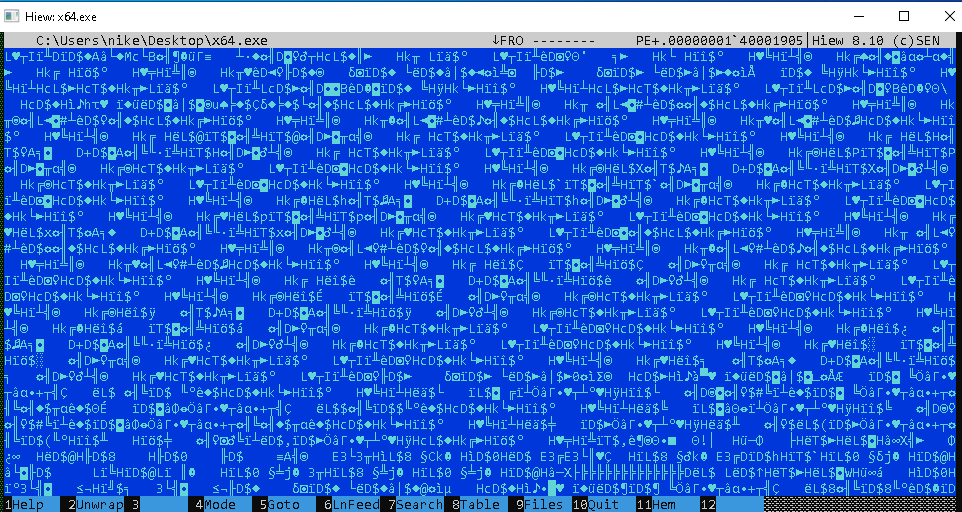
И файл, который был пропущен через алгоритм UPX:
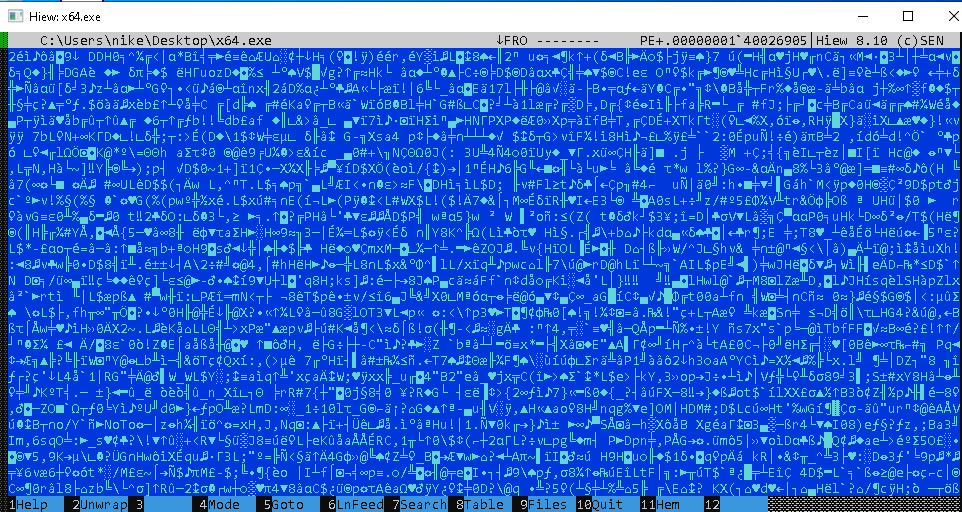
Изменения коснулись в этом случае двух основных точек исполняемого файла:
Точка входа — в случае с упакованным файлом это начало алгоритма распаковки, настоящий алгоритм программы будет работать только после того, как будет распакован оригинальный файл;
Код оригинального файла: теперь не найти паттернов, которые можно сразу разбирать как команды.
Итак, чтобы снова анализировать оригинальный файл, нужно найти настоящую или оригинальную точку входа. Для этого нужно разбить алгоритм на основные этапы:
Этап подготовки исполнения файла — загрузчик ОС настраивает окружение, загружает файл в оперативную память;
Сохранение контекста — упаковщик сохраняет контекст исполнения файла (набор значений регистров общего назначения, которые были установлены загрузчиком ОС);
Распаковка оригинального файла;
Передача управления оригинальному файлу.
Все описанные выше этапы можно легко отследить в отладчике. Особенно может выделяться процедура сохранения контекста. Для нее в разных архитектурах могут быть использованы команды pushad/popad или множественное использование команды push . Поэтому всегда приложение трассируют до первого изменения регистра ESP/RSP, и ставят «Hardware Breakpoint» на адрес, который был помещен в регистр в первый раз. Второе обращение этому адресу будет в момент восстановления контекста, который заполнил загрузчик ОС. Без него приложение завершится с ошибкой.
Пример UPX
Попробуем с помощью отладчика найти оригинальную точку входа для приложения. Запечатлим оригинальную точку входа до упаковки UPX:
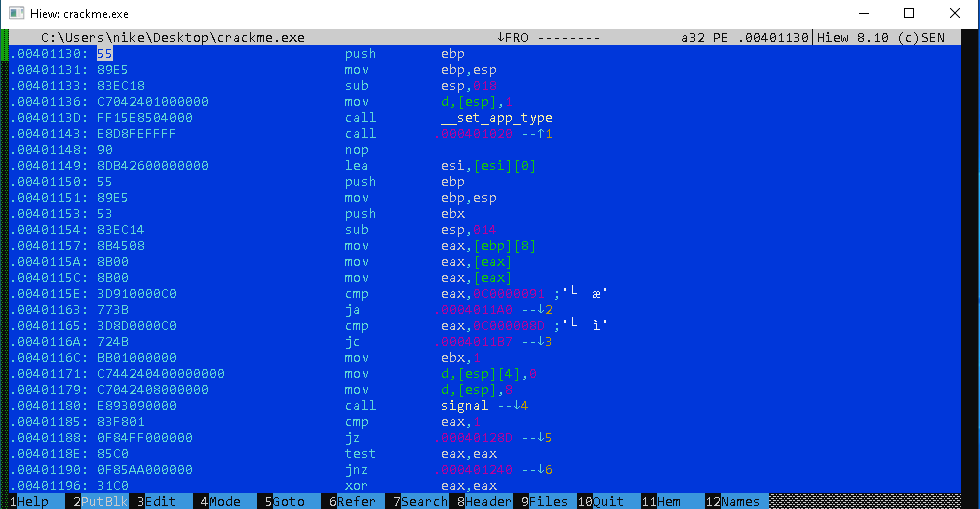
Как та же точка входа выглядит после упаковки:
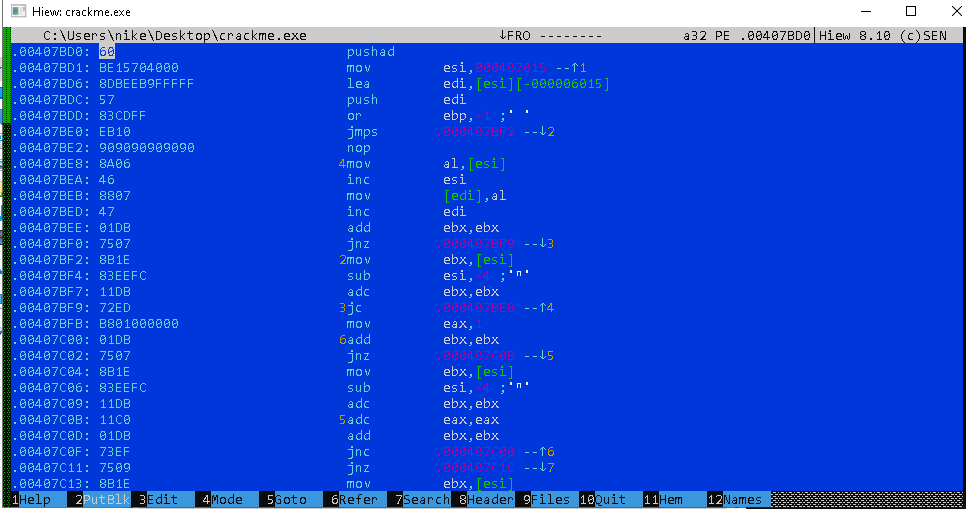
Запустим отладчик и попробуем найти место сохранения контекста:

Ждем первого использования ESP — в отладчике при этом значение регистра подсветится красным цветом. Затем устанавливаем точку останова на адрес и просто запускаем приложение:
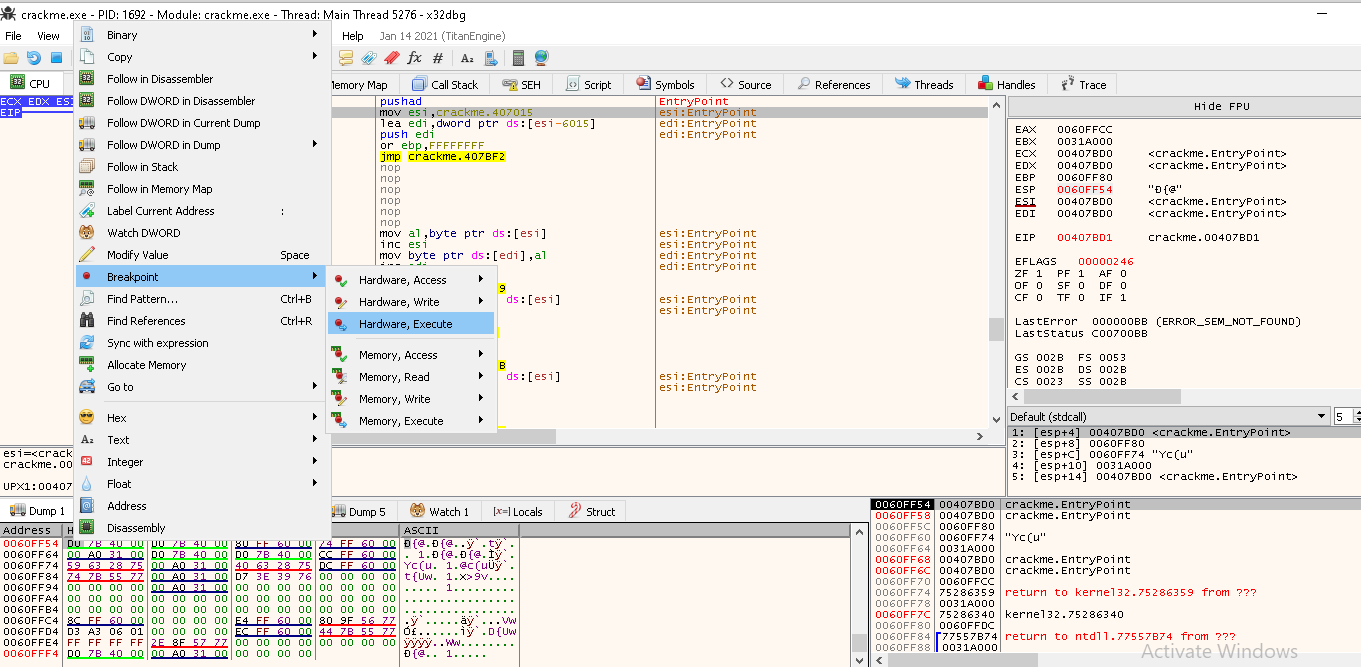
В результате попадаем на оригинальную точку входа:
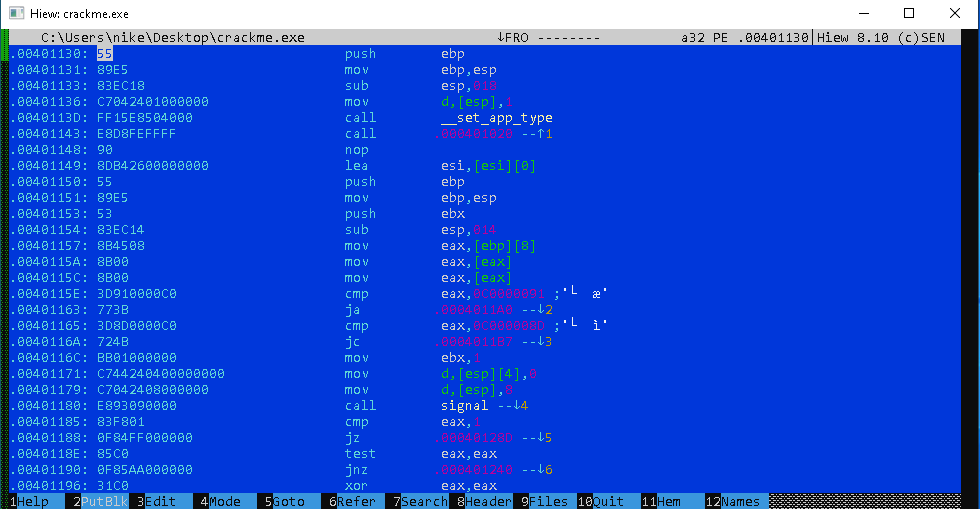
Вот так просто, теперь используя плагин Scylla Hide можно сохранить результирующий файл на жесткий диск и продолжить его анализ.
Подобный метод можно применять для любого упаковщика, который сохраняет контекст на стек.
Пример PyInstaller
Не всегда подобный подход работает для приложений, которые используют более сложную структуру исполняемого файла. Рассмотрим файл, который был создан с помощью PyInstaller — пакет, который позволяет преобразовать Python скрипт в исполняемый файл. При генерации исполняемого файла создается архив, который содержит виртуальную машину Python и все необходимые библиотеки. Сам исходный код приложения при этом преобразуется в байт код и его нельзя дезассемблировать.
Попробуем все же получить что-то читаемое. Создадим простое приложение на Python и упакуем с помощью PyInstaller. Исходный код приложения:
Установим пакет pyInstaller и создадим exe файл:
Итак, проведем сбор информации о том, что в итоге получилось. У нас есть архив, который должен запустить виртуальную машину, и код, который мы записали в виде скрипта. Попробуем восстановить исходник и просто его прочесть даже без запуска.
После выполнения команд выше, у вас должна создаться директория ./dist/test.exe . Откроем последовательно файл с помощью pyinstallerextractor и uncompile3 :

Наш скрипт находится в директории, которая создается в результате распаковки. Наименование файла должно соответствовать названию exe файла. В нашем случае это test.pyc . Откроем его в hiew :
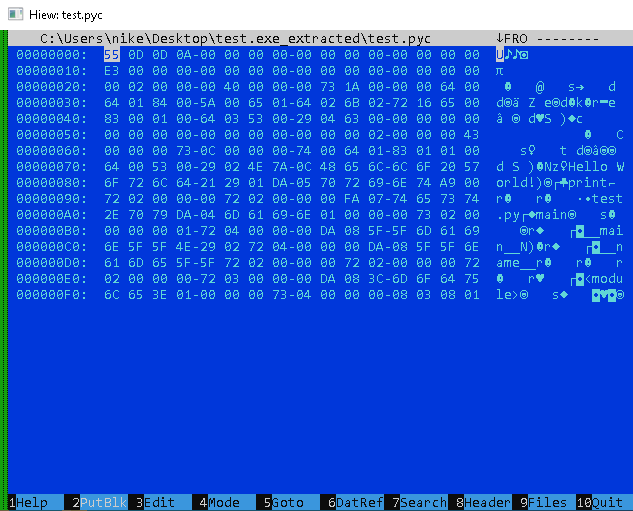
Декомпиляция стандартными средствами невозможна, так как инструменты просто не умеют работать с байткодом Python. Применим специализированный инструмент — uncompile6 .
Reverse Engineer a Windows .exe Application to get its source code and VS Project
In this tutorial, I am going to show you how to decompile or reverse engineer Windows executable file (.exe and .dll files) and get the source code back. This tutorial is going to be easy-peasy for a beginner to learn. If you’re a fast-learner, please feel free to skim the text.
For this tutorial, I am creating a dummy project which displays “Hello world” in Visual Studio to demonstrate how to get the source code back.
Here we go, here’s the project we are going to decompile.

Here are the code and the output. We are going to get the same code after decompilation.
 Project Code and Output
Let’s start decompiling the above project
Now that we created a sample project, let’s try to decompile the above project using Telerik’s JustDecompile.
In case you don’t have this software, please download and install it from here
Step – 1: Open JustDecompile
Open JustDecompile application. If you have installed this software now, probably you will get a shortcut created on your desktop. Otherwise, open it from the Start Menu
Step – 2: Locate the executable file you want to decompile
Open the file you want to decompile in JustDecompile or just drag and drop your files(.dll or .exe) on the interface.
I’m using the normal way. Just navigate to Open… -> File(s) or just press Ctrl + O on your keyboard and choose your file using File Explorer.
If you have created the project now. then you can find your executable file in the bin/Debug folder of your Project Directory. Here I have mine.
 Open JustDecompile
Step – 3: Reverse Engineer
Here we go to the actual part. The DECOMPILATION
When you open a file in JustDecompile, it will decompile the file and adds the file to the current workspace. You can browse through the left sidebar for the project files.
In my case, I got my source code back. Take a look in the picture below.

If you need to check the source code only, you might stop here. In case you need to create a Visual Studio project from the source code. Then follow the next step.
Step – 4: Creating a Visual Studio Project
So, now you have the source code. Here is what you have to do in order to create the Visual Studio Project from the decompiled source code.
Navigate to Tools -> Create Project. This will create Latest Visual Studio Project (Currently VS 2017).

If you want to create a Legacy project (for earlier Visual Studio Versions), then click on Create Legacy Project
Then create an empty directory and then open it. Then click on Save.
This will create a Visual Studio project in the given directory and you are good to go.

This is how you can reverse engineer and get your source files back. If you have any problems regarding this article, please feel free to drop a comment below. Thank you! ��
How to decompile an exe
If you are new to decompiling or want to increase your knowledge on the topic then we got you covered. In this article, we are going to learn about decompiling and how to do it. If you are not interested in learning about decomposing then you can skip to the how-to section.
What is an exe file?
An EXE file, also known as an “executable,” is a type of file that contains instructions for a computer to perform a specific task or run a program. In simpler terms, you need EXE files to run any program on a Windows computer. These files are often used to install or run software programs, but they can also open other file types or perform various actions.
You can find EXE files in the root directory of a program or application, and you can launch them by double-clicking on the file. They may also be stored in other locations, such as in the Program Files folder. Keep in mind that EXE files are specific to Windows and cannot be run on other operating systems like Mac or Linux. Some programs and applications may have versions available for other operating systems, which may use different file types (like DMG for Mac or DEB for Linux).
Be careful when downloading and running EXE files, as they may contain viruses or other malicious software. It’s best to only download and run EXE files from trusted sources and to use antivirus software to scan the files before opening them.

In summary, EXE files are an essential part of a computer’s functioning. They allow you to run and install a variety of programs and applications and perform a range of tasks and functions. They are a vital component of the Windows operating system.
Can I decompile an exe?
Yes, it is generally possible to decompile an EXE file, which refers to the process of converting the compiled code back into human-readable source code. Decompiling an EXE file can be useful for a variety of reasons, such as:
- Analyzing or modifying the code of a program.
- Recovering lost or corrupted source code.
NOTE: Decompiling an EXE file can be a complex and time-consuming process, and the resulting source code may not be perfect or easy to read. This is because the decompilation process involves reversing the compilation process, which can result in loss of information and changes to the original code.
There are several tools and techniques available for decompiling EXE files, and the specific method used may depend on the programming language and the features of the particular EXE file being decompiled. Some tools and techniques that may be used for decompiling EXE files include disassemblers, debuggers, and decompiler programs.
Tools you can use to decompile an exe
There are several tools that you can use to decompile an EXE file, which is the process of converting compiled code back into human-readable source code.
Type of tools you can use to decompile an exe:
Disassembler: It is a program that converts machine code (the low-level code that a computer executes) into assembly language (a more human-readable representation of the machine code). Disassemblers can be useful for analyzing the underlying code of an EXE file, but they do not produce fully decompiled source code.
Debugger: It is a program that allows you to execute code line by line, examining the values of variables and other data as the code is executed. Debuggers can be useful for analyzing the behavior of an EXE file, but they do not produce fully decompiled source code.
Decompiler programs: They are another type of tool that you can use to decompile an EXE file. A decompiler is a program that converts compiled code back into a high-level programming language, such as C++ or Java. Decompilers can produce more complete and readable source code than disassemblers or debuggers, but the quality of the decompiled code may vary depending on the complexity of the original code and the capabilities of the decompiler.
There are several decompiler programs available, and the specific program that you choose may depend on the programming language and features of the EXE file being decompiled, as well as your preferences and needs. Some popular decompiler programs include IDA Pro, Hex-Rays, and Ghidra.
Later in the article, we are going to see the top decompilers you should use to decompile an exe.
How to decompile an exe?
- Decompiling an EXE file refers to the process of converting compiled code back into human-readable source code.
- This can be useful for a variety of purposes, such as recovering lost or corrupted source code or analyzing or modifying the code of a program.
- Decompiling an EXE file can be a complex and time-consuming process.
- Decompiling an EXE file may be considered a form of reverse engineering, and in some cases, it may be illegal or violate the terms of use for a particular program or application.
- Choose a decompiler tool: There are several tools that you can use to decompile an EXE file, including disassemblers, debuggers, and decompiler programs. The specific tool that you choose may depend on the programming language and features of the EXE file being decompiled, as well as your preferences and needs. Some popular decompiler programs include IDA Pro, Hex-Rays, and Ghidra.
- Download and install the decompiler tool: Once you have chosen a decompiler tool, you will need to download and install it on your computer. Follow the instructions provided by the tool’s developer to install and set up the tool.
- Open the EXE file in the decompiler tool: Once you have installed the decompiler tool, you can open the EXE file that you want to decompile. Depending on the tool, you may need to select the file through a menu or by dragging and dropping it into the tool’s interface.
- Decompile the EXE file: Once you have opened the EXE file in the decompiler tool, you can begin the decompilation process. This may involve clicking a button or selecting a menu option to start the decompilation. The process may take some time, depending on the size and complexity of the EXE file.
- View and analyze the decompiled source code: Once the decompilation process is complete, you can view and analyze the resulting source code. The code may be presented in a text editor or other interface within the decompiler tool. You can use this source code to understand how the program or application works or to make modifications to the code.
- Save the decompiled source code: If you want to keep a copy of the decompiled source code, you can save it to your computer. Depending on the decompiler tool, you may be able to save the code in a variety of formats, such as a text file or a project file.
5 Best exe decompilers you should use
- IDA Pro: IDA Pro is a professional-grade decompiler tool that is widely used by software developers, reverse engineers, and security analysts. It supports a wide range of programming languages and file formats and offers a variety of features, such as debugging, disassembly, and code analysis. IDA Pro is available in a free version with limited features, as well as a paid version with more advanced features.
- Hex-Rays: Hex-Rays is another popular decompiler tool that is used by a wide range of professionals, including software developers, reverse engineers, and cybersecurity experts. It supports a variety of programming languages and platforms and offers features such as code analysis, debugging, and disassembly. Hex-Rays is available in a free trial version, as well as a paid version with more advanced features.
Click here to visit the Hex-Rays site or here to see all the versions.
- Ghidra: Ghidra is a free, open-source decompiler tool developed by the National Security Agency (NSA). It supports a wide range of programming languages and file formats and offers features such as code analysis, debugging, and disassembly. Ghidra is a powerful and versatile tool that is suitable for a wide range of decompilation tasks.
Click here to visit the Ghidra site or here to visit the project’s GitHub.
- OllyDbg: OllyDbg is a free, open-source debugger that can be used to decompile EXE files. It is designed for analyzing and debugging Windows executables and offers features such as disassembly, code analysis, and memory inspection. OllyDbg is a popular choice for reverse engineering and malware analysis.
Click here to visit the Ollydbg site or here to visit the download site.
- Reflector: Reflector is a decompiler tool that is designed specifically for decompiling .NET assemblies, including EXE files. It supports a variety of programming languages and offers features such as code analysis, debugging, and disassembly. Reflector is available in a paid version with more advanced features, as well as a free trial version.
There are several EXE decompiler tools that you can use, depending on your needs and preferences. And we have listed some of the best tools such as IDA Pro, Hex-Rays, Ghidra, OllyDbg, and Reflector.
These tools offer a variety of features and support a wide range of programming languages and file formats, making them suitable for a wide range of decompilation tasks.
Summary
In the article, we learned about decompiling and what you should keep in mind before decompiling. Remember that you will get the exact code and some exe files may not be decompiled at all.
20 Best EXE Decompilers 2023 (Ranked and Reviewed)
Today I’ll give you an ultimate list of the best EXE decompilers. These tools will allow you to decompile EXE (executable) files to view the actual source code behind them. Decompiling a .exe file is helpful if you want to understand how the program works without having access to the original source code.
If you know the name of the programming language in which the source code of your EXE file was written then it will be very helpful. Because most of the EXE decompiler tools are language specific.
For example, EXE to C++ decompiler, EXE to Python decompiler, EXE to C decompiler, EXE to C# decompiler, EXE to Java decompiler, EXE to AU3 decompiler, EXE to MFA decompiler, etc.
In case you don’t know the language, then don’t worry. There are some decompilers that can convert the .exe file to your specified programming language source code.
To make things easier for you, I have selected the best EXE decompilers for many popular programming languages.
This ultimate list is consist of free, paid, open source, and online EXE decompilers.
Let’s look at each of them and then select the best option that can fulfill your specific requirements.
dotPeek
dotPeek is a free-of-charge standalone tool based on ReSharper‘s bundled decompiler. It can reliably decompile any .NET assembly into equivalent C# or IL code.
The decompiler supports multiple formats including libraries (.dll), executables (.exe), and Windows metadata files (.winmd).
dotPeek can also decompile .baml files, enabling you to reconstruct XAML UI definitions.
In addition to traditional assemblies and executables, you can have dotPeek open archives (.zip, .vsix, or .nupkg) and folders. You can also find and load NuGet packages (and their dependencies) from any online package source, or load packages listed in packages.config file in your Visual Studio project.
Features
- Free
- Libraries, executables, and more
- Show or hide compiler-generated code
- Explore running processes
- View IL code in a separate view
- View IL code as comments to decompiled C#
- Use your preferred color theme
- Navigate decompiled code in different ways: Find usages of any symbol, Highlight usages in code viewer, Explore current document, Jump to any code, Set bookmarks, Navigate contextually, Navigate class hierarchies, and Explore inheritance chains
- Make sense of assemblies: Manage assembly lists, Explore assembly contents, Explore assembly metadata, View dependencies between assemblies
Decompiler – Binary executable decompiler
Decompiler reads program binaries, decompiles them, infers data types, and emits structured C source code. Designed with a pluggable architecture, it currently has:
- support for x86, 68k, PowerPC processors (partial support for Arm, Mips, Sparc, Z80, m6502, PDP-11)
- support for EXE, Elf, AmigaOS Hunk executable formats
- support for MS-DOS, Win32, U*ix, AmigaOS (partial for C64, ZX-81)
Decompiler comes with a GUI and a command-line interface.
Telerik JustDecompile
Telerik JustDecompile is one of the fastest decompilers for DLL files which are coded in .NET and C#. It offers an open API for everyone to create extensions. You can easily search the code once it is decompiled with JustDecompile.
The Telerik JustDecompile engine is open source. It means you can easily extend its functionality as well as leverage everyone else’s fixes and additions.
Features
- Free
- Open source decompilation engine
- 10 times faster than other DLL decompilers
- Open API for everyone to create extensions.
- Supports .NET 2.0, 3.5, 4.0, 4.5, 4.5.1, 4.5.2, 4.6, 4.6.1, 4.6.2, 4.7, 4.7.1, WinRT Metadata, C#5, APPX and WinMD.
- Code becomes easily searchable with JustDecompile.
- Create a Visual Studio project from a decompiled assembly.
- JustDecompile integrates with JustCode and JustTrace.
- Switch easily between different methods and assemblies in one JustDecompile instance.
- Decompile referenced assemblies in a Visual Studio project. Supported Visual Studio versions: 2010, 2012, 2013, 2015, and 2017.
- Extract resources From assemblies.
- Usage Analysis: Bookmark usages in loaded assemblies.
- Export code directly from the command prompt.
- Integrate With Windows Explorer Context Menu: Decompile an assembly after browsing to it in Windows Explorer.
VB Decompiler
VB Decompiler is an advanced tool that can decompile programs (EXE, DLL, or OCX) written in Visual Basic 5.0/6.0 and disassemble programs based on .NET technology. As you know, programs written in Visual Basic can be compiled to interpreted p-code or to native code, and a .NET assembly is always compiled to Microsoft intermediate language (MSIL).
Features
- Decompiling of the forms (frm and frx) and usercontrols (ctl, ctx)
- Code decompilation for the P-Code compiled applications. Recovery pseudo code to the standard Visual Basic instructions with the highest success rate. Processing COM OLE objects, API calls, etc.
- Native Code procedures disassembling (with powerful Pentium Pro disassembler, with support of the MMX and FPU instruction sets)
- Partially Native Code decompilation (using code emulation engine)
- Disassembling Visual Studio .NET (VB, C#, etc.) applications
- Universal x86 unpacker for packed applications (supported UPX, NSPack, and other popular compressing tools)
- Two decompilation schemes (with and without stack parsing)
- Recovery and edit the String References with Unicode support
- Syntax coloring in decompiled code
- Recovery API calls. Recovery prototypes of most standard Win32 APIs
- Fast decompilation scheme
- Anti-decompilation features to protect your software (obfuscator)
- Powerful HEX Editor with Copy/Paste and Undo/Redo features
- Save decompiled data to the single file
- Save procedures list to the MAP file, IDA script, or to the HIEW Names file
- Using VB Decompiler to decompile copyrighted code, commercial code, malware analysis, and/or decompile code for any commercial project
- Activation and using VB Decompiler in a company (one license for one developer)
- Tracing code from procedures and functions of Native Code compiled Visual Basic 5.0/6.0 applications. Code will not start and will be emulated by VB Decompiler.
- Get Analytic Report on the areas (procedures and functions) of the program that perform various manipulations with files, registry, windows, processes, as well as using service functions of Visual Basic to call functions by name (CallByName) and direct access to memory addresses (VarPtr).
.NET Reflector
Decompile, understand, and fix any .NET code, even if you don’t have the source. By using .NET Reflector you can easily look inside any .NET code.
Standard Edition Features
- Decompilation: Decompile, browse, and analyze any .NET assembly to C#, VB.NET, or IL.
- Desktop application: Use the standalone application to explore and navigate decompiled code.
- Search Filtering: Get results as you type and find what you’re looking for easily.
VSPro Edition Features
- Use the Visual Studio debugger: Use your regular debugging techniques on any decompiled assemblies as if they were your own, using the Visual Studio debugger.
- Debug third-party assemblies: Generate .pdb files for decompiled assemblies and save them so you only need to enable debugging once for each assembly.
- Dynamic decompilation: Assemblies decompile seamlessly in Visual Studio so source code is always available for your libraries.
- Use VS shortcuts: Use F12 to “Go To Definition”, F9 to “Set Breakpoints”, and F11 to “Step Into” any decompiled code.
- C#7 decompilation: .NET Reflector supports C#7, .NET 4.7.2, and .NET Core and Standard.
- Browse assemblies: .NET Reflector VSPro adds the Reflector Object Browser into Visual Studio. Use the tree view to navigate through code.
Visual Studio Decompiler
Are you a software developer? Then, you’d certainly appreciate an advanced tool, such as Visual Studio Decompiler. What if you worked for a client years ago and asks for new modifications, only you long lost the source code? Or if you’re asked to add something to an application that was developed by a freelancer who didn’t share the code? Then all you have to decompile the binary files with this utility and get access to a code that you can edit.
Features
- Decompile any .NET binary files like executable files (EXE) or dynamic linked libraries (DLL) to C# or VB.NET code
- Highlight the code syntax to easily browse through the code
- The interface looks a lot like Visual Studio
- The code structure is clean and you’ll easily identify the variables, functions, types, properties, objects, etc
- Support for all .NET specific constructs: events, methods, fields, nested types, properties & attributes
- Works with binaries generated from VB.NET and C#
- To help you understand the code better, it generates helpful comments in the code
- It’s free to use, so you can keep the money in your pocket
- Requires .NET framework 4.0 to run (as expected from a program that decompiles .NET binaries)
Download Visual Studio Decompiler if you need access to the sources of .NET applications.
unEbookWorkshop
unEbookWorkshop is an .EXE e-book decompiler and extractor. unEbookWorkshop can decompile any .EXE e-books that were compiled by ebook Workshop and extract all source files from the e-book! Run unEbookWorkshop, simply select an e-book that was made by e-book Workshop, press the button “Start”, select a folder for output, and in a short time you will get all source files of the ebook!
Resource Hacker
Resource Hacker™ is a resource editor for 32bit and 64bit Windows® applications. It’s both a resource compiler (for *.rc files), and a decompiler – enabling the viewing and editing of resources in executables (*.exe; *.dll; *.scr; etc) and compiled resource libraries (*.res, *.mui). While Resource Hacker™ is primarily a GUI application, it also provides many options for compiling and decompiling resources from the command line.
It is also known as a freeware resource compiler & decompiler for Windows® applications.
PyInstaller Extractor
PyInstaller Extractor is a Python script to extract the contents of a PyInstaller generated Windows executable file. The contents of the pyz file (usually pyc files) present inside the executable are also extracted.
The header of the pyc files are automatically fixed so that a Python bytecode decompiler will recognize it. The script can run on both Python 2.x and 3.x. Pyinstaller versions 2.0, 2.1, 3.0, 3.1, 3.2, 3.3, 3.4, 3.5, 3.6, 4.0, 4.1, 4.2, 4.3, 4.4, 4.5, 4.5.1, 4.6, 4.7, 4.8, 4.9, 4.10, 5.0, 5.0.1, 5.1 are tested & supported. Probably will work with other versions too.
RetDec
RetDec is a retargetable machine-code decompiler based on LLVM.
- Supported file formats: ELF, PE, Mach-O, COFF, AR (archive), Intel HEX, and raw machine code
- Supported architectures:
- 32-bit: Intel x86, ARM, MIPS, PIC32, and PowerPC
- 64-bit: x86-64, ARM64 (AArch64)
Features
- Static analysis of executable files with detailed information.
- Compiler and packer detection.
- Loading and instruction decoding.
- Signature-based removal of statically linked library code.
- Extraction and utilization of debugging information (DWARF, PDB).
- Reconstruction of instruction idioms.
- Detection and reconstruction of C++ class hierarchies (RTTI, vtables).
- Demangling of symbols from C++ binaries (GCC, MSVC, Borland).
- Reconstruction of functions, types, and high-level constructs.
- Integrated disassembler.
- Output in two high-level languages: C and a Python-like language.
- Generation of call graphs, control-flow graphs, and various statistics.
Spices .Net Decompiler
Recover source code from crashes and convert .NET executables to C#, VB.Net, J#, Delphi.Net and managed C++.
Spices.Net Decompiler offers a productivity package for .NET software developers that is exceptional in the industry for ease of use and top-of-the-range performance.
Spices.Net Decompiler is an efficient and flexible tool, that converts .NET binaries (.EXE or .DLL) from binary format to a beautifully formatted, optimized, and commented source code, generates equivalent and recompilable code that is remarkably close to the original source code, product of well known Spices.Net products family.
.Net Decompiler is completely integrated with Spices.NET and offers tools to decompile or visually represent .Net code, helps to recover or convert .Net code to one of six supported languages: MSIL, C#, VB.NET, Delphi.NET, J#, or managed C++.
Features
- C#/VB Language features supported
- Multiple languages decompilation/disassembling
- Well-formed and optimized code
- Code flow obfuscation
- Own metadata access engine
- Visual Decompiler
- Correctly decompiles a wide range of assembly types
- Any scope of decompilation/disassembling
- .NET versions support: Spices.Net Decompiler supports all known types of assemblies format, generics, new MSIL instructions etc.
- Output directions
- Multiple selection decompilation
- Whole assembly decompilation
- Optimizations/refactoring
- Active hints
- Code outlining/folding
- Supports all modifiers
- Supports all keywords
- Complex Nested statements
- Variables arrangement
- Variable names extraction
- COM/Interop/Unmanaged code
- Unsafe code, pointers
- Custom attributes
- Method overloading, interface implementation, overriding recognition
- Generics support
- Completely integrates with Spices.NET environment and Visual Studio IDE as part of Spices.VSIP.NET (Visual Studio Integration Package).
Decompiler.com
Decompiler.com offers the functionality of an EXE decompiler online.
Drag and drop your artifact into the online decompiler to view the content online or download it. .exe and .dll .NET decompilation back to the C# project. Navigate through and inspect decompiled code online without installing anything.
PE Explorer Disassembler – Dig into Executables
The PE Explorer Disassembler is designed to be easy to use compared with other disassemblers. To that end, some of the functionality found in other products has been left out in order to keep the process simple and fast. While as powerful as the more expensive, dedicated disassemblers, PE Explorer focuses on ease of use, clarity, and navigation.
The PE Explorer disassembler assumes that some manual editing of the reproduced code will be needed. To facilitate additional hand coding, however, the disassembler utilizes a qualitative algorithm designed to reconstruct the assembly language source code of target binary win32 PE files (EXE, DLL, OCX) with the highest degree of accuracy possible.
C4Decompiler
C4Decompiler is a general machine code C decompiler.
C4Decompiler is a free program that allows you to perform analysis that reveals the full details of the function’s interaction with the app. The program deduces the data types from the operations performed on them and then propagated and synchronized globally.
Boomerang
A general, open source, retargetable decompiler of machine code programs.
After a program has been thrown into the world in binary form, it can boomerang back as source code. The Boomerang reverse engineering framework is the first general native executable decompiler available to the public.
This project is an attempt to develop a real decompiler for machine code programs through the open source community. A decompiler takes as input an executable file and attempts to create a high-level, compilable, possibly even maintainable source file that does the same thing. It is therefore the opposite of a compiler, which takes a source file and makes an executable.
However, a general decompiler does not attempt to reverse every action of the decompiler, rather it transforms the input program repeatedly until the result is high-level source code. It therefore won’t recreate the original source file; probably nothing like it. It does not matter if the executable file has symbols or not, or was compiled from any particular language. (However, declarative languages like ML are not considered.)
The intent is to create a retargetable decompiler (i.e. one that can decompile different types of machine code files with modest effort, e.g. X86-windows, sparc-solaris, etc). It was also intended to be highly modular so that different parts of the decompiler can be replaced with experimental modules. It was intended to eventually become interactive, a la IDA Pro, because some things (not just variable names and comments, though these are obviously very important) require expert intervention. Whether the interactivity belongs in the decompiler or in a separate tool remains unclear.
REC Studio
REC Studio is an interactive decompiler.
It reads a Windows, Linux, Mac OS X or raw executable file, and attempts to produce a C-like representation of the code and data used to build the executable file.
It has been designed to read files produced for many different targets, and it has been compiled on several host systems.REC Studio 4 is a complete rewrite of the original REC decompiler. It uses more powerful analysis techniques such as partial Single Static Assignment (SSA), allows loading Mac OS X files and supports 32 and 64 bit binaries.
Although still under development, it has reached a stage that makes it more useful than the old Rec Studio 2.Features
- Multihost: Rec Studio runs on Windows XP/Vista/7, Ubuntu Linux, and Mac OS X.
- Symbolic information support using Dwarf 2 and partial recognition of Microsoft’s PDB format.
- C++ is partially recognized: mangled names generated by gcc are demangled, as well as inheritance described in dwarf2 is honored. However, C++ is a very broad and difficult language, so some features like templates won’t likely be ever supported.
- Types and function prototype definitions can be specified in text files. Some standard Posix and Windows APIs are already provided in the Rec Studio package.
- Interactivity is supported, limited to the definition of sections, labels, and function entry points. Will need to improve it to support the in-program definition of types and function parameters.
IDA Pro
The best-of-breed binary code analysis tool is an indispensable item in the toolbox of world-class software analysts, reverse engineers, malware analysts, and cybersecurity professionals.
IDA Pro as a disassembler is capable of creating maps of their execution to show the binary instructions that are actually executed by the processor in a symbolic representation (assembly language). Advanced techniques have been implemented into IDA Pro so that it can generate assembly language source code from machine-executable code and make this complex code more human-readable.
The debugging feature augmented IDA with the dynamic analysis. It supports multiple debugging targets and can handle remote applications. Its cross-platform debugging capability enables instant debugging, easy connection to both local and remote processes, and support for 64-bit systems and new connection possibilities.
dcc Distribution
This is a heavily updated version of the old DOS executable decompiler DCC
Note that the dcc_oo.exe program (in dcc32.zip) is a 32 bit program, so it won’t work under Windows 3.1. Also, it is a console mode program, meaning that it has to be run in the “Command Prompt” window (sometimes known as the “Dos Box”). It is not a GUI program.
Ghidra
Ghidra is a software reverse engineering (SRE) framework created and maintained by the National Security Agency Research Directorate. This framework includes a suite of full-featured, high-end software analysis tools that enable users to analyze compiled code on a variety of platforms including Windows, macOS, and Linux. Capabilities include disassembly, assembly, decompilation, graphing, and scripting, along with hundreds of other features. Ghidra supports a wide variety of processor instruction sets and executable formats and can be run in both user-interactive and automated modes. Users may also develop their own Ghidra extension components and/or scripts using Java or Python.
In support of the NSA’s Cybersecurity mission, Ghidra was built to solve scaling and teaming problems on complex SRE efforts, and to provide a customizable and extensible SRE research platform. NSA has applied Ghidra SRE capabilities to a variety of problems that involve analyzing malicious code and generating deep insights for SRE analysts who seek a better understanding of potential vulnerabilities in networks and systems.
Reko (Swedish: “decent, obliging”) is a decompiler for machine code binaries. This project is freely available under the GNU General Public License.
The project consists of front ends, a core decompiler engine, and back ends to help it achieve its goals. A command line, a Windows GUI, and an ASP.NET front end exist at the time of writing. The decompiler engine receives inputs from the front ends in the form of either individual executable files or decompiler project files. Reko project files contain additional information about a binary file, helpful to the decompilation process or for formatting the output. The decompiler engine then proceeds to analyze the input binary.
Reko has the ambition of supporting the decompilation of various processor architectures and executable file formats with minimal user intervention. For a complete list, see the supported binaries page.
Please note that many software licenses prohibit decompilation or reverse engineering of their machine code binaries. Use this decompiler only if you have legal rights to decompile the binary (for instance if the binary is your own.)