Sony Vegas Pro supported file/media formats
This article presents a format list regarding Sony Vegas Pro 12 and Sony Vegas Pro 13 supported file formats, so that you can easily learn what file formats you can import into Sony Vegas Pro for editing without ingesting issues.
 Being a pioneer and true innovator in NLE field, the Sony Vegas software always provide robust native support for a wide range of file types. If you want to throw your media files to Sony Vegas Pro for post production, it’s necessary to know Sony Vegas Pro supported file/media formats clearly before you start. In this post, we will display the major file formats that can be imported for working with Sony Vegas Pro software.
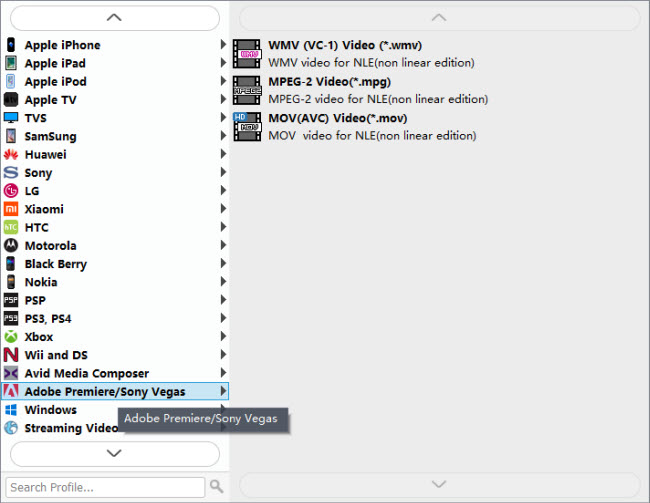
Before we start, we’d like to talk about what to do if you are having problems while importing source media to Sony Vegas Pro 11/12/13 for further editing? In our experience, if Sony Vegas Pro refused accepting your media files, you can use HD Video Converter to convert them to a format that is proper for use in Vegas. Working well as a Sony Vegas Pro Video Converter, the HD Video Converter features optimal format presets for Vegas, including .wmv, .mpg, and .mov:
Download a demo of Sony Vegas Pro Video Converter
Useful Tips: If you are planning to import Blu-ray and DVD movies to Sony Vegas Pro 13/12/11 to create your own masterpieces, iMedia Converter app can help you make Blu-ray and DVDs editable in Sony Vegas Pro with best quality.
Sony Vegas Pro 13 Supported file formats
Opens:
MOV, WMV, H.264, AA3, AAF, AIF, ASF, AU, AVC, AVI, BMP, BWF, CDA, DIG, DLX, DPX, DV, EXR, FLAC, GIF, HDP, IVC, JPEG, AVCHD, M2T, M2TS, MVC, Sony MXF (XDCAM and HDCAM SR), MP3, MP4, M4A, MPEG-1 and MPEG-2 video, OGG, MPO, OMA, Panasonic MXF (DVCPRO, AVC-Intra) PCA, PSD, QT, R3D, PNG, SFA, SND, TIFF, TGA, W64, WAV, VOX, WDP, WMA, XAVC Intra MXF, XAVC S
Saves:
H.264, AA3, FLAC, AC3, AIF, ATRAC, AVC, AVCHD, AVI, DPX, EXR, HDP, MOV, MP4, WMV, MP3, MPEG-1 and MPEG-2 video, M2T, Sony MXF (XDCAM and HDCAM SR), MVC, OGG, Panasonic MXF (AVC-Intra), PCA, W64, WAV, WMA, XAVC S, XAVC Intra MXF
DVD Encoding:
Video: NTSC 4:3, NTSC Widescreen, PAL 4:3, PAL Widescreen
Audio: AC-3 5.1 or stereo, PCM
Blu-Ray Encoding:
Video: MPEG-2 or AVC, 1080-60i, 1080-50i and 1080-24p
Audio: AC-3 5.1 or stereo, PCM
Format I/O and Hardware Support
Support for XDCAM essence markers;
Capture directly to XDCAM-compatible MXF files from supported SD/HD-SDI sources;
AVCHD timecode support;
Read and save DPX, OpenEXR, and Microsoft HD Photo formats;
NVIDIA 3D Vision Support;
Genlock controls for synchronizing AJA video device output to a reference signal;
Streaming Support for rendered AVC/MP4 files;
Support for 4K XAVC and XAVC S files;
Panasonic P2 Support;
Blu-ray rendering support with MainConcept AVC plug-in;
HDCAM SR (SStP) Mastering;
Support for AVCHD 2.0 Standard;
Support Metadata Orientation Information for Still Image Formats;
GPU Accelerated Performance;
GPU Acceleration for ‘Titles & Text’ Plug-in;
Comprehensive XDCAM Optical Media support, including full proxy workflow;
Export directly to PlayStation Portable devices;
AVC/AAC support;
MPEG-1, -2, and -4 support;
ATRAC 3 input and output;
MPEG-2, Insert I-Frame at markers;
Support for the Microsoft Image Mastering API (IMAPI) disc drivers;
External control surface support;
AJA and Blackmagic Design hardware support;
Application scripting for task automation;
QuickTime® format support, with optimized AVC decode, for DSLR formats;
Subtitle time/text export to DVD Architect Pro software;
Red Book audio CD production;
Exports chapter markers and subtitle to DVD Architect Pro 6.0 software.
Sony Vegas Pro 12 Supported file formats
Opens
AA3, AAF, AIF, ASF, AU, AVI, BMP, BWF, CDA, DIG, DLX, DPX, DV, EXR, FLAC, GIF, HDP, IVC, JPG, M2T, M2TS, MOV, Sony MXF (XDCAM and HDCAM SR), MP3, MP4, M4A, MPEG-1 and MPEG-2 video, OGG, OMA, Panasonic MXF (DVCPRO 25, 50, 100, AVC-Intra 50, 100), PCA, PNG, PSD, QT, R3D, SFA, SND, TIFF, TGA, VOX, W64, WAV, WDP, WMA, WMV
Saves
AA3, AC3, AIF, ATRAC, AVC, AVI, DPX, EXR, FLAC, HDP, MOV, MP3, MPEG-1 and MPEG-2 video, MP4, M2T, Sony MXF (XDCAM and HDCAM SR), OGG, PCA, W64, WAV, WMA, WMV
DVD encoding, Video: NTSC 4:3, NTSC Widescreen, PAL 4:3, PAL WidescreenDVD encoding, Audio: AC-3 5.1 or stereo, PCMBD encoding, Video: MPEG-2 or AVC, 1080-60i, 1080-50i and 1080-24pBD encoding, Audio: AC-3 5.1 or stereo, PCM
Extensive Capture and Export Support
Edit XDCAM, AVCHD, NXCAM, RED ONE® and EPIC®, HDCAM-SR™ and Panasonic P2 media natively, with no transcoding or re-wrapping;
Supports Digital SLR workflows using h.264 Quicktime files or AVCHD recording;
Encode to HDCAM-SR for pristine archiving and mastering;
MainConcept AVC encoder supports variable bit rates up to 40 Mbps and average bit rate of 25 Mbps;
MP4 encoding with progressive download function, enablingvideos to begin playing while downloading.
Vegas Pro 20/19/18/17 Supported Formats — Video/Audio

Over the years, Vegas Pro software has been a pioneer and true innovator while other NLE manufacturers play catch-up. Vegas Pro has always featured robust native file format support. From the beginning around 10 years ago, Vegas Pro users have enjoyed the ability to throw just about anything at their projects with the confidence that the application would simply accept it and enable them to get on with their work. What’s video format can import and edit in Vegas Pro 20, 19, 18, 17, etc? In this article I present the many of the major file formats as they can import and edit in Vegas Pro software.
CONTENTS
File Format Not Supported by Vegas Pro — Solved
The first group of file types comprise a surprisingly large number of formats. Well, surprising if you’re not already a Vegas Pro user anyway. These include old standby formats like DV (either AVI or MOV) and HDV as well as others which are less commonly used as source footage such as WMV, some types of MPEG-2 and MPEG-4, and others.
Note: Not all files are guaranteed to import and edit in Vegas Pro.
What is the best format for Vegas Pro? Have problem with importing footage from your camera into Vegas Pro for further editing? Or may you have some downloaded movies and want to use them on Vegas Pro? Then you’d better convert your videos to Vegas Pro accepted files at first. If you temporarily have no idea about what to do, you can take the video to Vegas Pro conversion into consideration which is introduced in the following paragraphs. The conversion is darn easy to be finished with only three clicks without loss of video quality. To do the video video to Vegas Pro conversion task, you are highly recommended to ask a professional video conversion software (Acrok Video Converter Ultimate and Video Converter Ultimate for Mac) for help.
If you plan to import and edit Blu-ray and DVD movies in Vegas Pro 20, 19, 18, 17, 16, 15, etc. Acrok Video Converter Ultimate can help you rip and convert Blu-ray/DVD to Vegas Pro best editing video formats.
Free download Any Video To Vegas Pro Video Converter


20% OFF Coupon Code: ACRO-LD93-NLID
Any Video to Vegas Pro Supported Formats Converter Interface
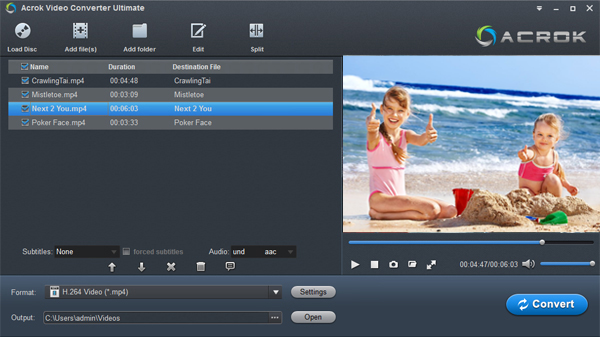
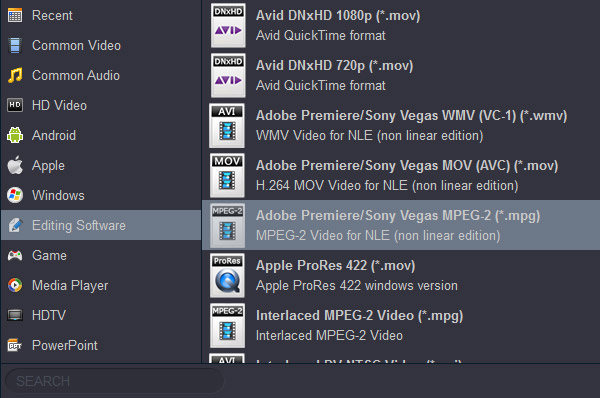
Best Codec and Foramt for editing in Vegas Pro: wmv3 .wmv, h.264 MOV, mpeg-2 MPG
Vegas Pro Supported File Formats — Import & Export
The following tablets shows you what formats are supported by by different versions of Vegas Pro. Some formats have been tested and some have not been tested. The content is based on official parameters. We cannot guarantee that all the formats listed can be imported or exported successfully. we will also update the content based on official information.
Vegas Pro 20 Supported Formats
Apple ProRes, Blackmagic RAW, HEVC/H.265, AVC/H.264, MP4, MPEG-2, MPEG-1, AVI, WMV, M4V, Sony XAVC / XAVC-S / XDCAM EX / HD 422 / MXF / ProDisc / HDCAM SR, MPEG IMX, DV, HDV, AVCHD, Panasonic P2, RED RAW
Vegas Pro 19 Supported Formats
Blackmagic RAW*, HEVC/H.265, AVC/H.264, MP4, MPEG-2, MPEG-1, AVI, WMV, M4V, Sony XAVC / XAVC-S / XDCAM EX / HD 422 / MXF / ProDisc / HDCAM SR, MPEG IMX, DV, HDV, AVCHD, Panasonic P2, RED RAW
*Currently in BETA
Vegas Pro 18 Supported Formats
| Import | Video | HEVC/H.265, AVC/H.264, MP4, MOV, MPEG-2, MPEG-1, AVI, WMV, M4V, Sony XAVC / XAVC-S / XDCAM EX / HD / HD 422 / MXF / ProDisc / HDCAM SR, MPEG IMX, DV, HDV, AVCHD, Panasonic P2, Red RAW |
| Audio | AIF, AAC, MP2, MP3, M4A, OGG Vorbis, WAV, WMA, FLAC | |
| Other | AAF, Premiere/After Effects (*.prproj), Final Cut Pro 7/ DaVinci Resolve (*.xml), Final Cut Pro X (*.fcpxml), EDL Text File (*.txt), Broadcast Wave Format, Closed Captioning | |
| Export | Video | HEVC/H.265, AVC/H.264, MPEG-2, MPEG-1, MP4, MOV, AVI, WMV, Sony XAVC / XAVC-S / MXF / HDCAM SR, Panasonic P2, XDCAM EX |
| Audio | AIF, AAC, MP3, OGG Vorbis, WAV, WMA, FLAC | |
| Other | VEGAS Project Archive (*.veg, *.vf), Premiere/After Effects (*.prproj), Final Cut Pro 7/DaVinci Resolve (*.xml), Final Cut Pro X (*.fcpxml), EDL Text File (*.txt), XDCAM Disc |
Vegas Pro 17 Supported Formats
| Import | Video | HEVC/H.265, AVC/H.264, MP4, MOV, MPEG-2, MPEG-1, AVI, WMV, XAVC-S, XAVC, XDCAM EX, XDCAM HD, XDCAM HD 422, XDCAM ProDisc, HDCAM SR, MPEG IMX, DV, HDV, AVCHD, Panasonic P2, Red RAW, Apple ProRes |
| Audio | AIF, AAC, MP2, MP3, M4A, Ogg Vorbis, WAV, WMA, FLAC | |
| Export | Video | HEVC/H.265, AVC/H.264, MPEG-2, MPEG-1, MP4, MOV, AVI, WMV, MAGIX Intermediate, Sony XAVC-S, Sony XAVC, Sony MXF, Sony HDCAM SR, Panasonic P2, XDCAM EX |
| Audio | AIF, AAC, MP3, Ogg Vorbis, WAV, WMA, FLAC |
Vegas Pro 16 Supported file formats
| Import | Video | AAC, AA3, AVI, BMP, MPEG-1, MPEG-2, MPEG-4, WMV, HEVC |
| Audio | AAC, AIFF, FLAC, LPEC, MP3, OGG, PCA, W64, WAV, WMA | |
| Export | Video | AVC/AAC, AVCHD, AVI, HEVC, MOV, MPEG-1, MPEG-2, MPEG-4, MVC, RM, WMV, XAVC S |
| Audio | AAC, AIFF, FLAC, LPEC, MP3, OGG, PCA, W64, WAV, WMA |
Vegas Pro 15 Supported file formats
AAC, AA3, AVI, BMP, MPEG-1, MPEG-2, MPEG-4, WMV, HEVC, ProRes, AAC, AIFF, FLAC, LPEC, MP3, OGG, PCA, W64, WAV, WMA, BMP, JPEG, PNG, TIFF, WDP, WMPhoto, DDS, DPX, EX, AAF, Premiere/After Effects (*.prproj), Final Cut Pro 7/ DaVinci Resolve (*.xml), Final Cut Pro X (*.fcpxml), EDL Text File (*.txt), Broadcast Wave Format, DVD Camcorder Disc, Closed Captioning
Export
AAC, AA3, AVI, BMP, MPEG-1, MPEG-2, MPEG-4, WMV, HEVC, ProRes, AAC, AIFF, FLAC, LPEC, MP3, OGG, PCA, W64, WAV, WMA, BMP, JPEG, PNG, TIFF, WDP, WMPhoto, DDS, DPX, EXR, VEGAS Project Archive (*.veg), Pro Tools AAF File (*.aaf), Media Composer AAF File (*.aaf), Premiere/After Effects (*.prproj), Final Cut Pro 7/DaVinci Resolve (*.xml), Final Cut Pro X (*.fcpxml), EDL Text File (*.txt), XDCAM Disc
Vegas Pro 14 Supported file formats
4K XAVC S, 4K XAVC, XDCAM EX, XDCAM Optical, DV, HDV, AVCHD, NXCAM, MOV, MP4, WMV, MPEG-1/2/4, H.264/AVC, WAV, FLAC, AAC, MP3, OGG, WMA, Surround Sound/5.1, BMP, PNG, JPEG, TIFF, OpenEXR-, DPX- and WDP image sequences
Export
DVD, Blu-ray Disc, AVCHD Disc, (DV-)AVI, MJPEG, MXF, MOV, WMV, XAVC, XAVC S, MPEG-1/2/4, H.264/AVC, H.265/HEVC, WAV, MP3, BMP, PNG, JPEG, TIFF, OpenEXR- , DPX- and WDP image sequences
Vegas Pro 13 Supported file formats
MOV, WMV, H.264, AA3, AAF, AIF, ASF, AU, AVC, AVI, BMP, BWF, CDA, DIG, DLX, DPX, DV, EXR, FLAC, GIF, HDP, IVC, JPEG, AVCHD, M2T, M2TS, MVC, Sony MXF (XDCAM and HDCAM SR), MP3, MP4, M4A, MPEG-1 and MPEG-2 video, OGG, MPO, OMA, Panasonic MXF (DVCPRO, AVC-Intra) PCA, PSD, QT, R3D, PNG, SFA, SND, TIFF, TGA, W64, WAV, VOX, WDP, WMA, XAVC Intra MXF, XAVC S
Saves:
H.264, AA3, FLAC, AC3, AIF, ATRAC, AVC, AVCHD, AVI, DPX, EXR, HDP, MOV, MP4, WMV, MP3, MPEG-1 and MPEG-2 video, M2T, Sony MXF (XDCAM and HDCAM SR), MVC, OGG, Panasonic MXF (AVC-Intra), PCA, W64, WAV, WMA, XAVC S, XAVC Intra MXF
DVD Encoding:
Video: NTSC 4:3, NTSC Widescreen, PAL 4:3, PAL Widescreen
Audio: AC-3 5.1 or stereo, PCM
Blu-Ray Encoding:
Video: MPEG-2 or AVC, 1080-60i, 1080-50i and 1080-24p
Audio: AC-3 5.1 or stereo, PCM
Format I/O and Hardware Support
Sony Vegas Pro 12 Supported file formats
AA3, AAF, AIF, ASF, AU, AVI, BMP, BWF, CDA, DIG, DLX, DPX, DV, EXR, FLAC, GIF, HDP, IVC, JPG, M2T, M2TS, MOV, Sony MXF (XDCAM and HDCAM SR), MP3, MP4, M4A, MPEG-1 and MPEG-2 video, OGG, OMA, Panasonic MXF (DVCPRO 25, 50, 100, AVC-Intra 50, 100), PCA, PNG, PSD, QT, R3D, SFA, SND, TIFF, TGA, VOX, W64, WAV, WDP, WMA, WMV
Saves
AA3, AC3, AIF, ATRAC, AVC, AVI, DPX, EXR, FLAC, HDP, MOV, MP3, MPEG-1 and MPEG-2 video, MP4, M2T, Sony MXF (XDCAM and HDCAM SR), OGG, PCA, W64, WAV, WMA, WMV
DVD encoding, Video: NTSC 4:3, NTSC Widescreen, PAL 4:3, PAL Widescreen DVD encoding, Audio: AC-3 5.1 or stereo, PCM BD encoding, Video: MPEG-2 or AVC, 1080-60i, 1080-50i and 1080-24p BD encoding, Audio: AC-3 5.1 or stereo, PCM
Extensive Capture and Export Support
Users Reviews
I have used Acrok software for six months now. I like its stability and its ease of use. Now its been upgraded to Ultimate conversion software to rip Blu-ray and DVD movies on Windows 10. What more can I say. A reliable company, great product! Thanks Acrok. I used to dread converting MXF, MTS and MKV into my computer but now with the Acrok Video Converter Ultimate, I no longer dread it. Very easy.
Mark Tomas
Sony Vegas Pro 13 торрент
Sony Vegas Pro — ПО на русском языке для профессионального, нелинейного монтажа видео с огромным потенциалом, который может быть расширен за счет использования большого выбора плагинов и дополнений (Add-on). Программа позволяет производить всевозможные операции над видео и аудио файлами: нарезка, склейка, конвертирование, ускорение, замедление и т.д.
Рекомендуем Вам бесплатно скачать Sony Vegas 13 торрент русскую версию с официального сайта для Windows 7, 10, XP 64 и 32 бит.
Обзор программы
Сони Вегас Про 13 – это видеоредактор, используемый в процессе создания видеороликов и презентаций (слайд-шоу). Обширный функционал данного ПО может впечатлить и одновременно напугать, поскольку не каждый новичок сможет разобраться с его особенностями. Каждый элемент инструментария софта – это важнейший компонент в сложном процессе монтажа роликов, фильмов или презентаций. На русском языке представлен не только интерфейс, но и справочная информация по всему ПО. Полную версию софта можно получить лишь за определенную плату, но в руках профессионала данная программа может приносить доход и окупается в кратчайшие сроки. Более подробная информация на Википедии
Основные функции Сони Вегас Про 13

- Vegas pro 13 поддерживает работу с записями из нескольких камер;
- обработка редких форматов видео: XDCAM, AVCHD и пр.;
- прожиг DVD/Blu-Ray дисков;
- мультиязычное меню интерфейса;
- создание профессионального видеоролика с применением световых и звуковых спецэффектов;
- добавление комментариев по ходу работы в видео;


- поддержка стандарта NVIDIA 3D Vision для компьютера;
- контроль 3D функции стабилизации;
- инструмент для создания анимированных титров;
- запись дисков Blu-Ray, а также DVD;
- Способность работы в режиме полного отсутствия окружающего звука.
- работа с видео в 32 битном режиме.
- конвертация видео/аудио файлов в нужный формат;
Особенности видеоредактора Vegas Pro
- необходимые инструменты для обработки видеоряда на профессиональном уровне;
- созданные видеоролики и презентации можно записать на DVD и Blu-Ray;
- разрешение создаваемых видеофайлов практически не ограничивается (до 4096×4096);
- цельный видеоролик может быть склеен из разных фрагментов, отличающихся между собой форматами, качеством и разрешением;
- доступ к функции Drag&Drop (легкое управление интерфейсами пользователя посредством «мыши» или сенсорного экрана);
- набор «горячих клавиш» позволяет эффективно использовать клавиатуру при работе с редактором;
- количество визуальных эффектов, накладываемых на видеоряд, превышает 200 штук;
- видео может быть отредактировано в 8- и 32-битном режиме;
- цвет картинки может быть откорректирован посредством цветового диска и набора фильтров.
Поддерживаемые форматы ввода (IMPORT)
4K XAVC S, 4K XAVC, XDCAM EX, XDCAM Optical, DV, HDV, AVCHD, NXCAM, MOV, MP4, WMV, MPEG-1/2/4, H/AVC, WAV, FLAC, AAC, MP3, OGG, WMA, Surround Sound/5.1, BMP, PNG, JPEG, TIFF, OpenEXR-, DPX- and WDP image sequences
Поддерживаемые форматы вывода (EXPORT)
DVD, Blu-ray Disc, AVCHD Disc, (DV-)AVI, MJPEG, MXF, MOV, WMV, XAVC, XAVC S, MPEG-1/2/4, H/AVC, H.265/HEVC, WAV, MP3, BMP, PNG, JPEG, TIFF, OpenEXR- , DPX- and WDP image sequences
Краткий видеообзор
Программы-аналоги
Если возможность оплатить полный функционал отсутствует, то можно скачать бесплатные аналоги , которые имеют обширный инструментарий и помогают справиться с редактированием видеоряда не хуже.
Sony Vegas Pro Supported File Formats


Do you love to edit videos to product a fantastic personal production before posting them to YouTube? Do you dream of becoming a film director to show your thought in a film? Then, everything can be started by Sony Vegas Pro. Edit video in Sony Vegas Pro and show what you want to show.
Sony Vegas Pro offers support for everything a professional video editor requires. You can import media from multiple devices (including HD video), use more than 300 filters and special effects, and use specific tools to work with text layers and subtitles. The app also lets you easily optimize the image quality of your content with various tools. Now, let’s see what video and audio files Sony Vegas Pro support and then you will know what files you can import to Sony Vegas Pro for editing.
Supported formats of Sony Vegas Pro 14
Import:
4K XAVC S, 4K XAVC, XDCAM EX, XDCAM Optical, DV, HDV, AVCHD, NXCAM, MOV, MP4, WMV, MPEG-1/2/4, H.264/AVC, H.265/HEVC, WAV, FLAC, AAC, MP3, OGG, WMA, Surround Sound/5.1, BMP, PNG, JPEG, TIFF, OpenEXR-, DPX- and WDP image sequences
Export
DVD, Blu-ray Disc, AVCHD Disc, (DV-)AVI, MJPEG, MXF, MOV, WMV, XAVC, XAVC S, MPEG-1/2/4, H.264/AVC, H.265/HEVC, WAV, MP3, BMP, PNG, JPEG, TIFF, OpenEXR- , DPX- and WDP image sequences
Supported formats of Sony Vegas Pro 13
Import:
MOV, WMV, H.264, AA3, AAF, AIF, ASF, AU, AVC, AVI, BMP, BWF, CDA, DIG, DLX, DPX, DV, EXR, FLAC, GIF, HDP, IVC, JPEG, AVCHD, M2T, M2TS, MVC, Sony MXF (XDCAM and HDCAM SR), MP3, MP4, M4A, MPEG-1 and MPEG-2 video, OGG, MPO, OMA, Panasonic MXF (DVCPRO, AVC-Intra) PCA, PSD, QT, R3D, PNG, SFA, SND, TIFF, TGA, W64, WAV, VOX, WDP, WMA, XAVC Intra MXF, XAVC S
Export
H.264, AA3, FLAC, AC3, AIF, ATRAC, AVC, AVCHD, AVI, DPX, EXR, HDP, MOV, MP4, WMV, MP3, MPEG-1 and MPEG-2 video, M2T, Sony MXF (XDCAM and HDCAM SR), MVC, OGG, Panasonic MXF (AVC-Intra), PCA, W64, WAV, WMA, XAVC S, XAVC Intra MXF
Supported formats of Sony Vegas Pro 12
Import:
AA3, AAF, AIF, ASF, AU, AVI, BMP, BWF, CDA, DIG, DLX, DPX, DV, EXR, FLAC, GIF, HDP, IVC, JPG, M2T, M2TS, MOV, Sony MXF (XDCAM and HDCAM SR), MP3, MP4, M4A, MPEG-1 and MPEG-2 video, OGG, OMA, Panasonic MXF (DVCPRO 25, 50, 100, AVC-Intra 50, 100), PCA, PNG, PSD, QT, R3D, SFA, SND, TIFF, TGA, VOX, W64, WAV, WDP, WMA, WMV
Export
AA3, AC3, AIF, ATRAC, AVC, AVI, DPX, EXR, FLAC, HDP, MOV, MP3, MPEG-1 and MPEG-2 video, MP4, M2T, Sony MXF (XDCAM and HDCAM SR), OGG, PCA, W64, WAV, WMA, WMV
Supported formats of Sony Vegas Pro 11
Import:
AA3, AAF, AIF, ASF, AU, AVC, AVCHD, AVI, BMP, BWF, CDA, DIG, DLX, DPX, DV, EXR, FLAC, GIF, H.264, HDP, IVC, JPEG, M2T, M2TS, MVC, MOV, Sony MXF (XDCAM and HDCAM SR), MP3, MP4, M4A, MPEG-1 and MPEG-2 video, MPO, OGG, OMA, Panasonic MXF (DVCPRO, AVC-Intra) PCA, PNG, PSD, QT, R3D, SFA, SND, TIFF, TGA, VOX, W64, WAV, WDP, WMA, WMV, XAVC Intra MXF, XAVC S
Export
AA3, AC3, AIF, ATRAC, AVC, AVCHD, AVI, DPX, EXR, FLAC, H.264, HDP, MOV, MP3, MPEG-1 and MPEG-2 video, MP4, M2T, Sony MXF (XDCAM and HDCAM SR), MVC, OGG, Panasonic MXF (AVC-Intra), PCA, W64, WAV, WMA, WMV, XAVC Intra MXF, XAVC S
How to Import Unsupported Video Files into Sony Vegas Pro?
As shown above, Sony Vegas Pro can’t handle any video and audio file. How can you do when you want to import some Sony Vegas Pro unsupported files to edit? For example, you have some MKV, AVI files and want to edit MKV/AVI in Sony Vegas Pro. In this case, you can use some video converters to convert these unsupported video to Sony Vegas Pro supported video and audio formats.
A web seach for «Sony Vegas Pro Video Converter», you will be recommended for many video converter applications. Among these software, Pavtube Video Converter is suggested strongly. It can convert any video and audio files to Sony Vegas Pro. It can convert Sony Vegas Pro unsupported MKV, AVI, TS, Tivo, OBS recordings, iPhone recordings, etc to Sony Vegas Pro and also can compress unsupported 4K video to 1080P video for Sony Vegas Pro when you are runing a low-end computer that can’t handle 4K video. You can change video and audio encoder, resolution, bitrate, frame rate, sample rate to make the output video more compatible with Sony Vegas Pro 14/13/12.
In addition, Pavtube Video Converter is also an excellent video editing tool with some simple video editing function. You can trim video, crop video, merge video, split video. You also can add subtitle/watermark, rotate/flip video, edit audio.
For Mac users, you can turn to Pavtube Video Converter for Mac to solve all Sony Vegas Pro media loading problems.
How to Convert and Import Unsupported File Formats to Sony Vegas Pro?
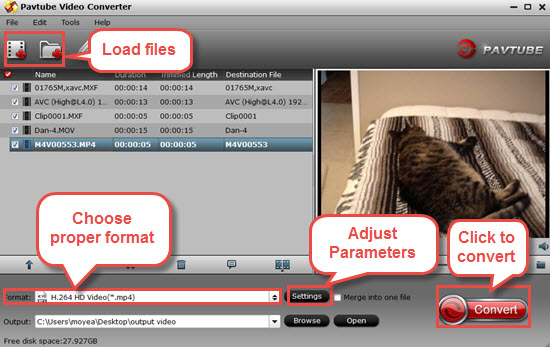
Step 1: Load file formats into the program.
Start Pavtube Video Converter on your computer, click «File» > «Add Video/Audio» or «Add from folder» to load unsupported source video files into the program. Or directly drag and drop the source file you want to the sftware. Then you can preview the whole videos in the preview window on the right.
Step 2. Choose Sony Vegas Pro supported format
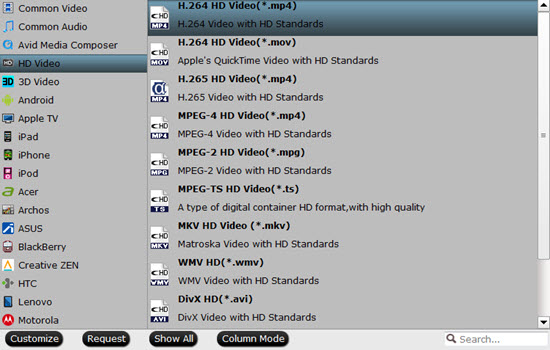
Click «Format» option to choose the output format. To make your Sony Vegas Pro 14/13/12 to readthe output files, just choose the most Sony Vegas accepted «WMV (VC-1) (*.wmv)» or MPEG-2 under «Adobe Premiere/Sony Vegas» option as output format. Since Sony Vegas Pro also accept HEVC codec video, which offer the same video quality with smaller size comapring to H.264 codec video. So you also can choose H.265 MP4 here for Sony Vegas Pro 14. For lower version Sony Vegas, HD MP4 is recommended.
Tips:
a. If the default settings do not fit your needs, you can click «Settings» button to customize output video parameters like bitrate, channels, frame rate, etc, such as to set higher bitrate to get much better image quality. In general, the higher video bit rate, the larger output file size, and vice versa.
b. You can use the video editor designed in Pavtube Video Converter to edit your original videos. Click «Edit» on the main interface, and edit your videos by trimming (get/cut off video clips), cropping (remove unwanted areas), adding text/image/video watermarks, inserting subtitles, adding special effects, etc.
Step 3. Encode video to Sony Vegas Pro
Hit the «Convert» button at the bottom right corner to start encoding unsupported video to Sony Vegas Pro. Once finished, hit «Open» button to get the generated files, and then drag it to the Vegas Pro timeline or into the Trimmer window where you can mark you in and out points before you add it to the timeline.
How to Import Files into Sony Vegas Pro?
Once you’ve set up your Project, you will need to import video clips. Before you do, take a look at Sony’s simple but powerful Project Media Window:
Each folder is called a ‘Bin’, and you can create as many as you want by selecting the Media Bin>Right Click>Create New Bin.
This is important, because once you’ve setup your project into bins, you can search (Right Click on a bin>Search Media Bins…) these bins and you can even save your results into a ‘Smart Bin’ for future use!
There are two simple ways to import video into Sony Vegas Pro:
File>Import…>Media…
Click the Import Icon (next to the lighting icon)
Once you have imported your video clip, you can right click it and select Properties… to view its properties. You will also get a snapshot of it at the lower end of the Project Media Window, as shown in the above image.
Sony Vegas Pro allows native editing of many file formats, including R3D. For Red Media, if you right click the clip you will have the option of selecting File Format Properties… to get extra settings to ‘correct’ your R3D files.