Get Sell
 3:16 PM
 Admin
 No comments
Product Description
Add the convenience of a USB dongle for your Avid Media Composer license. This allows you to install the software on as many computers — Mac and Windows — as you want and move the dongle from system to system to activate the license.
Avid Pace iLok USB Dongle (USB-C)
You can pack up to 1,500 licenses on the 3rd Generation iLok — three times as many as the previous generation! And at 1.5 inches x 0.5 inches, it’s the smallest iLok ever. Plus, this iLok’s USB-C format offers easy compatibility with newer computers. It’s super durable, thanks to its split- and crack-proof aluminum frame. Would-be thieves will have a hard time stealing your iLok, as the 3rd Generation iLok’s wider and stronger security loop accommodates most desktop security cables, and its etched serial number won’t rub off without a fight. A stylish embossed logo makes counterfeiting extremely difficult, so you’ll know that your iLok is the real deal. The 3rd Generation iLok comes complete with a glowing blue LED indicator.
Holds up to 1,500 licenses —
The 3rd Generation iLok holds up to 1,500 licenses, and depending on the type of licenses you own, it may even hold beyond that. With three times the capacity of its predecessor, the 3rd Generation iLok puts more licenses in your pocket than ever before.
Half the size with a heavy-duty aluminum frame —
At Sweetwater, we’ve lost count of how many times we’ve accidentally knocked an iLok out of our laptop’s USB port. The 2nd Generation iLok was an improvement over the first, but was still rather obtrusive. Half the size of a 2nd Generation iLok, the 3rd Generation iLok solves this problem for good. And while it’s unlikely that you’ll knock this minuscule device out of your computer, don’t fret if you do. Its sturdy 1-piece extruded aluminum frame can handle a fall to the floor without splitting or cracking.
The most secure iLok ever —
Secure the 3rd Generation iLok to your desk with a cable lock, and it won’t be going anywhere. Its security loop is built directly into the iLok’s robust aluminum frame, making it extremely difficult to break. A large, clearly visible serial number is etched onto the iLok. And to prevent counterfeiting, the 3rd Generation iLok features a stylish embossed logo.
Добавляем Bluetooth в магнитолу!

Требующие одновременное подключение к разъему AUX на магнитоле + отдельному питанию этого адаптера, при наличии в этой магнитоле USB разъема!

Как минимум, правильнее в таком случае воспользоваться другим копеечным USB адаптером:
Ссылка — раз, два:
 Таким
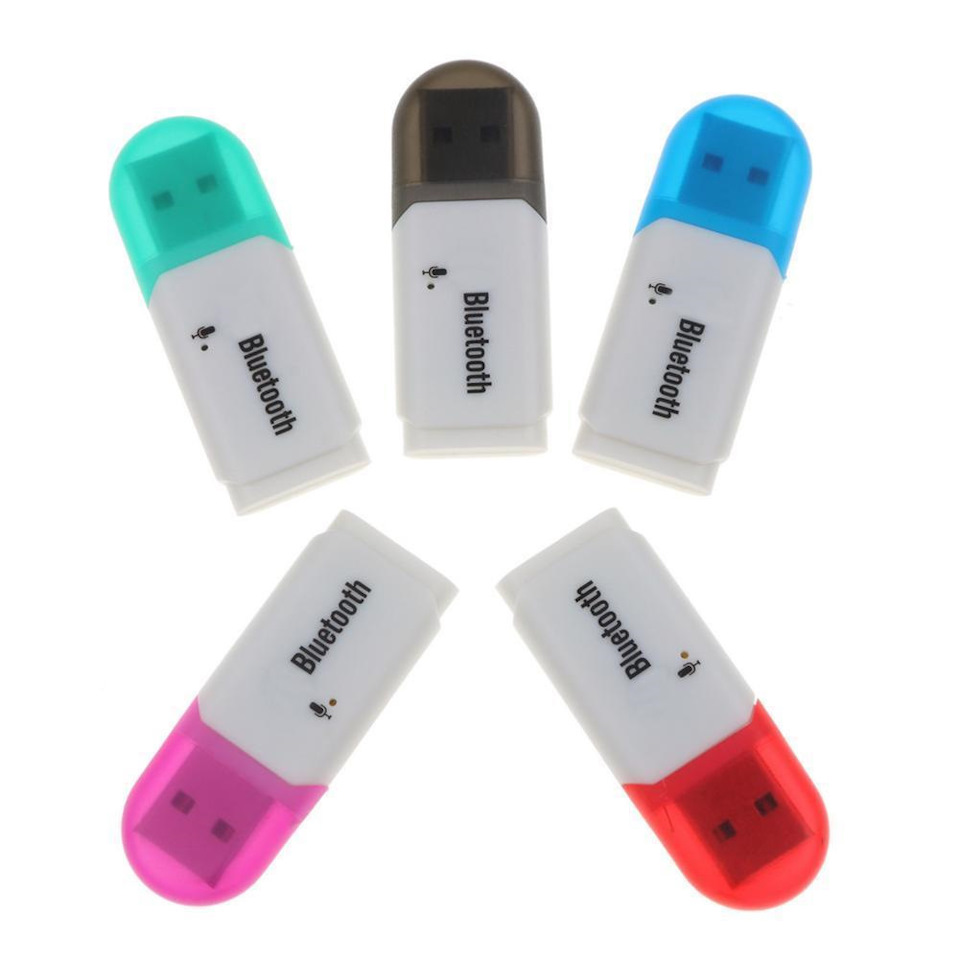 Или таким
Кстати, внутри они абсолютно одинаковые))):
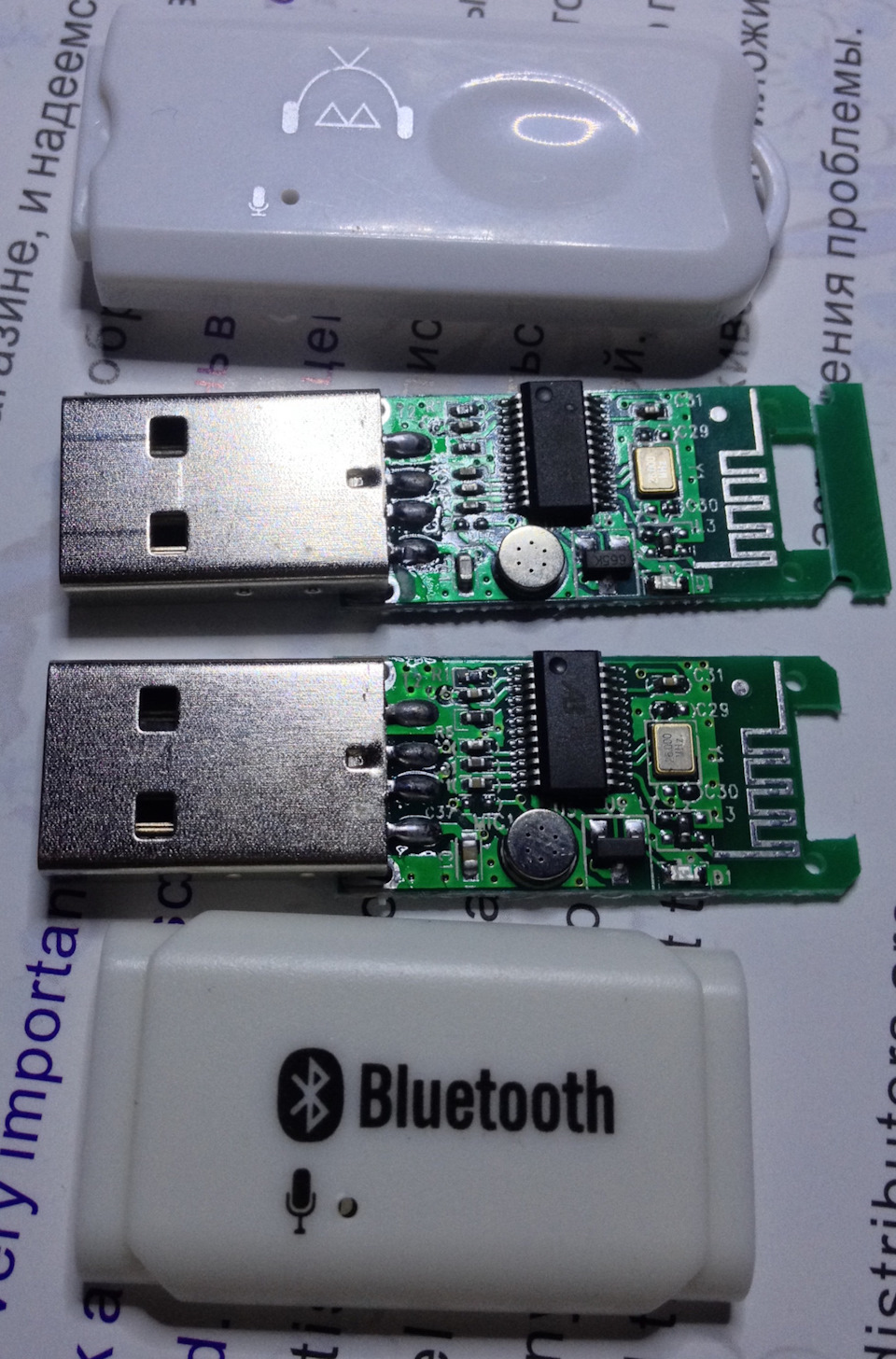
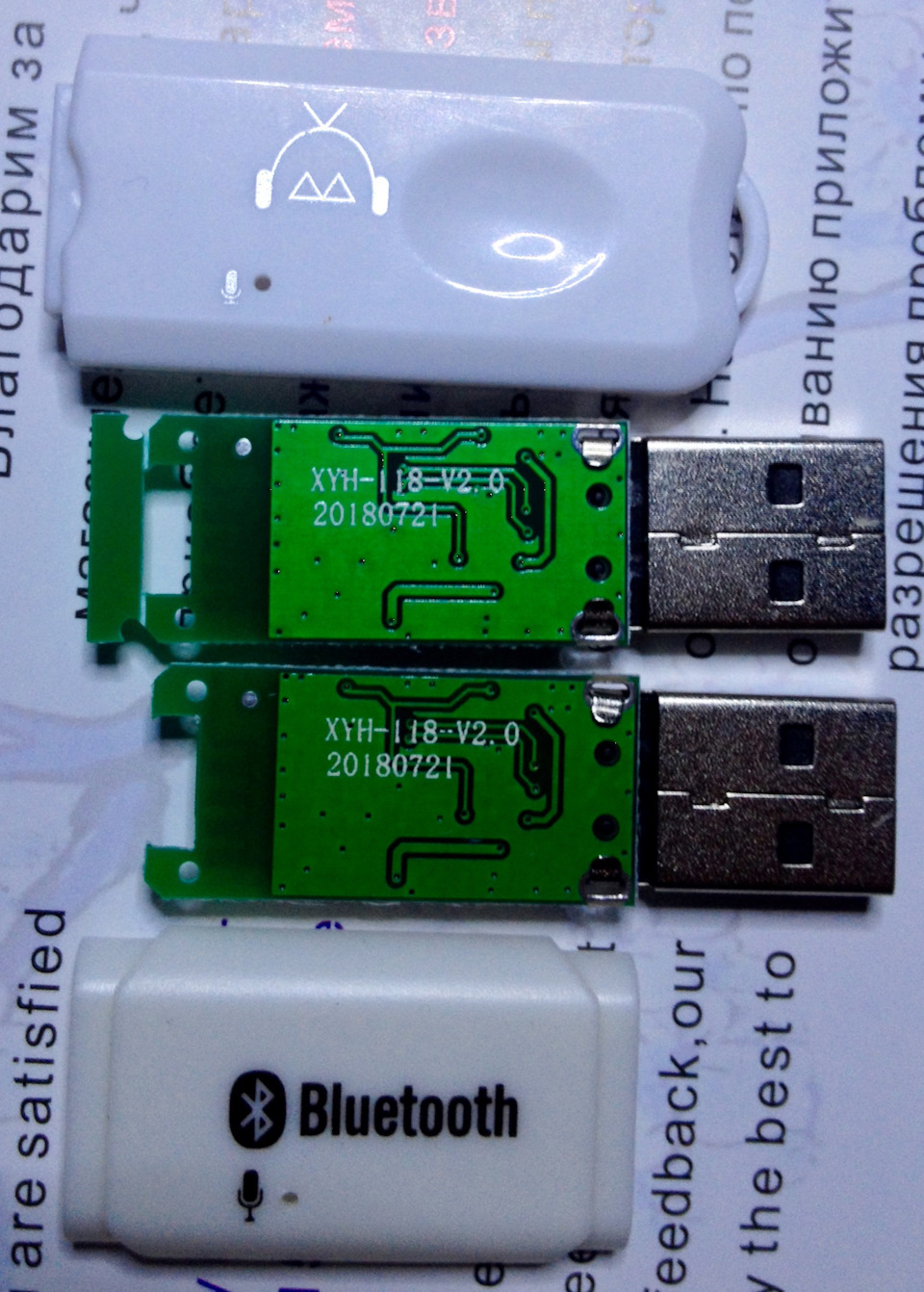
Без всяких телепающихся проводов, зарядок и пр…
Тупо вставляешь его в USB магнитолы и всё!
Эти адаптеры эмулируют "флэшку", и магнитола видит их как обычную USB "флэшку" с музыкой (т.е. подключившись к адаптеру с телефона по Bluetooth и нажав на play в телефоне, звук передается на адаптер и воспроизводится сразу магнитолой).
Плюс можно управлять треками как с телефона, так и с самой магнитолы!
На большинстве магнитол даже будут отображаться названия треков.
Да, и через этот адаптер даже можно совершать звонки по громкой связи (на нем есть микрофон), но качество обычно не фонтан.
Но мне, как и многим не нравится, когда из панели торчит здоровая "флэшка" (да и отломать ее можно случайно), поэтому Я советую ставить сразу во внутрь магнитолы (припаять к плате)!
Делается это очень просто, никаких хитростей в этом нет, достаточно взглянуть на распиновку USB разъема:
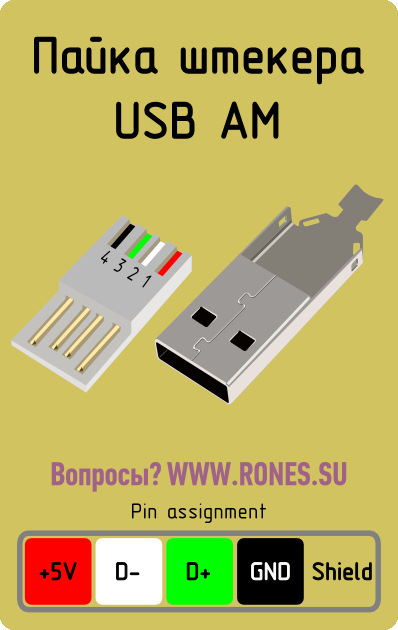 Два центральных — передача данных, крайние земля и питание +5В
Вскрываете корпус магнитолы, находите usb вход, вскрываете bluetooth адаптер, отпаиваете разъем "папа" от адаптера (он уже не нужен) и припаиваете получившуюся плату параллельно usb входу магнитолы:
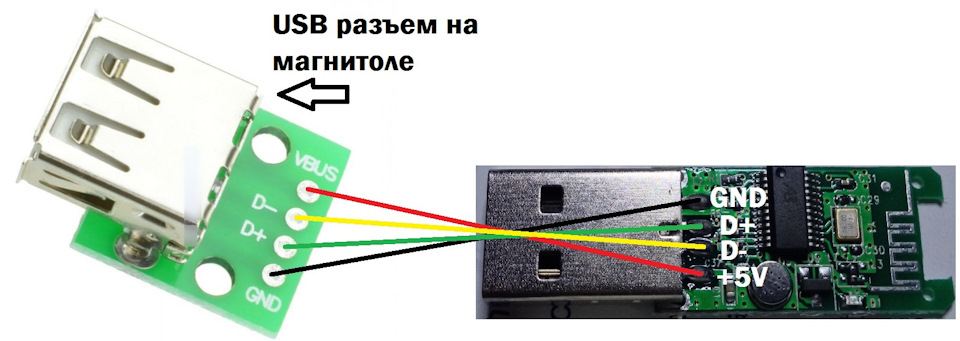
Если нужно сохранить работоспособность usb разъема для чтения "обычных флэшек" и пр., то достаточно припаять в разрыв питания нашей платы тумблер:
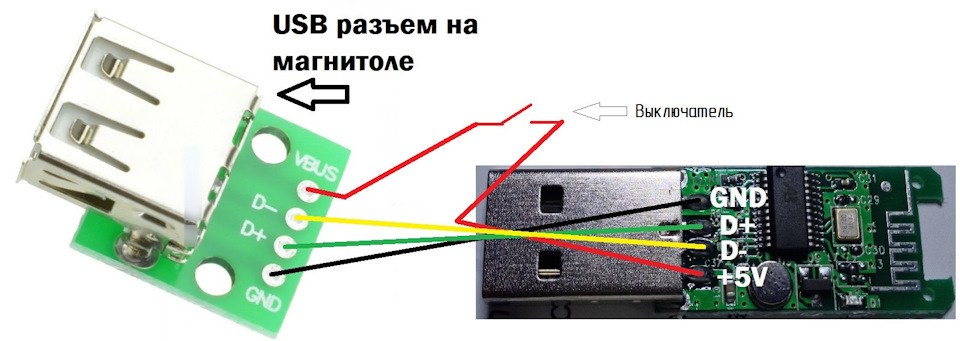
Получаем в итоге что-то вроде этого:
 Маааленький тумблер сбоку
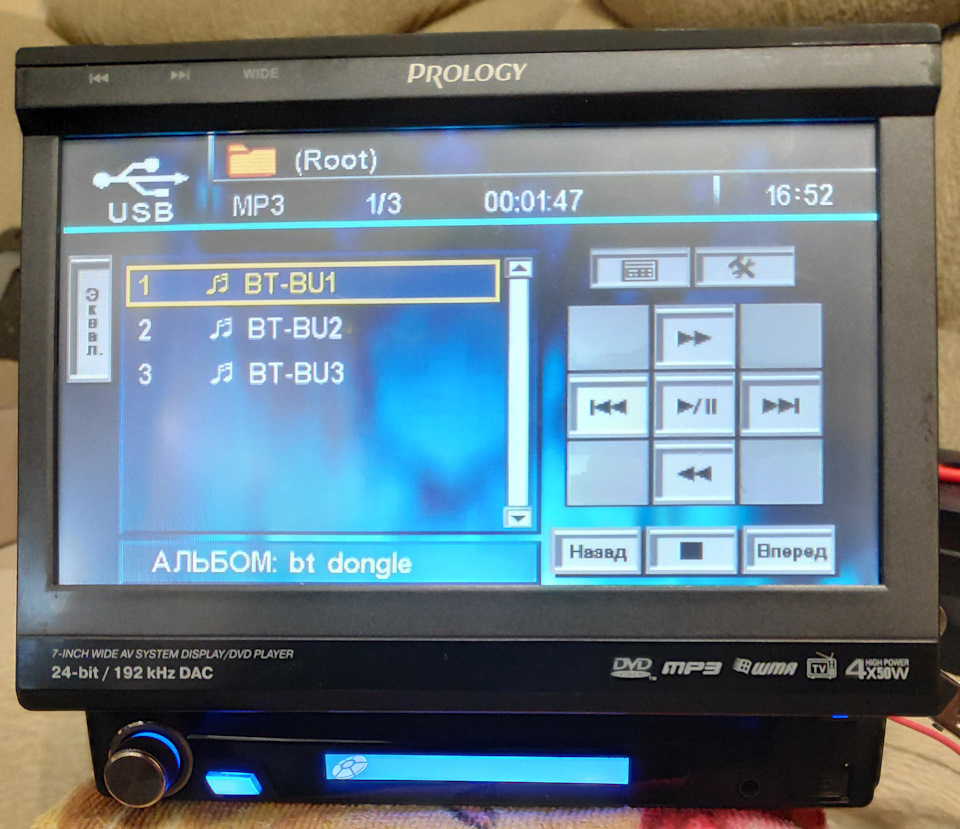
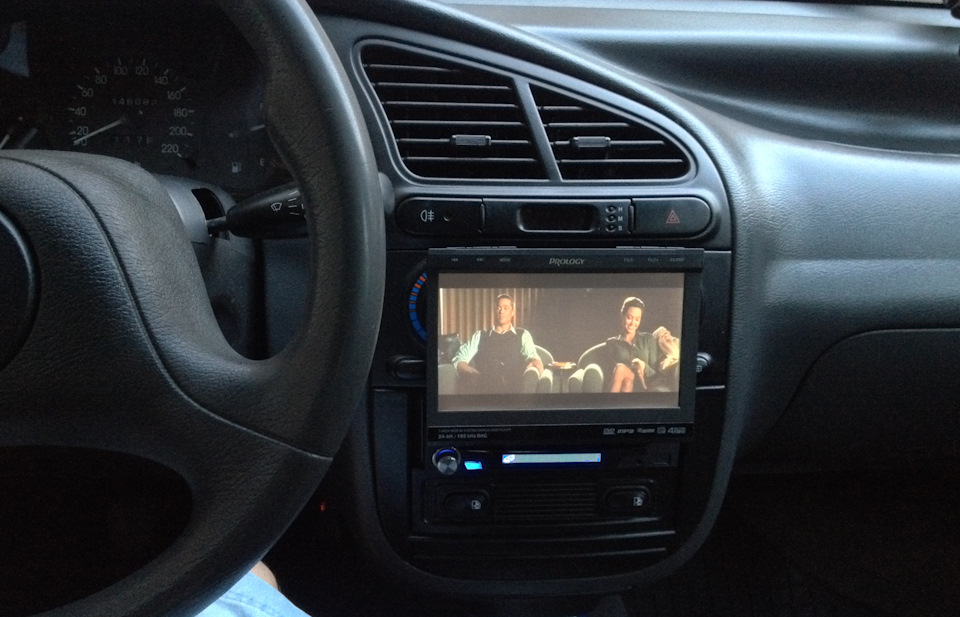
В случае если в магнитоле USB разъем находится на съемной лицевой панели, паяете точно так же платку адаптера в съемную панель к USB входу (если есть место в панельке), либо просто прозваниваете контакты идущие от USB разъема на съемной панели в разъеме соединяющем панель с тушкой магнитолы, и уже паяете к этим контактам внутри тушки.
Ежели у вас магнитола без USB, то это тоже решаемо — берете адаптер с выходом AUX.
Подпаиваетесь ко входу AUX магнитолы (при и его отсутствии, уже смотрите варианты по месту) и ищите на плате магнитолы где взять +5В для питания платы, ну и землю кидаете на корпус — всё.
UPD 24.11.19:
Немного более подробно покурил тему про Bluetooth на Хабре.
Сделал анализ используемых/поддерживаемых кодеков этим свистком:
Получается свисток поддерживает кодек SBS HQ — Частоту дискретизации до 48кГц вкл., моно/стерео, 8 подканалов и 16 блоков в аудиофрейме. Bitpool поддерживается до 53, а это дает аудиобитрейт 328кб/с. (на уровне того же aptX!)
Вот сравнение:
Хотя, если взять к примеру устройство, которое несоизмеримо дороже — наушники от Samsung (Gear IconX) за
10к, там уже другая песня! Там используется тот же кодек SBC, но уже с порезанным Bitpool до 37, что выдает максимум 239кб/с. Что значительно влияет на качество звука…
В худшую сторону.
Так что у кого наблюдаются проблемы с качеством звучания — смотрите настройки телефона (версию андройда), или ищите что срёт в эфир на частоте Bluetooth — из-за этого устройства и понижают скорость соединения, а следовательно и битрейт аудио!
Avid Media Composer Perpetual License New (Dongle)
Avid Media Composer is the media and entertainment industry’s most used video editing software, accelerating high-res, HDR, and HD workflows. With tons of great new features, experience the thrill of inspired storytelling with tools that empower you to create the best story possible.

Avid Media Composer is the media and entertainment industry’s most used video editing software, accelerating high-res, HDR, and HD workflows. With tons of great new features, experience the thrill of inspired storytelling with tools that empower you to create the best story possible.
Get the tools you need
Got a story to tell? There’s a Media Composer for everyone. Get started for free with Media Composer | First. Access the full suite of industry-standard editing tools with the new low-cost Media Composer. Or gain real-time collaboration, MediaCentral integration, and additional dialog search, finishing, and newsroom tools with Media Composer | Ultimate.
Tell great stories
Accelerate storytelling with the tools embraced by top movie, television, and broadcast editors. From first cut to final finishing, Media Composer helps spark and speed your creativity like no other, enabling you to take on any media resolution, work with HDR and 3D content, and create impactful scenes, effects, and soundtracks with unmatched ease.
Deliver your best stories
There’s a reason why more professional moviemakers and television editors use Media Composer than any other video editing solution—it gives you the editing and finishing speed you need to complete projects faster. From its ACE-certified tools and unique timesaving workflows, to the most reliable media management in the biz, Media Composer empowers creative storytelling like no other.
Edit anything
SD and HD. 2K through 8K and beyond. Even stereoscopic 3D and HDR. No matter what media you’ve got, Media Composer welcomes the widest range of file and camera formats, codecs, and resolutions, so you can acquire and turn around content faster. Without copying or transcoding media first. Whether you’ve got footage in a camera, media drive, smartphone, or video server, bringing your story together is easy.
Get beauty without the wait
It’s no secret that high-resolution, high frame rate media can put the brakes on any workflow. Media Composer eliminates these bottlenecks, offering powerful 64-bit performance, groundbreaking Avid DNxHR and Avid Resolution Independence technologies, plus background rendering and transcoding, to keep your media and creativity flowing.
Gain great efficiency
Experience the fastest editorial workflows in the industry. Instantly access and edit file-based media without transcoding or copying media. Build stories with up to 24 video tracks. Preview clips before committing them to a project. Edit multicam projects with ease. Even automate non-creative media tasks—such as transcoding, consolidating, and relinking—in the background using Dynamic Media Folders.
Get reliable media management
Media Composer keeps track of all projects, source material, rendered files, metadata, and other media for you, so you’ll never lose sight of your assets. Gain peace of mind with over 20 years of industry-proven media management innovation supporting everything you do.
Design stunning visuals
Add dramatic flair to your stories with a host of built-in effects, color, and title tools. From creating jaw-dropping VFX, green screen composites, motion effects, and transitions, to correcting color, tinting scenes, and designing graphical titles and animations, it’s easy to give your projects that professional polish.
Work in HDR
With support for a variety of High Dynamic Range (HDR) color specs, profiles, and workflows, Media Composer enables you to color grade video and achieve richer, more dramatic imagery, with exceptional detail in the shadows and highlights. It’s a fast-growing technology—and an important way to future-proof your valuable content.
Create studio-quality soundtracks
Sound is half the picture. With Media Composer, you can make your projects sound as good as they look. Record, edit, and mix up to 64 audio tracks in 7.1 surround. Create groups to mix dialog, Foley, music, and sound effects more easily. And polish soundtracks using the same high-quality audio effects and sound processors that come with Pro Tools.
Expand your creative possibilities
Don’t have the footage or effects you need? Shop the in-app Avid Marketplace—no shoes, shirt, or pants required. Preview stock footage in context with your project. Purchase plug-ins, software options, and hardware to extend your capabilities. You’ll even find training material to help advance your editing skills.
Get the Avid hardware advantage
Looking for the fastest way to capture, monitor, and output high-quality video? Pair Media Composer with an Avid Artist interface and get the tight integration you need to handle the most demanding workflows—from portable 4K interfaces, to solutions that offer an extensive array of I/O or video over IP. You can also use third-party interfaces through Avid Open I/O.
Extend your workflow
From finding every clip or take that contains specific words of dialog in seconds, to adding advanced color correction, mastering, newsroom integration, visual effects, and titling tools, it’s easy to extend your workflow by adding one or more Media Composer options.
Go further with Media Composer | Ultimate
Need to work together as a team in a post-production, news, or other media environment? Media Composer | Ultimate (formerly Media Composer) provides all the same editing tools as Media Composer, plus extended workflows for real-time collaboration.