How To Install Serum Presets – Quick 2 Minute Guide
*This post may contain affiliate links. When you purchase through these links we will receive a small commission. It helps us keep the lights on here and keeps what we do free :). Check our affiliate disclosure for more info
How Do I Add Presets To Serum?
Here’s how you can install Serum presets (quick guide):
- Download your Serum presets.
- Right click and extract all (Windows), or double click the file (Mac).
- Navigate to your Serum presets folder, by clicking “menu”, then “show serum presets folder.
- Drag your downloaded presets into this folder.
- Rescan folders on disk, or open and close your DAW.
So you wanna know how to install Serum presets? In this article we’re going to cover everything you need to know when installing new Serum presets, wavetables, & even skins!
Download The Preset Pack
Firstly you’ll want to grab a Serum preset pack. Check out our free Lo-Fi Sample Pack, that comes with Serum presets – Purple Slush Zero.
Unzip The Serum Presets
Once you’ve downloaded your Serum presets, you’ll notice that they usually come as a .zip or .rar file. These allow the files to be smaller to download, and, as a result, quicker to download.
To access the files inside, you’ll need to unzip them.
If you’re using Mac you just need to double click the zip file, and it will start unpacking for you.
On Windows, simply right click & select “Extract all“, and it will begin the process.
If you have WinRar installed (an unzipping program), you right click and select “Extract Here”. WinRar is generally better for handling zip files over the Windows 10 built-in stuff.
Also a lot of Windows users tend to use .rar files and these can only be opened using WinRar on Windows.
Where Do Serum Presets Go? Finding The Folder
Now you have your files unzipped, you need to put them in the right directory, so they can show up inside Serum.
To find this, open up an instance of Serum inside your DAW, click “menu” in the top right corner, then navigate to “show serum presets folder”.
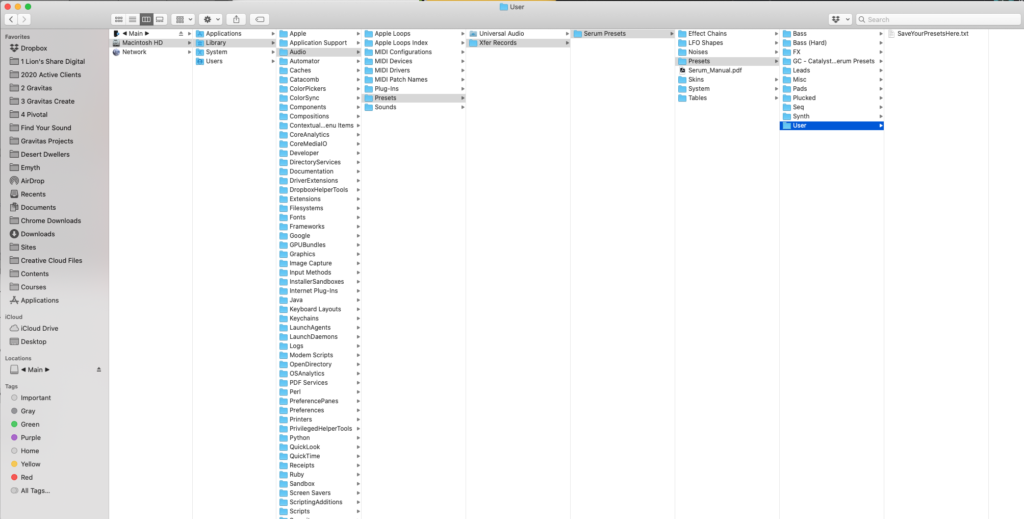
This will open up a new folder window, then you navigate to the “presets” sub folder, then the “user” sub folder.
Now you can drag and drop your presets folder over here.
Rescan Presets Folder
Then you want to head back to the “menu” option in Serum, click it, then navigate down to “Rescan folders on disk”.
This will rescan your preset folders allowing Serum to find the new presets you just installed.
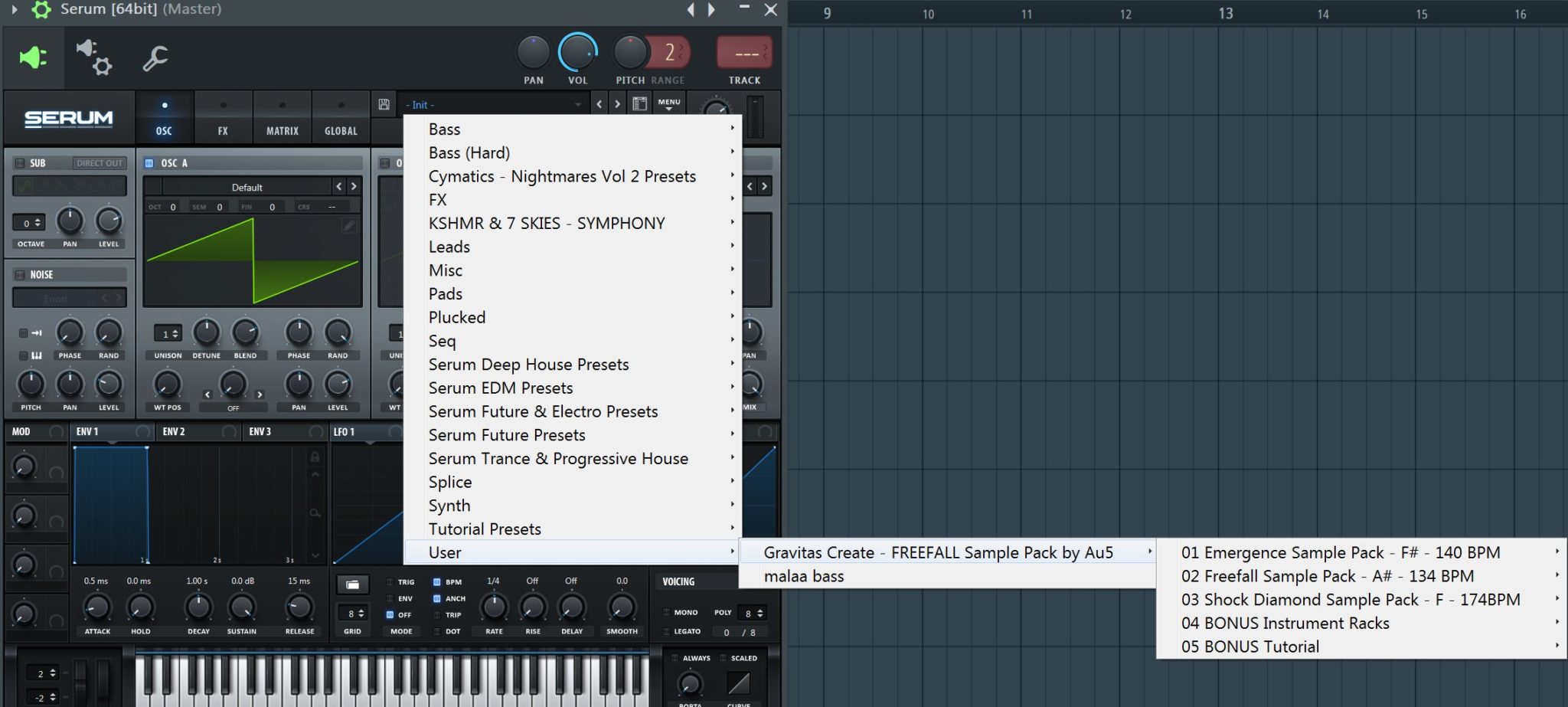
Now all you have to do is check your Serum preset browser, hover over “user”, and you will see your new presets show up!
How To Install Wavetables in Serum
Step 1 – Download Your Custom Wavetables
Find a Wavetable pack you want to install inside of Serum. I’m going to use our, organic orange sorbet wavetable pack (made out of deliciously organic foley).
Download it to your computer wherever you like, but remember you’ve got to find it.
Playing hide and seek with your computer files isn’t fun.
Step 2 – Unzip Your Wavetable Pack
Like with the Serum presets above, you’re gonna have to unzip them.
On Mac because lord Steve Jobs made everything easy for the price of 2 computers, you just gotta double click the file.
On Windows, you gotta go a step further, which is not optimal broducer workflow. Right click on the zip file, then select “Extract All”
If the pack is a .rar, you may also need to install some 3rd party software. Unzip or WinRar are good, but WinRar is best.
Step 3 – Find Serum’s Wavetable Folder
Now your files are unzipped, you need to find the wavetable folder. This is pretty much the same process as finding the presets folder, but you’re going to click a different folder called “tables”.
So open up an instance of Serum in your DAW, click “menu” (top right), then navigate to “show serum presets folder”.
This will open up an explorer window on your computer. You’ll want to go to the “tables” folder, instead of the “presets” folder this time.
Then you’re going to drag that extracted folder into the tables folder.
Step 4 – Rescan Wavetables
Once your wavetables are inside your “tables” folder, they won’t automatically show up inside Serum, unless you rescan.
To do this, you want to go back to the “menu” option, at the top right of Serum. Select this, then navigate to “rescan folders on disk”.
Once you have done this, you will be able to use your new wavetables in the same way you would use the normal wavetables on Serum.
How To Install Skins in Serum
This is virtually the same process as the above. Instead, you’ll want to navigate to the “skins” folder.
You’ll then take your extracted files, and drag and drop them into this folder.
Then rescan the folders inside Serum.
To change your skin, you’ll want to click the top left “Serum” logo. This will open up a navigation window you can use to change your skin to the new skin you installed.
Click the desired skin, then start using Serum!
What is the Serum presets folder? Where are serum presets stored?
- On a Mac: \Library\Audio\Presets\Xfer Records\Serum Presets
- On a PC: \Documents\Xfer\Serum Presets
As mentioned above, if you are unsure about your serum presets folder location, you can always use the menu prompt “Menu > show serum presets folder”
How to solve the “Serum preset folder not found” error
Locate first the default serum preset folder location (Mac: \Library\Audio\Presets\Xfer Records\Serum Presets, PC: \Documents\Xfer\Serum Presets, or Menu > show serum presets folder) then check if the folder exists and contains files and subfolders.
- Solution 1: if the folder doesn’t try to disable your antivirus or anti-malware software and run again the full installer (not just the update)
- Solution 2: if the folder exists it may be a Mac permission issue. Open your terminal and run the command sudo chmod -R 777 /Library/Audio/Presets/Xfer\ Records/
- Solution 3: the folder exists but the path is using non-ASCII characters (e.g. accented characters, Chinese or Arabic characters etc.): remove the non-ASCII characters
How to change Serum presets folder
When your preset library is ever-growing in size (especially when wavetables are attached to them) you may want to move it to an external drive instead of the system one. To do that, just make a copy of the preset folder into the new location and then delete the original one. On next run Serum will prompt you with a “Serum preset folder not found” message & will prompt you to point it to the new preset folder. Just make sure to keep the folder content structure & subdirectories identical, and to avoid non-ASCII characters in the folder path.
How to save Serum presets
Very easy: after you’ve made a sound you’re happy with, you can just click the floppy disk icon �� on the left of the preset name bar, then select the subfolder where you want to store it. The saved files are under the file extension .FXP and are cross-compatible PC & Mac
This will open up a folder window where you can name, and save your preset.
Choose a name for your preset, then hit “save”. Your preset will now be saved for use another time. You can then find these saved presets in the “User” folder.
Summary
To recap:
- Download your Serum presets
- Unzip them using your native program or WinRar
- Navigate to your Serum presets folder, by clicking “menu”, then “show serum presets folder”.
- Drag your presets in this folder.
- Rescan your folders, or open and close your DAW.
- Voila!
[Total: 0 Average: 0 ]
With over 8 years of hands-on experience in the music industry, Harry has run successful raves, played alongside industry heavyweights such as Max Chapman, DJ EZ, DJ Zinc and more (pictured below), had music played on national radio, DJ’d on live radio, produced until he hated every song, mixed until his ears bled, created sample packs from scratch using just a Zoom H1n and some sound design skills… and pretty much anything related to music production – he’s done it, tested it, tried it.
How to Install Serum Presets
Did you recently buy or download some new serum presets, yet you have no idea how to install or open them? Look no further, for we have a step by step guide on how to install serum presets to your computer. Whether you have windows or mac, follow these instructions and you’ll be set.
If you find watching videos is easier for you to learn, watch our tutorial on installing serum presets.
So, what are serum presets?
“Presets is just an abbreviation for preset settings. When you open any VST synth inside your DAW for the first time and play a random note, you will encounter two kinds of default settings. The initial preset will be either a generic waveform (e.g., saw wave), or a more sophisticated preset sound that is supposed to demonstrate the power and versatility of the synth.” -from Samplified.us
Today, we’ll be learning how to install presets into Xfer Serum to help your creativity in the studio!
How to Install Serum Presets
Step 1: Download The Pack
First, download your desired preset packs. As an example, here I’ll be unzipping and using Gravitas Create’s Mutate – Hybrid Trap sample pack.

Step 2: Unzip/Extract Preset
When you first download a pack, they typically come in a zip or rar file – these are compressed folders that make it easier to compile files together and easily download them at once. However, once they’ve been downloaded, they need to be properly “unzipped” to be accessed and utilized via serum.
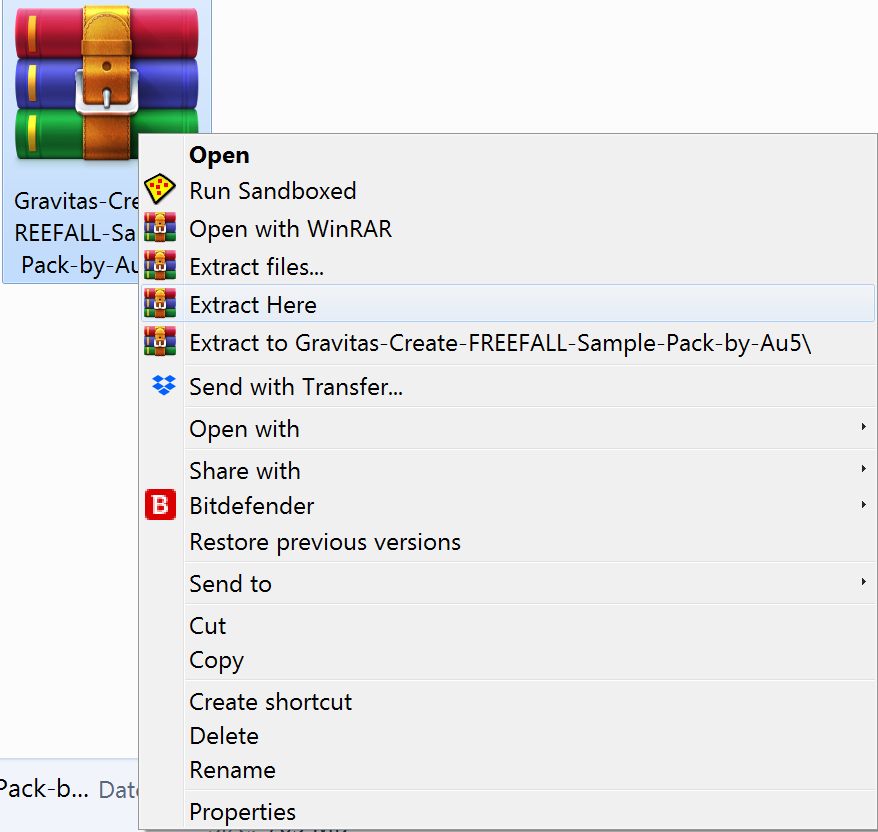
*You may need to download winzip or winrar if you don’t see this prompt.
To unzip the files, extract the files to right-click on the .zip or .rar file,
Once the files have been extracted and unzipped correctly, drag/drop them to your serum preset directory
See C:\Users\___\Documents\Xfer\Serum Presets\Presets/User
On a mac, the process is essentially the same but you will use Mac’s native zip program.
The default Serum Presets folder on a Mac will be found at /Library/Audio/Presets/Xfer Records/Serum Prests/Presets/User.
Step 3: Open DAW and Serum
Once your daw is up, do the following in serum:
Right-click on MENU in the top right
Select “Show Serum Presets Folder”
Confirm Serum Presets are in the file directory
(You may want to move your downloaded presets to the default serum preset location, ie. 0:48 on video)
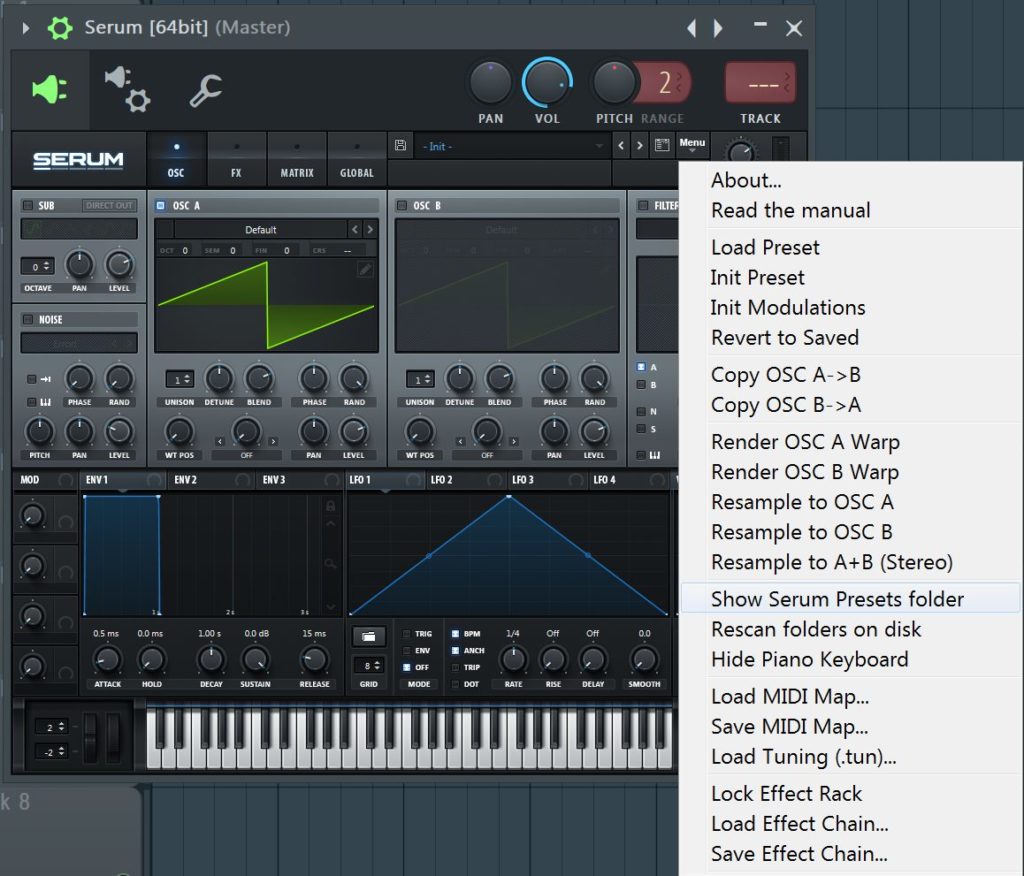
Now that you can see the files are in the right place, all we need to do is confirm serum can find them.
Select “Rescan Folders on Disk”
(You may want to move your downloaded presets to the default location, ie. 0:48 on video)
Now, you’re almost ready to make use of your brand new serum presets!
First, let’s go back to Menu on Serum (Open Serum > Menu > Show Serum Presets Folder)
Click on the Presets section
Hover over “user”
Now, you’ll find your folder containing your downloaded serum presets. Browse freely through them to your delight!
(Make sure your presets have already been unzipped)
Drag/drop the selected folders into this root
Refresh Serum by opening it again
Free Serum Presets to Install Right Now
Now that you know how to install serum presets, test it out with some of our free packs! These packs were created by some of our top artists, load these bad boys up and let’s make some cool noises!
Catalyst, Vol. 1 – 120 Free Serum Presets from Bass Music producers Au5, ill-esha, Psymbionic, David Starfire, Kermode, Wolf-e-Wolf, Dysphemic, and more by Gravitas Create
Catalyst, Vol. 2 – 164 Free Serum Presets from Bass Music extraordinaires such as AHEE, Encanti of ZEE, Buzz Junior, K+Lab, Mr. Bill, Prismatic, Templo, Mindex, and more by Gravitas Create
Flavors Future Bass Lite – 20 Samples and 5 Serum Presets for Future Bass by Gravitas Create
Other Free Resources
Gravitas Create has a full free downloads section, ready for you to use right now. Here is a list of our notable favorites.
Psymbionic Presents Shapeshifter: Wavetables for Serum – This is a selection of serum wavetables sampled from the Intellijel Shapeshifter Eurorack module. In addition, Shapeshifter is immediately importable to most wavetables synths. For example, Xfer Records Serum, Ableton Wavetables, and Kilohearts Phase Plant. Check out Psymbionic’s free wavetables today!
Ambient Pad Ableton Rack – This is an organic pad. After using this, you can create subtle melodic texture and ambience in your track.
Au5 & Cristina Soto: Freefall Song Stems – Using these stems, you can create a new remix to Au5 and Cristina Soto’s iconic “Freefall” single.
How To Install Serum Preset Banks
If you’re looking to expand your Serum preset library and access a world of new sounds, installing banks is a great way to get more out of the plugin. With thousands of Serum banks available online, it’s not hard to find incredible-sounding presets that outclass the stock presets included with the plugin.
If you have recently downloaded an additional Serum bank, you will need to know how to install it.
To install Serum banks, start by opening the Serum presets folder. You can access this folder by selecting ‘Show Serum Presets Folder’ from the Serum menu. Next, copy and paste your Serum bank anywhere into this folder. Lastly, press ‘Rescan folders on disk’ from the Serum menu.
Hi, I’m Ben from Live Aspects and in four easy steps, I’ll show you exactly how to install preset banks in Xfer Serum.
- Step 1: Download Serum Bank
- Step 2: Open The Serum Presets Folder
- Step 3: Copy & Paste Bank Into Presets Folder
- Step 4: Rescan Folders In Serum
Without further ado, let’s get started!
Step 1: Download Serum Bank
To install Serum banks, start by downloading the bank you would like to install onto your computer. If it is in a .zip or .rar format, make sure to extract it before continuing on to the next step.
Step 2: Open The Serum Presets Folder
- Mac: \Library\Audio\Presets\Xfer Records\Serum Presets\Presets
- Windows: \Documents\Xfer\Serum Presets\Presets
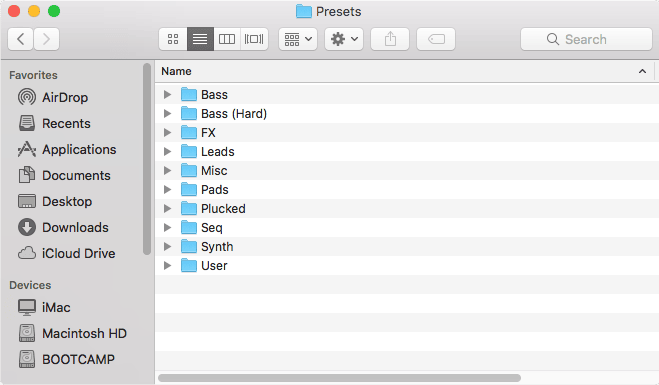
If you are struggling to locate the presets folder, select ‘Menu > Show Serum Presets Folder’ from the Serum menu to instantly open it.
Step 3: Copy & Paste Bank Into Presets Folder
Copy and paste your new Serum bank into the Serum presets folder. Feel free to make a new folder or paste it into any of the existing folders.
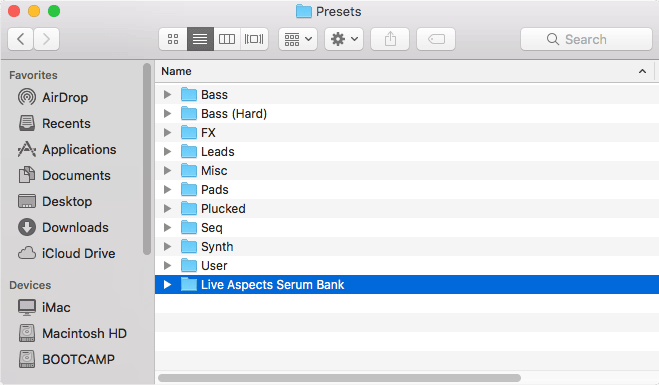
Step 4: Rescan Folders On Disk
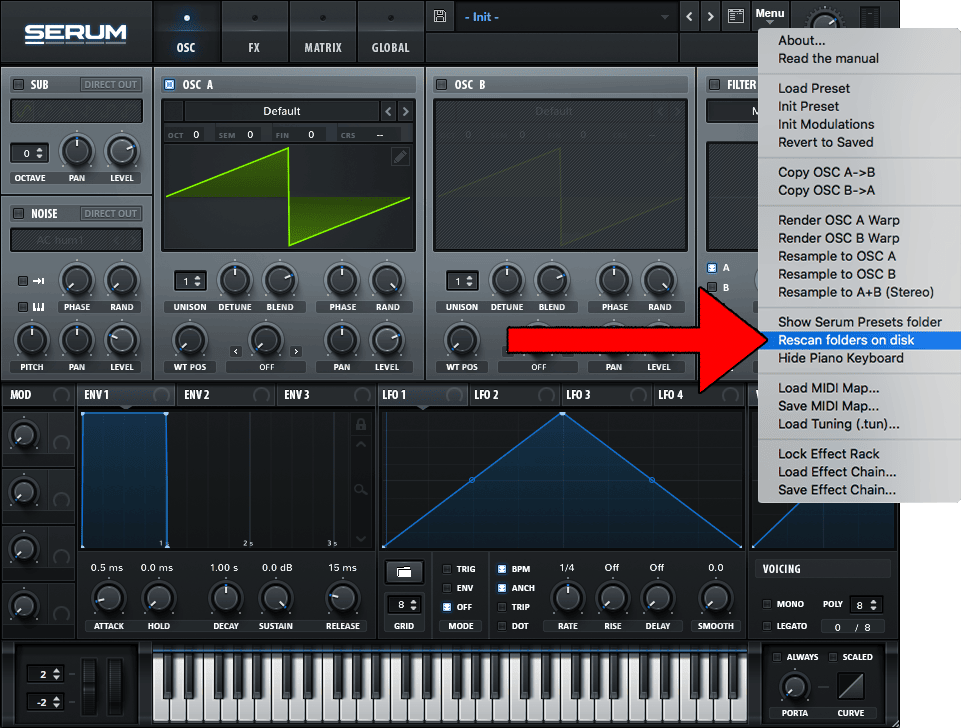
Lastly, select ‘Rescan folders on disk’ from the Serum menu. You will now be able to access your new Serum bank from the Serum plugin!
FAQ | How Do I Fix ‘Serum Presets Folder Not Found’?
If the Serum presets folder cannot be found, the best thing to do is to re-install the plugin and restart your DAW. It’s possible there was an error when initially installing Serum or the folder has been accidentally deleted. Select ‘Show Serum Presets Folder’ from the Serum menu to check if the preset folder exists on your computer.
FAQ | How Do I Export A Serum Preset?
To export a Serum preset, simply press the save icon immediately to the left of the loaded preset name. A file dialog will appear asking you to choose a preset name and save location.
FAQ | Where Are Serum Wavetables Stored?
Serum wavetables are stored in the same location as Serum presets. Navigate to the Serum menu in the top-right and select ‘Show Serum Presets Folder’. All Serum wavetables are stored in the ‘Tables’ folder.
Want To Know More?
Here at Live Aspects, we have dozens of useful lessons and tutorials created to enhance your music production skills and help speed up the learning process. You can access our huge range of music theory lessons and production tips and tricks here.
Benjamin Jones
Hi, my name is Ben. I live in Melbourne, Australia and I’m the founder of Live Aspects. I’m a DJ and producer with a bachelor’s degree in Audio Production. I’ve spent the last eleven or so years addicted to music production and discovering the extraordinary ways producers around the world create their music. My goal is to provide eager producers with the tools and information they need to make amazing music and experience the thrill of music production.
Как сохранить свой пресет в Серуме?
Значок дискеты слева от заголовка пресета позволяет сохранить собственные пресеты. В нижней части, под дисплеем названия пресета находятся примечания и автор. Дважды щёлкните здесь, чтобы ввести свой собственный текст, который будет сохранён, вместе с пресетом.
Как сохранить пресет в FL Studio?
Выбрав Save preset as. и сохранив файл (место сохранения менять нельзя), он появится в списке (в самом начале) и вы сможете использовать его в будущем.
Как установить пресеты в серум?
- Скачать пресеты
- Открыть серум
- Кликнуть в плагине на кнопку открытия папки с пресетами
- Перетащить туда пресеты
- Перезапустить плагин
Куда устанавливать пресеты серум?
Папка «Serum Presets» содержит всё, что Serum читает и куда записывает, за исключением файла настроек. Эта папка устанавливается по умолчанию: (OSX) /Library/Audio/Presets/Xfer Records/ (WIN) /Документы/Xfer/
Как убрать эффект в фл студио?
Удаление эффекта — откройте выпадающее меню эффектов на целевом слоте эффекта и в подменю Select выберите пункт (delete).
Как установить плагин в фл студио?
Также некоторые бесплатные плагины распространяются без установки, а просто одним *. dll файлом (если это так, то это плагин VST 2). Для того, чтобы FL Studio нашёл его, просто поместите этот *. dll файл в папку с плагинами (E:\VST Plugins\VST x64 или E:\VST Plugins\VST x32).
Как добавить сэмплы в FL Studio 20?
Для этого откройте «File settings» в меню «Options». Далее кликните на иконку с папкой в окошке Browser extra folders и выберите папку с сэмплами. Она должна будет добавиться и отобразиться в конце списка окна.