Import Spotify Playlist to SoundCloud? 2 Easy Ways!
Nowadays, we enjoy millions of music tracks on multiple platforms and from streaming services. Spotify, Amazon Music, Apple Music, Deezer, and Tidal are popular streaming platforms, while most of these platforms only allow users to listen to music within their own apps and cannot play on other devices. Therefore, we sometimes use SoundCloud to stream music audio tracks to enjoy more music on different platforms as SoundCloud offers access to different streaming apps.
However, Spotify users can only stream music tracks within the app. When we want to listen to our favorite playlists on SoundCloud, we should upload the music tracks one by one manually, and in the uploading process, the audio quality may not be retained, it’s disgusting, right? Luckily, we’ve found alternative ways to import Spotify playlist to SoundCloud. We can utilize some useful online tools and third-party software to do that. If you’re eager to know the answer, please read this article carefully.
How to Import Spotify to SoundCloud with Online Tools
We can’t directly transfer Spotify to SoundCloud. Well, there are some online tools available for us to transfer music tracks between different platforms, such as Tune My Music, Free Your Music, MusConv, and Soundiiz. With their help, we can import any Spotify playlists, artists, and songs to other music platforms, including SoundCloud. Most of the operating procedures are similar, so I’ll use Tune My Music as an example to show you how to transfer playlist from Spotify to SoundCloud.
Step 1. Go to the official website of Tune My Music and from the Home page, you can see a button that says “Let’s start”, then click it and start.
Step 2. After clicking “Let’s start”, you need to choose a music source platform in the list. You can scroll down and select Spotify.
Step 3. Here on this page, a pop-up window will ask you to log into your Spotify account. Click “I agree” to confirm Tune My Music to load your music data in Spotify. When you logged in successfully, your music tracks will be loaded too.
Step 4. You can choose to load albums, playlists, or single songs as you like.
Step 5. After loading the music files, you can select SoundCloud in the list as the destination and log in to your SoundCloud account.
Step 6. You can check your transferring music files by clicking Start Moving My Music. After finished, you can listen to your Spotify music on SoundCloud now.
Best Method to Import Spotify Playlist to SoundCloud
You can use the above method to upload Spotify music to SoundCloud, however, the audio quality may be lost in the process. In such a case, why not use third-party software to help you? A Spotify music converter can help you download and convert Spotify music to other audio formats like MP3 so that can be played on other compatible devices, and you can transfer them to SoundCloud easily. Among the software, I’d like to recommend you Tunelf Spotibeat Music Converter.
To import Spotify to Soundcloud, all you need is Tunelf Spotibeat Music Converter. It is designed to download Spotify Music without a premium account and convert them to popular audio formats to keep them playable on any other compatible devices forever. You can manage your music library by different archives and keep the original ID3 metadata information with lossless quality. Do you want to play Spotify music on multiple platforms? Are you still searching for a Spotify to SoundCloud converter? Don’t worry, Tunelf software can help you solve the problem without the need to get a premium account. You only need to convert Spotify music to SoundCloud in three steps and check them below.
How to Put your Spotify Music on SoundCloud – Online & Offline
Do you know how to convert Spotify playlists to SoundCloud? In this tutorial, you will learn about 2 simple ways to convert Spotify playlists to SoundCloud. One for offline use and one for online use.
Started in Germany from 2007, SoundCloud has become one of the biggest music distribution sites and audio sharing platforms, owning more than 175 million monthly users all over the world. As one of the biggest competitors of SoundCloud, Spotify owns over 285 million monthly active users, providing online music, podcasts, and radio services to people who come from over 90 countries.
Here, we are not going into a discussion of why many people want to move playlists from Spotify to SoundCloud. We respect every choice you made and provide with you 2 simple methods to transfer playlist from Spotify to SoundCloud if you are looking for it.

Part 1. Convert Spotify Playlists to SoundCloud: Offline Tool [100% Workable]
Transfer Playlists from Spotify to SoundCloud: Required Tool
This is a 100% effective method for both Spotify Free users and Spotify Premium users. For starters, you need to download an additional app called AudKit Spotify Music Converter.
This third-party tool is legal and proficient in converting Spotify music to MP3, AAC, WAV, M4A, M4B, and several common audio file formats. The converted Spotify songs are saved on the local computer, which is addable and playable in any other apps, music players, portable devices, and so forth. That is to say, you can transfer all your playlists from Spotify to SoundCloud after the conversion within the AudKit software.
Main Features of AudKit Spotify Music Converter
- Download Spotify playlists for offline playback
- Convert Spotify songs to multiple popular audio formats
- Keep 100% audio quality and ID3 tags from Spotify songs
- Transfer Spotify music to SoundCloud and others
What makes this converter most outstanding is the output speed and sound quality. Through testing in many times, the average running speed could up to 5X faster during the conversion. That means a 3-min Spotify song only takes 30-sec conversion. As for the sound quality, the converted tracks sound almost the same as the original songs, the negligible difference can’t be heard from the playback on most devices.
Move Playlists from Spotify to SoundCloud: Step by Step
After downloading and installing AudKit Spotify Music Converter on the computer, every user can get a free trial to use AudKit app. The trial version allows each user to convert the first 1 min of each Spotify song. You can register for the full version from AudKit’s official store if you are satisfied with this tool. Now let’s check the full tutorials on how to transfer Spotify playlists to SoundCloud.
Step 1 Load Spotify playlists to AudKit one by one
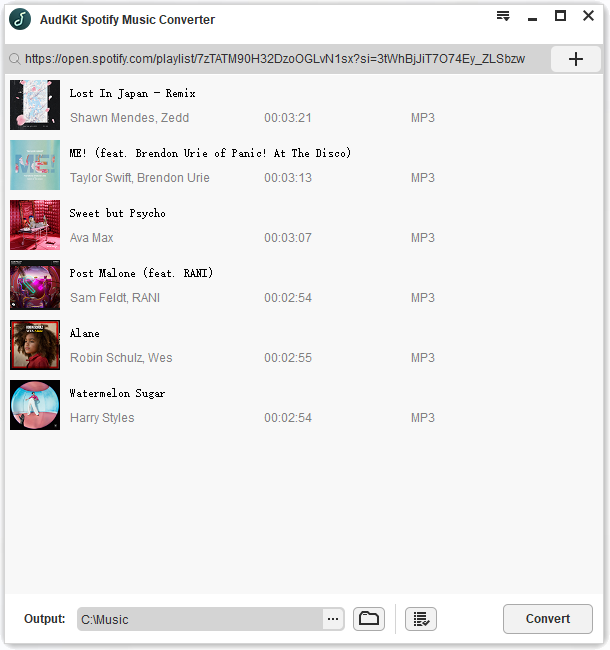
Open and launch the AudKit app from the desktop. The Spotify desktop app will be automatically activated at the same time. Enter into your Spotify library and open your own playlists. Copy and paste the URL of the playlists to the blank bar in AudKit’s interface. Then click the plus button to start loading. Please make sure that each playlist contains no more than 100 tracks since the limits of Spotify’s API. But there are no upper limits of the numbers of loading playlists. You can add all your playlists to AudKit one by one.
Step 2 Change output settings to suit for SoundCloud
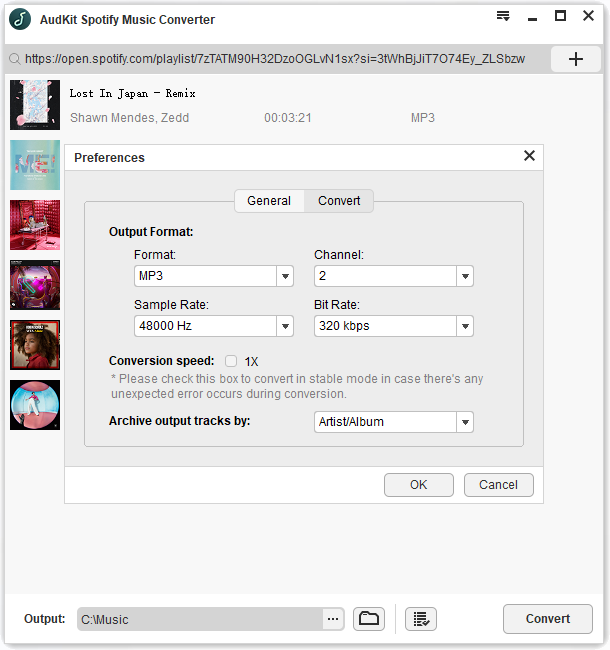
On AudKit’s interface, unfold the top menu icon and choose ‘Preferences’ then ‘Convert’. The settings page will show up for you to reset the output parameters, including formats, bit rate, sample rate, and so on. To be compatible with SoundCloud, you can set output format to MP3 or AAC format, bit rate to 320 Kbps, and sample rate to 48000 Hz.
Step 3 Download and Convert Spotify songs for SoundCloud
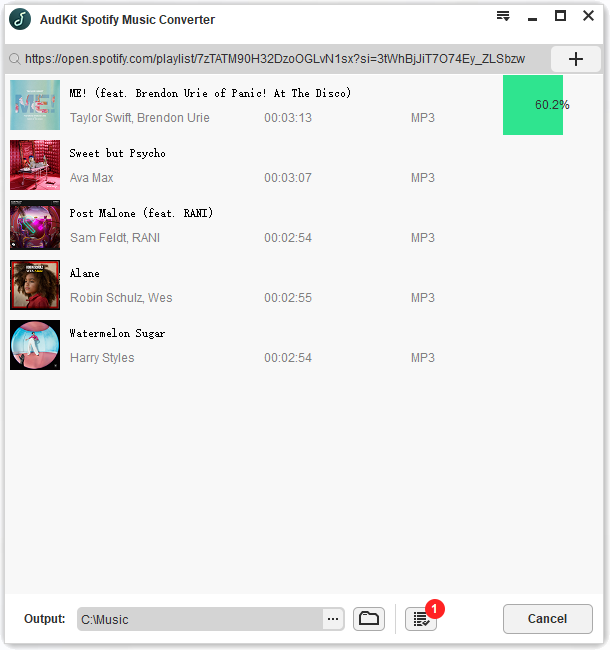
Tap on the ‘Convert’ button to begin the converting process. Wait until the whole conversion ends, then follow the on-screen tips to navigate the local folder that saves all converted Spotify files.
Now, you can open SoundCloud and log into your SoundCloud account. Then upload the local Spotify music files to your SoundCloud Music library with simple clicks.
Part 2. Transfer Spotify Playlists to SoundCloud: 3 Online Sites [80% Workable]
This method is suitable for those who are looking for how to put your Spotify music on SoundCloud without installing an extra app. There are 3 most-used online tools for you to refer to: Soundizz, TuneMyMusic, FreeYourMusic. It is easy to use these tools, just enter their sites, and follow the on-screen instructions to start transferring.
However, you should notice the low success rate of transferring playlists from Spotify to SoundCloud, which is the most obvious drawback of these online tools. In most cases, you can’t sync 100% Spotify playlists to SoundCloud due to these 2 factors.
1. The music library of Spotify and SoundCloud is not exactly the same.
This factor makes some Spotify tracks exclusive, which are not available in SoundCloud. The online converting tools can only copy and paste the commonly existing tracks in both Spotify and SoundCloud.
2. The instability of the online converting process is much higher.
If you have a large Spotify music library, the syncing process by online converters could be very unstable. The network situation is highly demanded during the syncing process.
Conclusion
To get a stable and high-speed conversion from Spotify to SoundCloud, we still recommend you to try the first method, which is 100% workable for all types of Spotify tracks and fits for all types of Spotify users.

Elle Johnson
Elle Johnson has been working in the technology and music software field for over 5 years. She is dedicated to providing easy-to-use guides and effective tips to play music anywhere.
Transfer
Spotify to SoundCloud
Transfer your playlists, songs, and albums from Spotify to SoundCloud. Easily convert your Spotify playlists to SoundCloud with FreeYourMusic.
We're also available on
They talkin’ about us!
How to transfer
Spotify playlist to SoundCloud


How to transfer playlists
from Spotify to SoundCloud
Launch FreeYourMusic and select the transfer tab.
Choose Spotify as the source platform and SoundCloud as the destination platform. Connect your accounts.
Select which playlists you wish to transfer from Spotify to SoundCloud
Click “Begin transfer” to start transferring your playlists from Spotify to SoundCloud.
How to transfer all music data
from Spotify to SoundCloud
Launch FreeYourMusic and select the transfer tab.
Choose Spotify as the source platform and SoundCloud as the destination platform. Connect your accounts.
Select all of your music data by clicking “Select all”.
Click “Begin transfer” to start exporting your entire music collection from Spotify to SoundCloud.
How to transfer albums
from Spotify to SoundCloud
Launch FreeYourMusic and select the transfer tab.
Choose Spotify as the source platform and SoundCloud as the destination platform. Connect your accounts.
Filter albums by picking the "albums" tab. Choose which albums to transfer.
Click “Begin transfer” and wait for the transfer to finish.
Are there any transfer limits?
There are two versions of our application available — free and premium. If you are using a free version of our app, you can move one playlist per session. You can also buy the full version of FreeYourMusic, which will give you access to unlimited transfer per session. You pay only once and get lifetime updates and support.
How long will it take to transfer Spotify to SoundCloud?
It takes just a few clicks! Start by selecting Spotify as a source music platform and then, select the next destination — SoundCloud streaming service. Once you pick your playlists and albums for the migration process, FYM will transfer them in a few minutes or less.
Can I move to other platforms too?
Of course. FreeYourMusic supports the most popular music services. You can transfer music from Amazon Music, Apple Music, Deezer, Pandora, SoundCloud, Spotify, Tidal, YouTube, YouTube Music, Napster, Qobuz, QQ Music (QQ 音乐), Yandex Music, VK Music (VKontakte Music / BOOM), Anghami, Zvuk (Звук), Gaana, JioSaavn, Resso, Boomplay, File Backup (Excel/CSV) — all you have to do is choose a playlist you want to move and next let FYM move it to its final destination.
Can I import or export songs to my device besides transferring my playlists between platforms?
You can save a copy of your playlists by exporting the song information to your device in a text file. To do this, pick "Backup" when choosing a music streaming account.
Can I transfer the playlist to a different account on the same platform?
You can transfer your songs between accounts on the same platform, for example from one account Spotify to another Spotify account.
Is this safe to use?
The transfer happens on the user device and not on our servers. We don’t see and don’t store any passwords/account details. We only store a cookie that we get from the external website. Thanks to this, we can act in your name without ever seeing your passwords. We never share this data, and we only use it in the app to be able to create playlists and add songs to your services.
How to Transfer Music from Spotify to SoundCloud

The evolution of streaming music platforms cannot be ignored and has been greater for all to see for the past several years. So far, there are more and more various streaming music services emerging on the market. And Spotify and SoundCloud are two of them.
As a big fan of both Spotify and SoundCloud, I found myself not only attracted to their basic service but also other additional features. The prevalence of the social web, combined with the music’s unique ability to bring people together, creates a compelling niche — one where like-minded individuals can share and discuss their favorite music. Well, if you want to share a Spotify playlist to SoundCloud, you can keep reading this article. Here we’re going to show you how to transfer music from Spotify to SoundCloud platform with two easy methods.
1. Spotify & SoundCloud: A Brief Introduction
What Is Spotify?
Launched in Oct. 2008, Spotify is a Swedish digital music, podcast and video streaming service provider. There are millions of songs from over 2 million artists worldwide on Spotify, so you don’t have to wonder whether a song you like is available on Spotify or not. Spotify concurrently supports two kinds of streams (Premium at 320Kbps and above and Free at 160Kbps). All song files from Spotify are encoded in the format of Ogg Vorbis. The Free users can only use some basic functions like playing music. If you want to download songs for offline listening, you have to upgrade to the Premium account.
What Is SoundCloud?
SoundCloud is a German online audio distribution and music sharing platform, which allows users to upload, promote and share or stream audio. It hundreds of millions of tracks by 20 million creators and anybody who wants to upload a track can do it with a free account. All songs on SoundCloud are 128Kbps in the format of MP3, and the standard of the songs on this platform is 64Kbps Opus.
- See More:Spotify vs. SoundCloud: Which Is Better?
2. Method to Move Spotify Music to SoundCloud with ViWizard
As we said above, all music downloaded from Spotify are encoded in the format of Ogg Vorbis which is only accessible through special proprietary closed software – Spotify. Even if you are a Premium user, you are only allowed to play your downloaded music on Spotify by logging in your Spotify account. But all Spotify music downloaded through ViWizard Spotify Music Converter can be compatible with all devices and players.
ViWizard Spotify Music Converter is a powerful music downloader and converter dedicated for Spotify music tracks, playlists, artists, podcasts, radio, or other audio content. With the program, you can easily remove the restriction and convert Spotify to MP3, WAV, M4A, M4B, AAC and FLAC at 5x faster speed. Besides, all the ID3 tags info and audio quality will be kept as before, thanks to its advanced technology. The interface is intuitive and friendly, and the conversion can be easily done in 3 steps.
ViWizard Spotify Music Converter Key Features
- Strip all digital rights management protection from Spotify music
- Caple of downloading Spotify songs, playlists, and albums in bulk
- Enable users to convert all Spotify streamed content to plain files
- Keep lossless audio quality, ID3 tags and metadata information
- Available for both Windows and Mac systems
Here is the detailed guidance on how to migrate music from Spotify to SoundCloud.
Step 1 Launch ViWizard Spotify Music Converter
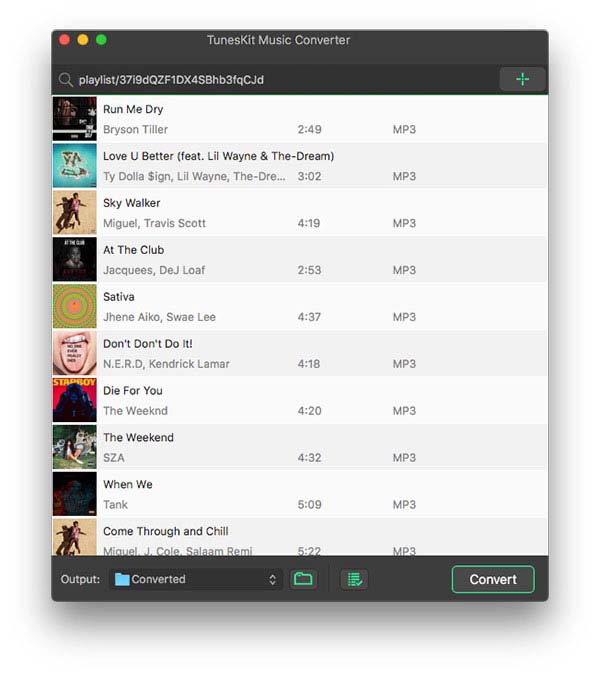
Download and install Music Converter for Spotify on your personal computer. Then open Music Converter for Spotify and Spotify will be started automatically and immediately. Find music you want to download on Spotify and directly drag and drop your selected Spotify music to the main screen of the converter.
Step 2 Configure All Sorts of Audio Parameter
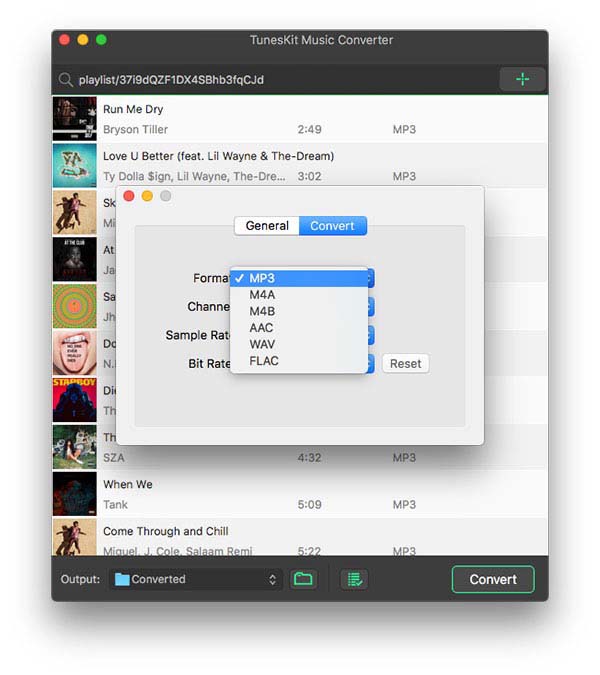
After uploading your selected Spotify music to the converter, you are prompted to configure all sorts of audio settings. According to your personal demand, you can set the output audio format, audio channel, bit rate, sample rate and more. Thinking of the stability of conversion mode, you should better to set the conversion speed as 1×.
Step 3 Start to Download Spotify Music
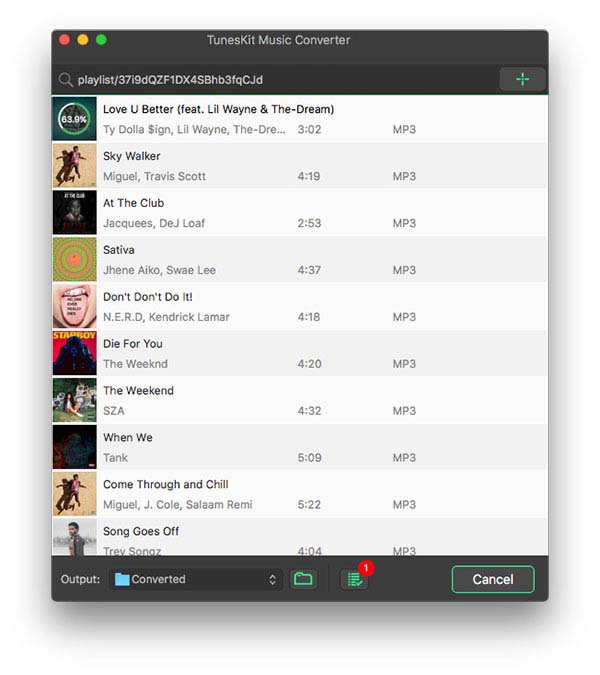
After all is done, you can click the "Convert" button to convert and download music from Spotify. Just wait for a while and you can get all DRM-free Spotify music. All music can be found in the local folder on your personal computer by clicking the "Converted" button. Note that you are allowed to convert and download Spotify music no more than 100 in one time.
Step 4 Import Spotify Music to SoundCloud
Now all Spotify music are in MP3 or other common audio format, and you can easily add them to SoundCloud by following the quick steps below:
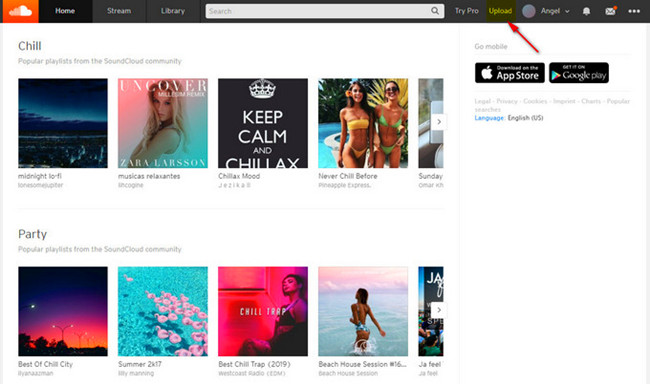
1. Open SoundCloud in a webpage and click the "Sign In" button in the upper right corner to log in.
2. Then click the "Upload" button at the upper right and click it and drag and drop your tracks or choose files to upload by clicking the orange button. You need to select Spotify song you want to move to SoundCloud.
3. After a few seconds, you can see that your Spotify music has been uploaded. Continue to click the "Save" button to save your songs on SoundCloud.
3. Way to Import Spotify to SoundCloud Online
The second way to can try to transfer your favorite tracks from Spotify to SoundCloud is to use an online tool such as Soundiiz. The process is also very easy and the successful rate is high. You can take a look at the instruction below to learn how.
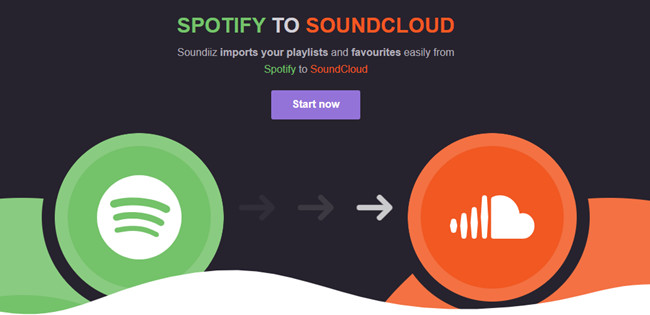
Step 1: Go to Soundiiz.com official website. Click the «Start now» button and sign in Soudiiz with your username and passcode. If you didn’t have one, you need to sign up first.
Step 2: Select the Playlists category in your Library and connect Spotify.
Step 3: Choose the Spotify playlists that you want to transfer and click the Convert tools in the top toolbar.
Choose SoundCloud as the destination platform and wait for the process to end.
4. Final Words
Here are two different methods to transfer Spotify music to SoundCloud for listening. While the online tool allows you to do that without installing any software, yet you’re also allowed to sign up their platform for using. More importantly, they’ll not 100% guarantee that the Spotify songs you want to import will be available on SoundCloud. In other words, if the songs in Spotify cannot be found on SoundCloud, you’ll not be able to listen to them on SoundCloud.
However, with the help of ViWizard Spotify Converter, you can easily download and convert any songs you want from Spotify to SoundCloud. Besides, the quality is lossless and the software is quite easy to operate. You can also transfer any Spotify music to any platform or device you want. It’s very powerful, and it also provides a free trial version. If you like it, just have a try!