How to Download GIFs on Gfycat

By Evan Gower Evan Gower General Manager With over a decade of experience in digital publishing. Evan leads our team with a keen eye for emerging tech trends. Read more • Edited by Steve Larner  Steve Larner Editor Steve Larner carries over ten years of content management, editing, and writing experience in a wide variety of industries. As a tech enthusiast, Steve also enjoys exploring new products and devices and helping others solve their technological problems. Read more June 16, 2021
GIFs (short for Graphical Interchange Format) are files that get used for light video sharing. Although GIFs have been around for decades, they have seen a huge comeback thanks to social media, particularly Instagram. The Instagram Stories feature has become the new home of GIFs as they are fun, lightweight, and easy to use.
However, using GIFs outside the typical ‘Facebook Messenger’ and ‘Instagram Stories’ environments is an entirely different scenario. Gfycat is one of the most popular GIF services that lets you browse interesting GIFs and even upload, create, and share your files.
Video vs GIF
In the age of streaming services, people aren’t used to having the option to download a video file directly unless they use YouTube Premium and Disney+, for instance, which offer the download feature. Aside from specific streaming services, a third-party video downloader is generally required, or you can’t keep any videos. Gfycat not only lets you download any video you want; you also do it in three easy clicks or literally, as you would save an image—right-click -> Save video as -> Save.
Although third-party video downloaders successfully save the desired media to your PC and allow you to play it with your preferred media player, GIFs are much more convenient forms for short videos. For one, GIFs are much smaller in size, which means that uploading them won’t take too long—very suitable for sharing via chat. Additionally, GIF files work in MS Word documents (only shows still images), just like photos. It is that simple. When it comes to short videos, GIFs take the cake.

Downloading GIFs from Gfycat
Although technically, you can download a video from Gfycat and use a third-party program to convert it to a GIF, you can directly download a short video as a GIF from the site. Gfycat is primarily intended for GIFs, but the video file download process is pretty straightforward.
Downloading GIFs Directly from Gfycat
- Open the video that you want to download as a GIF file.

- Navigate to the panel on the bottom, far right section of the screen. Click on the “More Share Options” icon, which is the last one on the far right.

- The screen that now appears over the video features more sharing options. Click on “GIFS” at the bottom of the video frame.

- Choose “Small Gif…” for media sharing from your device or “Large Gif…” for saving a higher quality animated GIF image to use and watch on your PC or for other similar uses.

- Paste the copied link to a new browser tab and press “Enter” to load the animated image URL.

- Right-click on the image and select “Save Image As…” to download it to your device.

- You can now view or share the animated GIF you downloaded by uploading it to your chosen source or opening it on your device.
Downloading GIFs from Gfycat by Sharing to Social Media
Aside from directly downloading media as a GIF animated image, you can also share it as an animated GIF to Facebook, Instagram, and more. Here’s how to do it.
- Open the video that you want to share on social media as an animated GIF.

- On the right side of the screen, choose your social sharing option, such as “Facebook,” “Twitter,” “Copy”, “Embed,” etc.

- A new framed window appears. For social media, follow the instructions (log in, share button, etc.) on the screen to share the content. For “Embed,” simply paste the code into your website HTML. For “Copy,” paste the GIF link into your desired application.

- Your social media share, HTML embed process, or copy/paste process now displays the animated GIF wherever you placed it.

With so many GIF websites out there, you really have plenty of options. If you’re looking for a GIF file that weighs less than 2MB, Gfycat is the right place to come to. Additionally, most GIF websites don’t feature short video files, which is another thing Gfycat excels at.
Gyfcat Загрузить | Как скачать гифки с Gfycat
GIF-файлы (аббревиатура от Graphical Interchange Format) — это файлы для легкого обмена видео. Хотя GIF-файлы существуют уже несколько десятилетий и в основном существуют в обсуждениях на форумах, GIF-файлы получили огромное распространение благодаря социальным сетям, особенно Instagram. Функция Instagram Stories стала известным домом для GIF-файлов, поскольку они забавны и просты в использовании.
Однако использование GIF вне Instagram Stories и Facebook Messenger — другое дело. Gfycat — один из самых популярных сервисов GIF, позволяющий просматривать интересные GIF-файлы.
Вы должны захотеть сохраните гифки из Gyfcat на свой мобильный телефон, чтобы вы могли общаться с друзьями с помощью GIF в любое время.
Я собираюсь показать вам, как этого добиться. Gyfcat скачать, вперед!
СОДЕРЖАНИЕ
Лучший способ загрузки с Gfycat
1. Загрузить напрямую с Gfycat
В эпоху потоковых сервисов мы не можем напрямую загружать видеофайл с большинства веб-сайтов. Если вы не используете сторонний загрузчик видео, вы не можете сохранять видео. То же самое и с Gfycat. Вы можете сохранять изображения только с веб-сайта напрямую.
2. Скачать с AnyVid
AnyVid — полезный инструмент, который поможет вам с загрузкой Gyfcat. Это работоспособный инструмент, позволяющий загружать файлы с Gfycat без входа в систему. Технически вы можете сохранить видео из Gfycat с помощью AnyVid, а затем использовать стороннюю программу для преобразования его в GIF.
How to Download Animated GIFs Videos from Gfycat to MP4, GIF, AVI?
Way 1: Click Save As button; Way 2: Use Allavsoft to Download from Gfycat

June 1st, 2021 by Daniel Woida
Overview
Gfycat is a popular short video hosting service on which you can enjoy various animated GIFs in many genres. Have found some interesting GIFs on Gfycat and want to download them, but have no idea about how to download them? The following part just shares two popular methods to download Gfycat videos. Check them as below.
Method One: Click Save As button
When you find your wanted Gfycat video, open it, right click on the video playing interface>click on Save as. button and then the video will be downloaded as a default MP4 format file. Other output formats are not available by clicking the Save as. button.
Method Two: Use Allavsoft to Download from Gfycat
Allavsoft is a professional Gfycat downloader which supports to download any GIF video from Gfycat to GIF, MP4, AVI, FLV or any other video format is supported to save as the output format. Also, you should have no worry about the downloaded output video quality: the original Gfycat video quality will be downloaded. Also, you can use the batch downloading function to batch download Gfycat videos. Let’s check the steps on how to use Allavsoft to download Gfycat videos as below.
How to Download Gfycat to MP4, GIF, AVI?
The following is a step by step guide on how to download original Gfycat source file or download to MP4, AVI, MOV etc any video format.
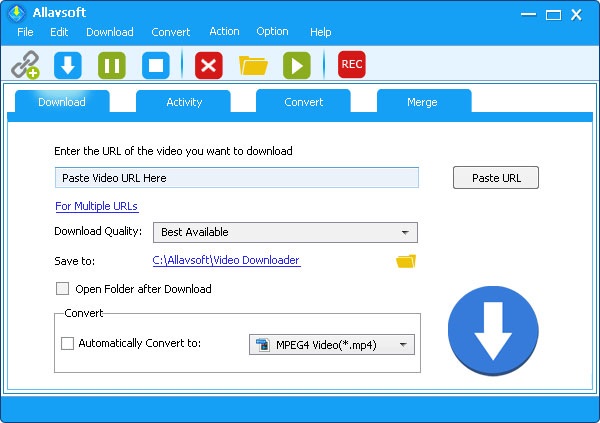
Free download and install the best Gfycat Video Downloader — Allavsoft ( for Windows , for Mac) , install and then launch it, the following interface will pop up.

Step 1 Import Gfycat video url to Allavsoft
When playing your wanted Gfycat video, copy its video URL from the browser address bar or click the paper airplane sharing button>copy its video URL and then paste it to Allavsoft URL text box.
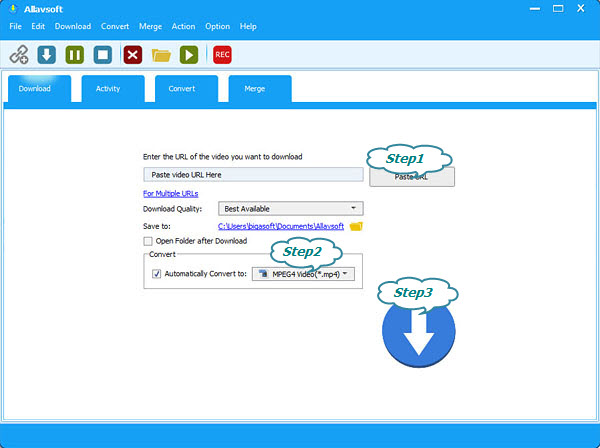
Step 2 Set final output format (Optional)
If you ignore this step, it will download the original source file. This Allavsoft also gives various output selections and you can choose your wanted one by clicking the «Automatically Convert to» button> General Video category.
Step 3 Start to download Gfycat video
Click the Download button to simply get any of your wanted Gfycat videos downloaded as MP4, AVI, MKV, FLV, etc.
More about Gfycat
Gfycat also has Gfycat Pro membership as well as the free membership. Gfycat Pro members are supported to watch HD video from Gfycat without ads. Also, you can upload your personal GIF files to Gfycat for sharing. When you upload your GIF files to Gfycat, you must ensure that the time length of your GIF is within 60 seconds but there is no file size limit for your uploaded Gfycat GIF file. Gfycat has over 130 million monthly active users.
Как скачать GIF-файлы на Gfycat
GIF (сокращение от Graphical Interchange Format) – это файлы, которые используются для легкого обмена видео. Несмотря на то, что они существовали в течение десятилетий, в основном населяя темы форума, GIF-файлы получили огромное возвращение благодаря социальным сетям, особенно Instagram. Функция Instagram Stories стала новым домом GIF-файлов, поскольку они веселые, легкие и простые в использовании.
Вы можете автоматически поделиться GIF-файлом с помощью одного из доступных параметров общего доступа, просто щелкнув соответствующий значок. Например, если вы щелкнете по значку Facebook, появится окно, предлагающее вам сразу и мгновенно опубликовать видео в виде файла GIF в вашем фиде Facebook. Однако загрузка файла GIF – это отдельная история.
Загрузка файла GIF
В окне «Поделиться», которое вы открыли поверх рассматриваемого видео, есть два других варианта: «Вставить» и «GIFS». Нажмите кнопку GIFS. В новом окне GIF вы увидите две ссылки: Small GIF ( Сохранить изображение как -> Сохранить. Теперь у вас есть файл GIF в выбранном вами месте, и вы можете использовать его как обычный файл фотографии.
Использование файла GIF
Как уже упоминалось, если вы хотите использовать файл GIF для своего веб-сайта, например, вам лучше выбрать вариант Small GIF (